




Discord's core experience is free and always has been. But if you have spent any time on the platform you have almost certainly noticed profiles that look noticeably different from a standard account. Animated borders wrapping around someone's avatar. Glowing particle effects that play when you open their profile. Stylised backgrounds sitting behind a username. These are not Nitro features. They come from the Discord Shop, and they are available to every user with or without a subscription.
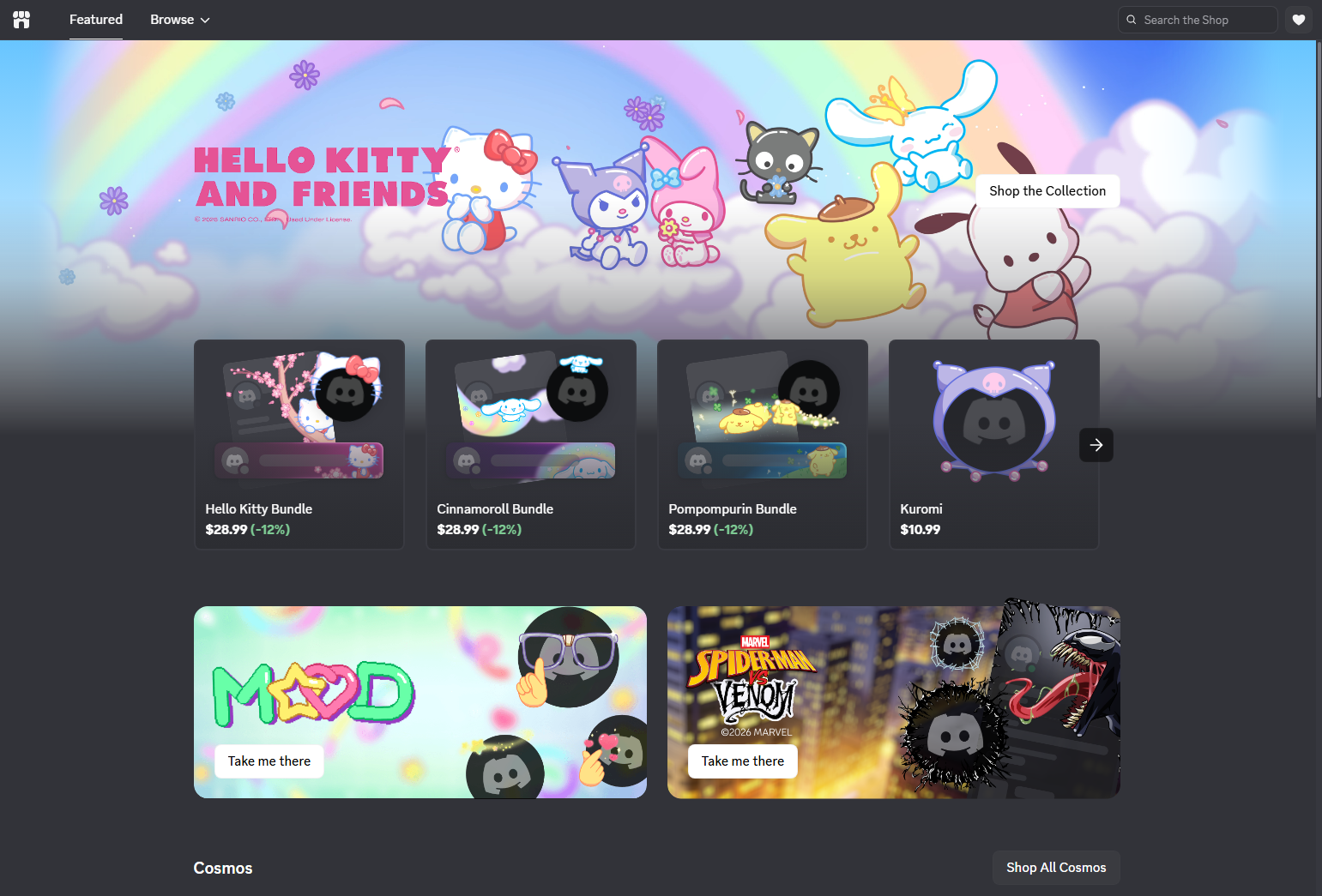
The Shop is Discord's in-app storefront for cosmetic items that let you personalise how your profile looks across every server and direct message on the platform. Here is what it sells, how the pricing works, and how to actually apply what you buy.
What the Discord Shop Sells
The Shop currently carries four main types of items, each targeting a different part of your visible Discord profile.
Avatar Decorations are animated or static frames that wrap around the outside of your profile picture. They appear on your profile card when someone clicks your name, and they also show up on your avatar icon in text channels as you send messages. Collections rotate regularly and span themes from seasonal designs, anime, fantasy, and cyberpunk through to brand partnership items tied to games and other services. Individual decorations typically cost around $5.
Profile Effects are animated overlays that play across your entire profile card when someone views your profile. Think floating embers, glitch distortions, sparkling particles, or falling petals. They are purely visual and serve no functional purpose, but they make a profile feel immediately distinct from a default one. Profile effects are sold alongside matching avatar decorations as part of themed collections and are priced similarly to decorations.
Nameplates are background textures or visual treatments that sit behind your username on your profile card. They are a newer addition to the Shop and are designed to complement the decoration and effect from the same collection, giving the full profile a cohesive themed look.
Bundles pair a matching avatar decoration and profile effect from the same collection at a discounted combined price. Bundles are only available if you have not already purchased either item individually. If you own one item from a bundle, you cannot access the bundled discount for the other item and must buy it separately at full price.
Discord Orbs and How They Work
Alongside direct purchases with real money, the Shop accepts Discord Orbs, a currency you earn by completing Quests inside Discord. Quests are short tasks that typically involve engaging with a game, trying a partnered service, or watching content during a promotional window. Completed Quests award Orbs that accumulate in your account and can be spent in a dedicated Orbs section of the Shop.
Orb-exclusive items rotate independently of the standard Shop catalogue. Some are available only to Orbs holders and cannot be bought directly. Checking the Quests tab regularly and completing those that offer Orb rewards is the most consistent way to earn free shop items without spending money.
Nitro Member Pricing
The Shop is open to all Discord users regardless of subscription status. Anyone can buy avatar decorations, profile effects, and nameplates. However, Nitro subscribers receive member pricing on eligible items, which typically represents a meaningful discount on individual purchases.
Nitro members also have access to a small set of bonus items tied to their active subscription. These are not permanent purchases. They are available to use while the Nitro subscription is active and are lost if the subscription lapses. Everything purchased outright from the Shop is yours to keep permanently regardless of whether you ever have Nitro.
How to Open the Discord Shop
On desktop, you can reach the Shop in two ways. The quickest is the Shop icon in the left sidebar next to your direct messages list. Alternatively, open User Settings by clicking the gear icon next to your username, go to Profiles, and you will see buttons labelled Change Decoration, Change Effect, and Change Nameplate that each link directly to the relevant Shop section.
On mobile, tap your avatar icon in the bottom right corner of the screen, then tap the Shop icon in the upper right corner. This takes you to the same storefront with the same items.
How to Buy and Apply an Item
Step 1: Browse and Preview
Open the Shop and navigate through the available collections. Clicking any item shows you a preview of how it looks on a profile before you commit to buying it. For animated items, the preview plays the animation so you can see exactly what you are purchasing.
Step 2: Purchase the Item
Select the item you want and click or tap the purchase button. The Shop shows both the real money price and the Orbs price if the item is eligible for Orbs. Complete the payment through Discord's checkout. Purchased items are added to your collection immediately and are yours to keep permanently.
Step 3: Apply Your Decoration or Effect
After purchasing, go to User Settings and open the Profiles tab. Click Change Decoration to apply an avatar decoration, Change Effect to apply a profile effect, or Change Nameplate to apply a nameplate. Select the item from your collection, click Apply, then Save Changes. The item appears on your profile across all servers and direct messages straight away.
If you use Nitro's per-server profiles, you can equip a different decoration and effect combination on each server profile independently, letting you tailor your appearance to specific communities.
What to Know Before You Buy
Items in the Shop rotate periodically. Collections appear for a limited time and are then removed from sale. However, anything you have already purchased remains in your collection permanently and can be applied at any time regardless of whether it is still available to buy. If you see something you want, there is no advantage to waiting.
Purchases from the Shop are non-refundable. Discord's support documentation is clear on this. The preview system exists specifically so you can see what an item looks like before spending money on it, so it is worth using it properly rather than buying based on the thumbnail alone.
Bundle pricing only applies before you own any item in that bundle. If you buy a decoration and then decide you also want the matching profile effect, you will pay full price for the effect since the bundle is no longer available to you.
Frequently Asked Questions
Does the Discord Shop require Nitro?
No. The Shop is open to all Discord users and you can buy avatar decorations, profile effects, and nameplates without a Nitro subscription. Nitro members receive discounted member pricing on eligible items and have access to a small set of exclusive items tied to their active subscription, but the core Shop is available to everyone.
Do purchased items expire?
No. Once you purchase an item from the Shop it is yours permanently. You can remove it from your profile and reapply it at any time. The only items tied to an active subscription are the bonus items included for Nitro members as part of their membership, not anything purchased outright.
Can I gift Shop items to other users?
Yes. Discord allows you to purchase certain Shop items as gifts. During checkout you can choose to send the item to another user directly. If a gift you purchased was not delivered, check User Settings under Gift Inventory where unsent gifts are stored and can be resent.
Why is a bundle showing as unavailable?
Bundles are only purchasable if you own neither item in the bundle. If you already bought one item from a collection, the bundle shows as partially owned and cannot be purchased at the discounted price. The remaining item must be bought individually at full price.
Can I use avatar decorations on mobile?
Yes. Decorations, profile effects, and nameplates all appear on your profile across desktop and mobile. The Shop is accessible on mobile through your profile settings, and anything you purchase or apply on one platform is reflected consistently across all platforms where you use Discord.



Discussion (0)
Be the first to comment.