




If you use NordVPN, you might have come across Meshnet and wondered what it actually does. Meshnet is a feature that lets you connect multiple devices directly over the internet, almost like they are on the same local network.
It is one of the most useful features in NordVPN, especially for remote access, file sharing, and gaming.
What Is Meshnet in NordVPN?
Meshnet is a feature in NordVPN that creates a private network between your devices or trusted devices of others.
With Meshnet, you can:
- Connect devices securely over the internet
- Access your files remotely
- Use one device’s IP address from another
- Play LAN games online
- Route traffic through another device
It works like a virtual LAN (local area network).
How Meshnet Works
Meshnet connects devices using encrypted tunnels.
Here is what happens:
- You enable Meshnet on your devices
- Devices are linked via your NordVPN account
- Each device gets a unique Meshnet IP
- Devices can communicate securely
Even if devices are in different locations, they behave like they are on the same network.
Key Features of Meshnet
Meshnet offers several powerful features.
- Remote device access
- Secure file sharing
- Traffic routing through another device
- Private gaming network
- End-to-end encryption
These features make it more than just a VPN tool.
How to Enable Meshnet in NordVPN
Follow these steps to turn it on.
Step 1: Open NordVPN App
Launch the NordVPN app on your PC.
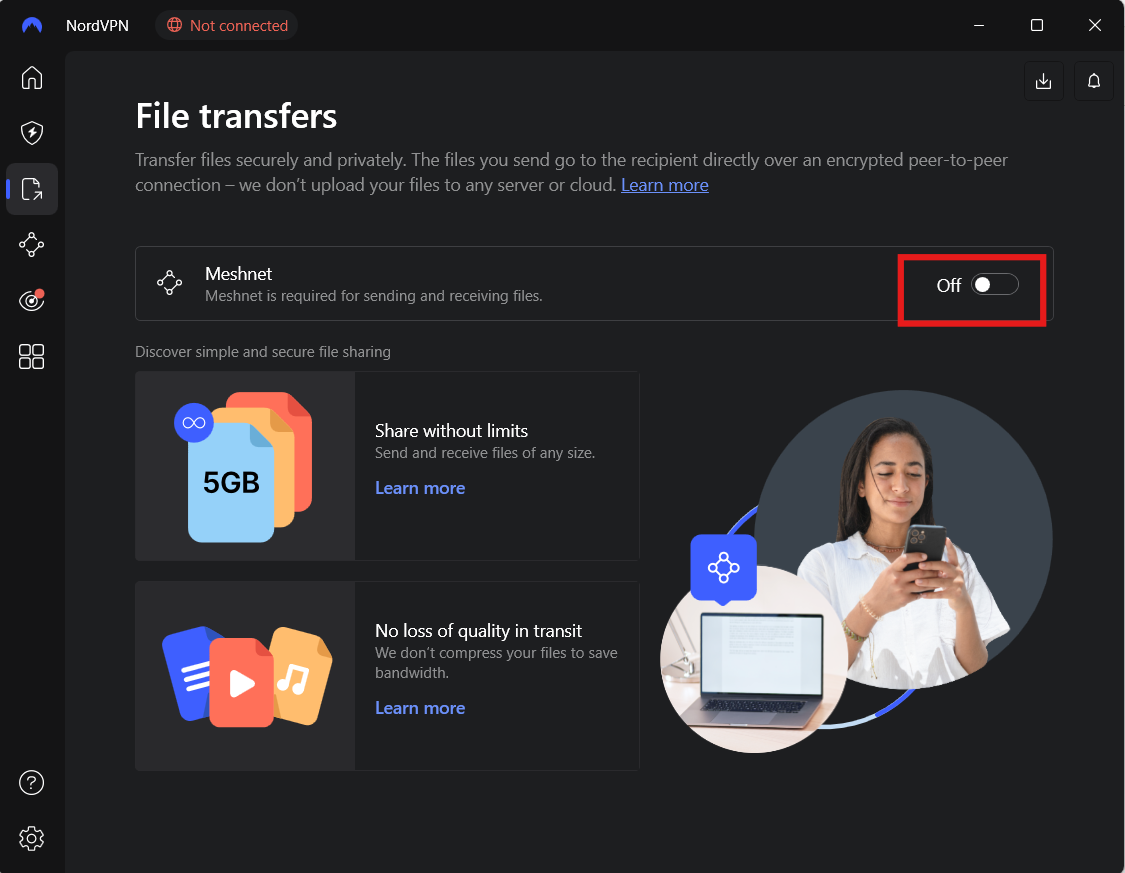
Step 2: Go to Meshnet
- Find Meshnet in the sidebar or settings
Step 3: Turn On Meshnet
- Toggle Meshnet ON
How to Use Meshnet
Once enabled, you can use it in different ways.
Remote Access
Access your home PC from anywhere.
File Sharing
Transfer files securely between devices.
Gaming
Play LAN games with friends online.
Routing Traffic
Use your home IP while traveling.
When Should You Use Meshnet?
Meshnet is useful when:
- You want remote access to your PC
- You need secure file transfers
- You want to simulate a LAN network
- You want to use your home IP remotely
It is ideal for advanced users and remote workflows.
Meshnet vs Traditional VPN
There is a key difference.
| Feature | Meshnet | VPN |
|---|---|---|
| Purpose | Device-to-device connection | Hide IP and encrypt traffic |
| Connection | Direct between devices | Through VPN server |
| Use case | Remote access, LAN gaming | Privacy and security |
Meshnet is about connectivity, while VPN is about privacy.
Limitations of Meshnet
While powerful, it has some limitations.
- Requires NordVPN account
- Setup needed on all devices
- Not all apps may work seamlessly
- Depends on internet connection
It is still evolving.
Final Thoughts
Understanding what Meshnet in NordVPN is and how to use it opens up new possibilities beyond traditional VPN usage. It allows you to connect devices securely, access files remotely, and create your own private network.
If you want more control over your devices and connections, Meshnet is a feature worth exploring.
FAQs
What is Meshnet in NordVPN?
It is a feature that connects devices securely like a virtual LAN.
Is Meshnet free?
It is included with NordVPN, but requires an account.
Can I use Meshnet without VPN?
Yes. Meshnet works independently of the VPN connection.
Is Meshnet safe?
Yes. It uses encrypted connections for secure communication.
Discussion (0)
Be the first to comment.