




If you want to reduce battery usage while browsing, you may want to enable Energy Saver in Google Chrome. Energy Saver is a built-in Chrome feature that helps extend battery life by limiting background activity and reducing browser resource usage.
This feature is especially useful for laptop users who want to conserve battery power during long browsing sessions. In this guide, you will learn what Energy Saver is in Chrome and how to enable it.
What Is Energy Saver in Google Chrome?
Energy Saver in Google Chrome is a feature designed to reduce power consumption while using the browser. It works by limiting background processes and reducing visual effects that consume system resources.
When Energy Saver is enabled, Chrome may:
- Reduce background tab activity
- Limit visual effects and animations
- Lower browser resource usage
- Improve battery efficiency
These changes help extend battery life while browsing.
Benefits of Using Energy Saver in Chrome
Energy Saver offers several advantages for users who rely on laptops or portable devices.
Key benefits include:
- Longer battery life during browsing
- Reduced CPU and GPU usage
- Better power efficiency on laptops
- Improved performance when battery levels are low
The feature is designed to balance performance with energy savings.
How Energy Saver Works
When Energy Saver is active, Chrome reduces the workload of the browser.
The feature may:
- Limit background tasks running in inactive tabs
- Reduce animation effects
- Decrease browser refresh rates in certain scenarios
These optimizations reduce the overall power consumption of the browser.
How to Enable Energy Saver in Google Chrome
You can enable Energy Saver directly from Chrome settings.
Step 1: Open Chrome Settings
- Open Google Chrome.
- Click the three-dot menu in the top-right corner.
- Select Settings.
Step 2: Go to Performance Settings
- In the sidebar, click Performance.
- Locate the Energy Saver option.
Step 3: Enable Energy Saver
Turn on the Energy Saver toggle.
Once enabled, Chrome will automatically reduce energy usage.
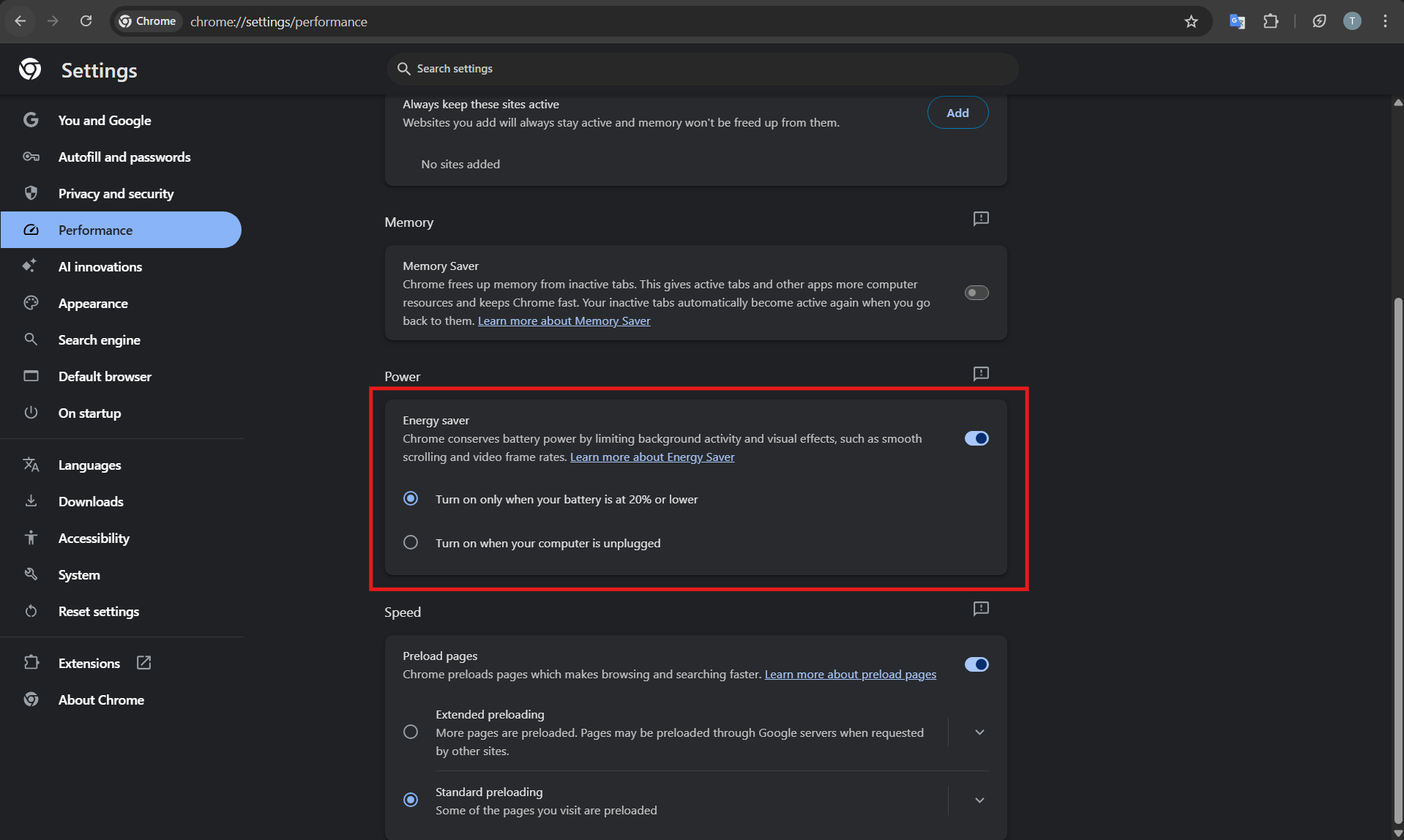
When Energy Saver Activates
Chrome can activate Energy Saver in different situations.
It may activate when:
- The laptop battery drops below a certain percentage
- The device is unplugged from power
- The user manually enables the feature
You can also choose when Energy Saver should activate in Chrome settings.
Energy Saver vs Memory Saver
Chrome includes another feature called Memory Saver.
The two features serve different purposes:
Energy Saver:
- Reduces battery consumption
- Limits browser resource usage
Memory Saver:
- Frees up RAM by unloading inactive tabs
- Improves browser performance
Both features can work together to improve browsing efficiency.
Should You Enable Energy Saver?
For most laptop users, enabling Energy Saver is recommended.
It helps extend battery life without significantly affecting browsing performance.
However, users running heavy web applications or online games may notice reduced performance while the feature is active.
Final Thoughts
Energy Saver in Google Chrome is a useful feature for improving battery life and reducing power consumption during browsing sessions. By limiting background activity and optimizing resource usage, Chrome can run more efficiently on portable devices.
For users who frequently work on laptops, enabling Energy Saver can help maintain longer battery life without sacrificing normal browsing functionality.
FAQs
What does Energy Saver do in Chrome?
Energy Saver reduces browser power consumption by limiting background activity and resource usage.
Does Energy Saver affect performance?
It may slightly reduce performance in some situations, but the impact is usually minimal.
Is Energy Saver useful for desktop computers?
It is mainly designed for laptops where battery life is important.


Discussion (0)
Be the first to comment.