



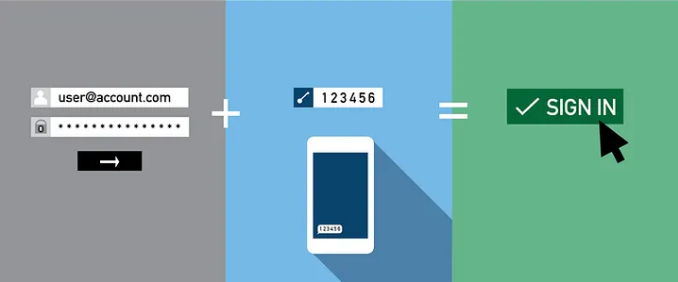
Most people who have enabled two-factor authentication on their accounts feel reasonably secure. They have done the right thing. They turned it on. Job done.
The uncomfortable truth is that two-factor authentication is not a single thing with a single level of protection. The six-digit code texted to your phone and the physical security key plugged into a USB port are both called two-factor authentication, but they protect you in completely different ways against completely different attacks. One can be bypassed by a criminal making a phone call to your mobile carrier. The other cannot be bypassed by anything short of stealing the physical object from your hands.
Here is what actually separates them.
What Two-Factor Authentication Is Trying to Do
The idea behind two-factor authentication is that a password alone is not enough. Passwords get stolen in data breaches, guessed by automated tools, or handed over by people who do not realise they are being phished. A second factor adds something the attacker cannot easily obtain just by knowing your password.
That second factor generally falls into one of three categories. Something you have, like your phone or a physical key. Something you know, like a PIN. or something like a fingerprint. The three main methods of two-factor authentication, SMS codes, authenticator apps, and hardware keys, all use the something you have category. The difference is in how they implement it and how many ways that something can be taken from you without you noticing.
SMS Codes: Better Than Nothing, But Not By Much
When you set up SMS-based two-factor authentication, the service texts you a code whenever you log in. You enter the code and you are in. It is the most common form of two-factor authentication in the world, and it is the weakest of the three.
The core problem is that the code travels over the mobile network as a text message. The mobile network was not designed with security as a priority, and there are multiple well-documented ways to intercept or redirect SMS messages.
The most common attack is called SIM swapping. An attacker calls your mobile carrier, pretends to be you, claims they have a new phone, and asks for your number to be transferred to a SIM card they control. Mobile carriers have safeguards against this but they are routinely bypassed through social engineering. Once the number is transferred, every text message sent to you arrives on the attacker's phone. Every two-factor code for every account tied to that number is now theirs. The attack does not require any technical sophistication. It requires a convincing phone manner and some basic personal information about you, which is often freely available from social media or data breach dumps.
The second major vulnerability is real-time phishing. An attacker sends you a convincing fake login page for your bank or email provider. You enter your username and password, and the fake page simultaneously tries to log into the real site. The real site sends a code to your phone. The fake page asks you to enter that code. You do, the attacker's session is authenticated, and they are in. The entire exchange can happen in under two minutes and the code expires before you realise anything went wrong.
Authenticator Apps: A Meaningful Step Up
Authenticator apps like Google Authenticator, Microsoft Authenticator, Authy, and Ente Auth generate six-digit codes directly on your phone, refreshing every thirty seconds. The codes are produced by a mathematical function using a secret key set up when you first configured the app and the current time. The app does not need an internet connection or a phone signal to generate them. No code is ever transmitted over the mobile network.
This eliminates the SIM-swapping attack entirely. There is no text message to intercept. An attacker who successfully transfers your phone number receives nothing useful because the codes are generated on the device itself, not sent to it.
What authenticator apps do not protect against is real-time phishing. A sophisticated fake login page can still prompt you for the code your authenticator generates, relay it to the real site before it expires, and authenticate successfully. The attack is harder to execute and the time window is narrower, but it is not impossible. Security researchers have demonstrated automated tools that perform exactly this attack.
The other practical consideration with authenticator apps is what happens when you lose your phone. If you have not set up encrypted cloud backup for your codes, losing your phone means losing access to every account protected by that app, unless you have recovery codes saved somewhere safe. This is a real operational risk that catches people out regularly.
Despite these limitations, authenticator apps are the right choice for most people and most accounts. They are significantly more secure than SMS, free to use, and straightforward to set up. The security improvement over SMS is substantial and the inconvenience over SMS is minimal.
Hardware Security Keys: The Only Phishing-Proof Option
A hardware security key is a small physical device, typically resembling a USB drive, that you plug into your computer or tap against your phone to authenticate. The most widely used are made by Yubico under the YubiKey brand, with Google's Titan Key being another well-known option. They cost between £25 and £60.
Hardware keys use a protocol called FIDO2 or WebAuthn, and the way it works is fundamentally different from codes of any kind. When you register a key with a website, the key and the website exchange cryptographic credentials tied to that specific website's address. When you authenticate, the key cryptographically proves it is the same key that was registered, and this proof is bound to the exact website address you are visiting.
This is what makes hardware keys phishing-proof in a way nothing else is. A fake login page for your bank has a different web address than your actual bank, even if it looks identical. The key knows the difference. When a phishing site asks the key to authenticate, the key refuses, because the address does not match the one it was registered with. There is no code to steal, no timing window to exploit, and no social engineering angle that works. An attacker cannot bypass a hardware key without physically possessing it.
The National Institute of Standards and Technology, which sets US government security guidelines, and the FBI both recommend hardware keys for high-value accounts. Major tech companies including Google, Apple, and Microsoft all support them. Google famously rolled out hardware keys to all its employees in 2017 and reported zero successful phishing attacks on employee accounts in the following year.
How the Three Methods Compare
| SMS | Authenticator App | Hardware Key | |
|---|---|---|---|
| Stops automated attacks | Yes | Yes | Yes |
| Stops SIM swapping | No | Yes | Yes |
| Stops real-time phishing | No | No | Yes |
| Works without internet | No | Yes | Yes |
| Cost | Free | Free | £25 to £60 |
| Risk if lost | Phone ported by attacker | Locked out of accounts | Need backup key |
| Best for | Low-stakes accounts | Most people, most accounts | High-value accounts |
Which One Should You Actually Use
For most accounts and most people, an authenticator app is the right answer. It is a substantial improvement over SMS, it is free, and the setup takes about two minutes per account. The accounts that matter most, your email, your password manager, your bank, your primary social media, should all have authenticator-based two-factor authentication enabled if the service supports it.
For accounts of the highest value, a hardware key is worth the investment. Your email account in particular is the master key to your digital life. Whoever controls your email can reset the password on almost everything else you own online. Protecting it with a hardware key is one of the most impactful security decisions an individual can make.
SMS two-factor authentication is better than nothing, and for low-stakes accounts where the service offers no better option, it is worth enabling. But for anything you would genuinely suffer if someone accessed, treat SMS as a temporary measure and upgrade when you can.
The most important thing is not to mistake having two-factor authentication enabled for having strong two-factor authentication. The method matters enormously.
Frequently Asked Questions
Can I switch from SMS to an authenticator app without losing access to my accounts?
Yes. Most services let you add an authenticator app while SMS is still active, then disable SMS once the app is set up. Do this one account at a time and save the recovery codes the service provides before switching off SMS. The process is typically straightforward and takes a few minutes per account.
What happens if I lose my phone and I use an authenticator app?
If you have not set up encrypted cloud backup for your codes, you use the recovery codes you saved when setting up each account. This is why saving recovery codes somewhere secure, such as a password manager or printed and stored physically, is essential. Authy and Ente Auth both offer encrypted cloud backup that lets you restore your codes on a new device.
Are hardware keys compatible with all websites?
Hardware keys work on any site that supports the FIDO2 or WebAuthn standard. This includes Google, Microsoft, GitHub, Twitter, Facebook, Dropbox, and many others. Not every website supports hardware keys yet, which is why most people use a hardware key for their most important accounts and an authenticator app for everything else.
Is it worth buying a hardware key for personal use?
If you have accounts that would cause serious damage if compromised, your primary email, a password manager, financial accounts, or anything used for work, yes. A £30 to £50 YubiKey is one of the best security investments available to an individual. If your accounts hold nothing particularly sensitive, an authenticator app provides strong protection at no cost.



Discussion (0)
Be the first to comment.