



Powerline adapters represent a good way to extend the network coverage in your home or in your office, especially in areas where your router's wireless signal doesn't reach. TP-LINK TL-WPA8630P is a high-end powerline adapter kit that promises a maximum theoretical bandwidth of 1200 Mbps. It is the fastest device of its kind in TP-LINK's portfolio and we were very curious to see what it has to offer in terms of real-life performance. If you want to hear our opinion about this device and the service it delivered in our testing, read this review:
Unboxing the TP-LINK TL-WPA8630P AV1200 Gigabit Passthrough Powerline AC Wi-Fi Kit
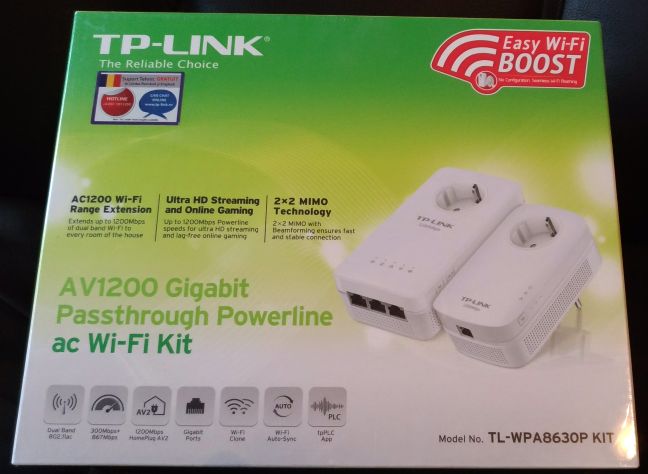
The packaging used for the TP-LINK TL-WPA8630P is similar to that of other TP-LINK networking products. It uses calming green colors and on the front of the box you see the two devices that make up the kit, as well as a list of its most important specifications.
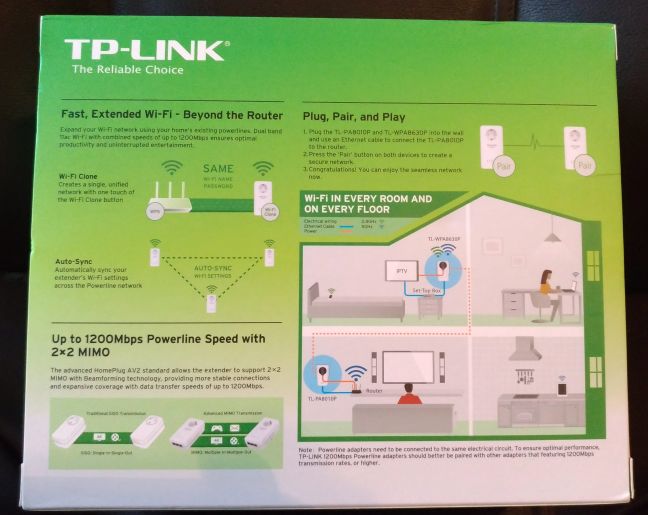
On the back of the box there are useful examples of how you can use this kit to extend the network coverage in your home.
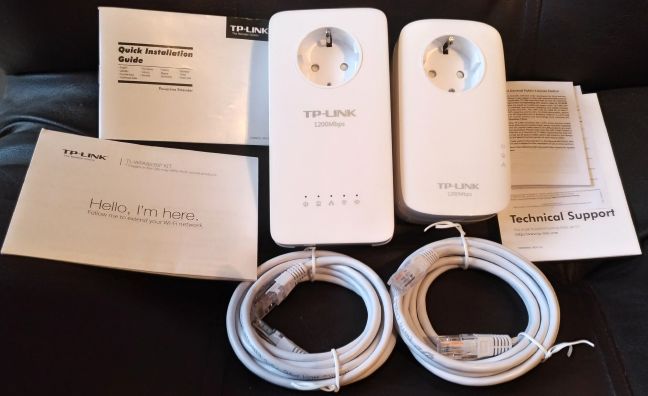
Inside the package you will find the following elements: the two components that make up the kit (the TP-LINK TL-WPA8630P extender and the TL-PA8010P adapter), two network cables of 6.56 feet or 2 meters length each, the quick installation guide in several languages, technical support information, a visual guide for setting up the kit, the license notice that applies to this kit and several other leaflets with information.
Now that you know more about the unboxing experience, let's see what you get in terms of hardware specifications.
Hardware specifications and design
The TP-LINK TL-WPA8630P powerline adapter kit offers support for all modern wireless networking standards up to 802.11ac. This is a dual band device, which promises a total maximum theoretical bandwidth of 1200 Mbps: 867Mbps on the 5GHz band and 300Mbps on the 2.4GHz band (that's a sum of 1167 Mbps, in case you are wondering).
TP-LINK has included support for the HomePlug AV2 standard that allows the TP-LINK TL-WPA8630P extender to support 2x2 MIMO* with Beamforming Technology, which should translate into both fast and stable wireless network connections.
Another interesting feature advertised by TP-LINK is Auto-Sync, that allows users to add additional TP-LINK extenders to the powerline network and uniformly sync settings such as SSID, password, Wi-Fi Schedule and LED Schedule for all the devices that make up the powerline network.
As you can see in the picture below, both devices are quite large and heavy: the TL-PA8010P adapter (on the left) weighs 17 ounces or 492 grams while the TL-WPA8630P extender (on the right) weighs 30 ounces or 853 grams.
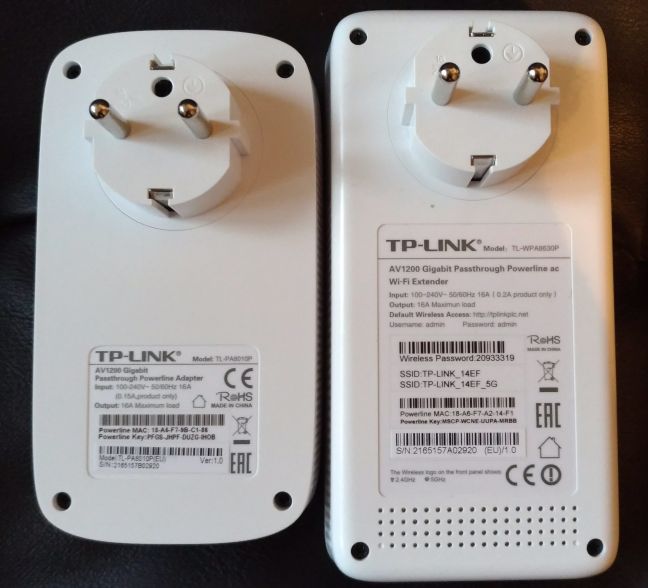
The the TL-PA8010P adapter has an Ethernet port for connecting it to the wireless router, while the TL-WPA8630P extender has three Gigabit Ethernet ports for connecting up to three devices to the network.
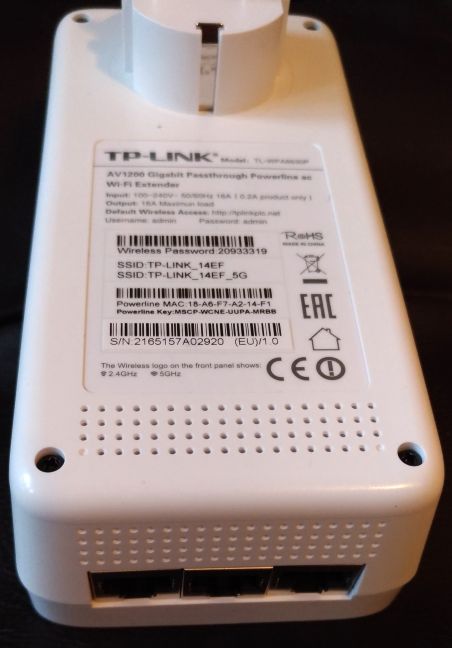
Unfortunately TP-LINK doesn't provide any information about the processor used in this kit, the amount of RAM or other similar information. If you want to check the official specs of this kit, go to this page: TL-WPA8630P KIT Specifications.
Setting up and using the TP-LINK TL-WPA8630P powerline wireless kit
In order to set up and use the TP-LINK TL-WPA8630P powerline wireless kit, connect the TL-PA8010P adapter to your wireless router, using a network cable. Then, plug it into the wall socket. Take the TL-WPA8630P extender and plug it into the wall socket, somewhere near the adapter. Pair the two devices using the Pair button on each of them, starting with the TL-PA8010P adapter. Next, find the Wi-Fi Info Card that's available in the packaging of the kit so that you know how to connect to the wireless networks that are broadcast by the kit.
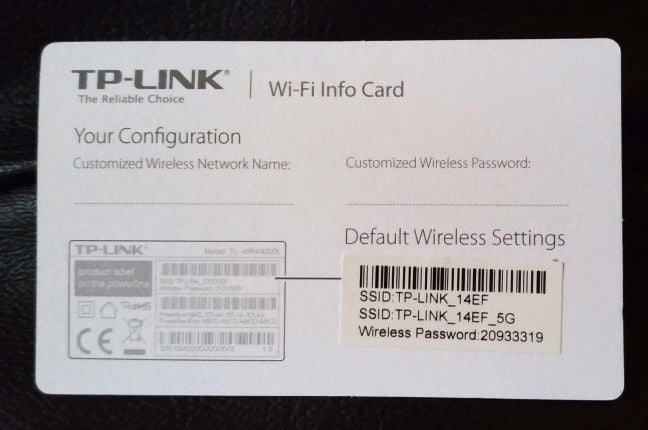
Connect a laptop or a mobile device to the wireless network broadcast by the kit and, in a web browser, type the IP address of the kit. You can now use the user interface to administer how this powerline kit works.
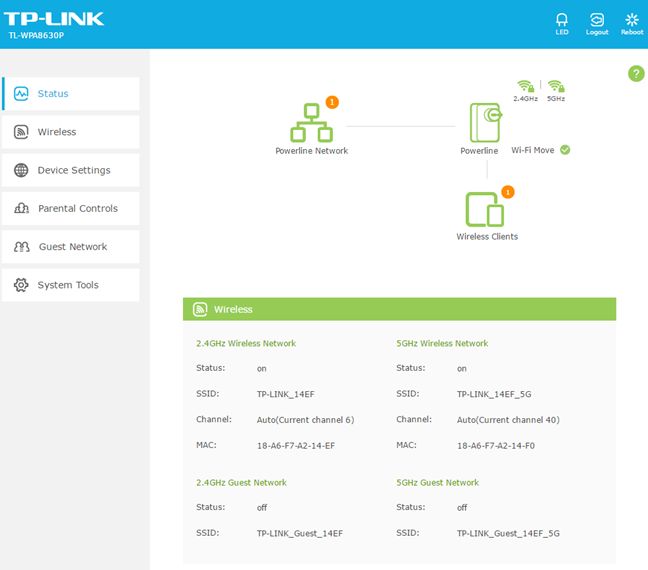
Once that is out of the way, you can move the TL-WPA8630P extender to the location where you want to use it.
While administering this kit, you will notice that the user interface is quite simple and good looking. It offers both basic and advanced settings, and this should please both experienced users as well as beginners. We highly recommend you that you configure in detail the two networks that are broadcast by this kit, as the defaults will not provide the fastest wireless connection that is possible.
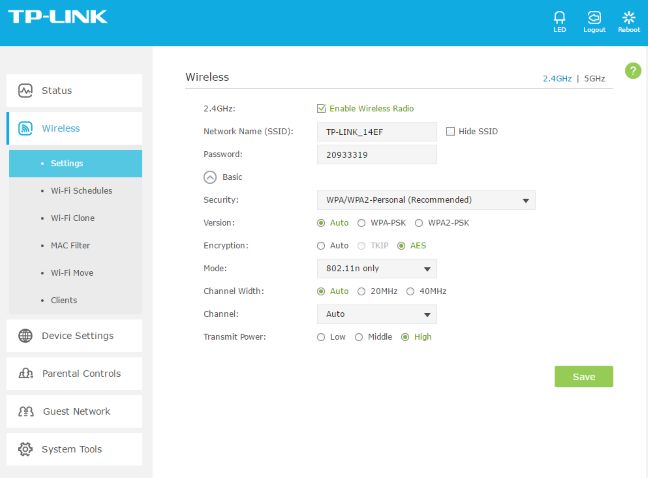
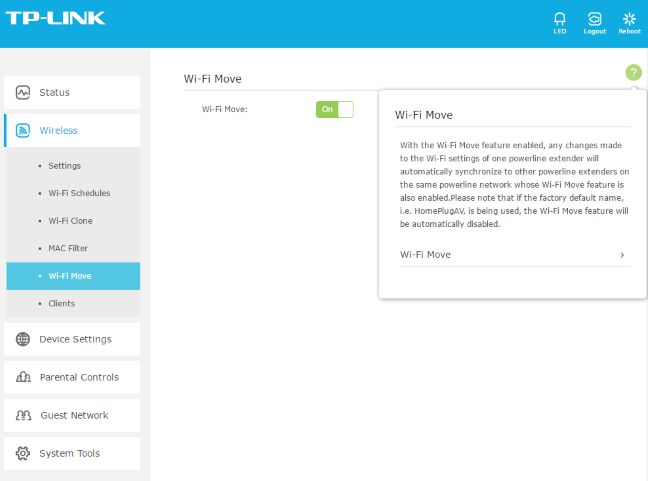
If there is a setting you don't understand, you can press the question mark (?) button on the top-right of the administration interface, and TP-LINK will display useful documentation about what you see on screen.
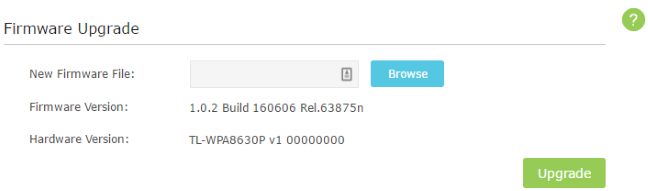
Another step that you should consider taking is checking for firmware updates and installing the latest update available. Recent firmware updates have fixed some bugs and improved the performance of this device. Before doing all our testing, we upgraded the firmware to the latest version available at the time, which you can see in the screenshot below.
One last step that you should t ake is changing the default username and password for administering this powerline kit. Using admin/admin is very insecure and can expose you to risks that are easily avoided.
Overall, we enjoyed the configuration experience. The user interface is quite simple, the documentation is well written and we had access to the configuration options that we expected. It's only important downside is the fact that it is available only in English.
If you don't enjoy using the web interface for administering the TP-LINK TL-WPA8630P powerline kit, you can install the TP-LINK PLC Utility for Windows. It's a free app that needs to install WinPcap in order to be used fully.
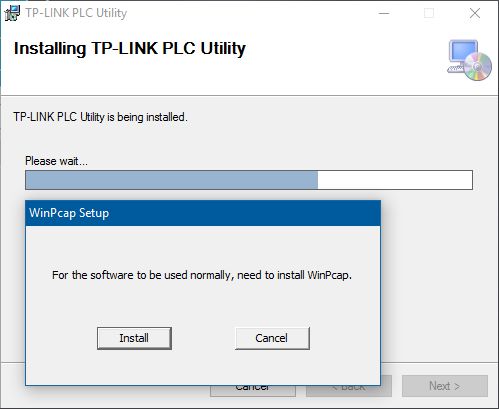
It's user interface is very minimalistics and it offers easy access to several configuration options for each of the devices that make up the powerline kit.
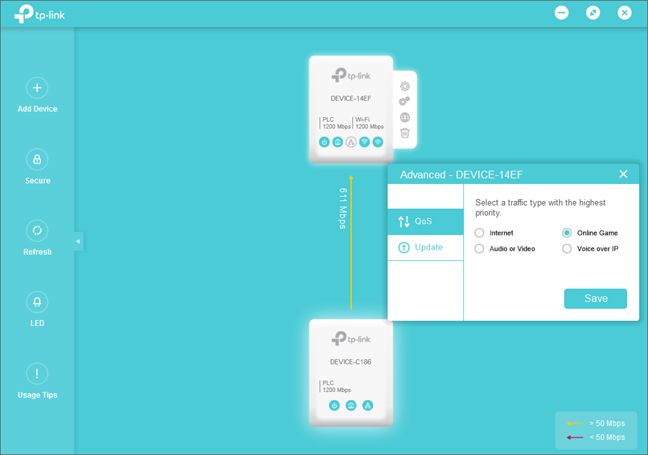
You can also install the tpPLC mobile app for Android and iOS on your smartphone, which allows you to administer your kit with ease. Below you can see a screenshot of the user interface and of some of the configuration options that are available.
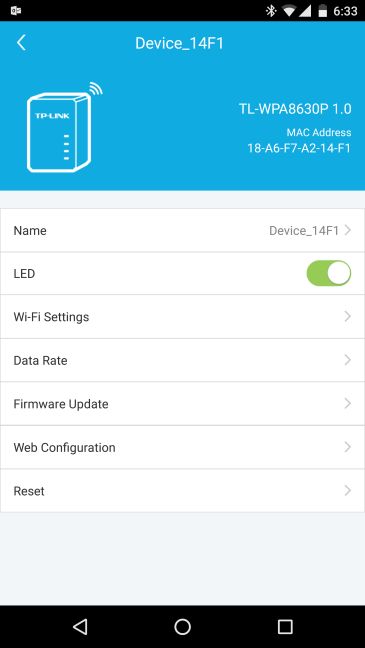
Overall, we were pleased with how TP-LINK TL-WPA8630P worked, its stability and speed. We had no issues in connecting our devices, in streaming media and sharing files and folders. Also, the performance was top-notch, as you can see in the next two sections of this review.
If you want to know how fast this powerline kit is, the real-life transfer speeds that it offers and the extra features that might be useful to you, go to the second page of this review, using the navigation buttons below.
Wireless network performance
First, let's take a look at the apartment that was used in our testing and how it is set up (the apartment has 753 square feet or 70 square meters). You can see that the router is placed in the living room. With most wireless routers, the signal strength is not that great in rooms like the kitchen. That's why we placed the powerline extender in the kitchen and this is where we made all our measurements. During our testing we used a very fast internet connection capable of downloads of 1 Gbps and of uploads up to 200 Mbps.
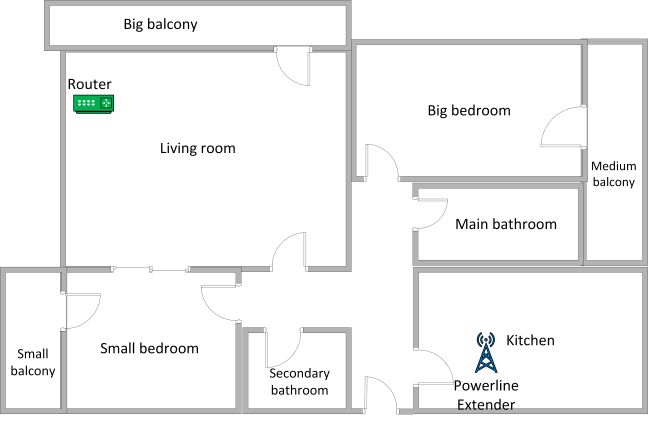
We used a Microsoft Surface Pro 3 for all our measurements and several software tools. To get a better perspective of the performance offered by the TP-LINK TL-WPA8630P kit, we compared it with one of its main competitors: ASUS PL-AC56. The two devices have similar specs and are direct competitors in this niche.
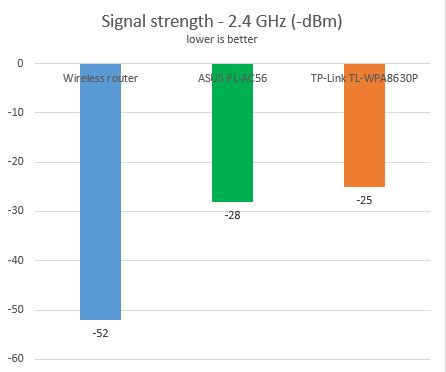
We started by evaluating the 2.4 GHz wireless network and measured the signal strength offered, using a tool named inSSIDer. As you can see below, the signal strength that was delivered by TP-LINK TL-WPA8630P was very good.
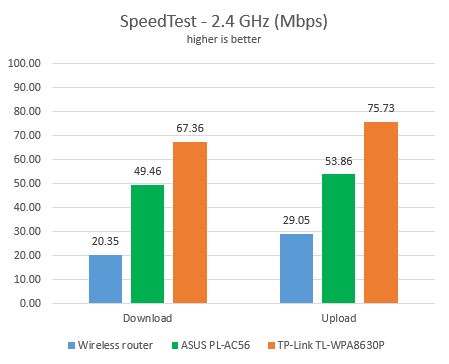
Then, we measured the speed of the internet connection on the 2.4 GHz wireless frequency, using SpeedTest. TP-LINK TL-WPA8630P offered very good download and upload speeds, better than our router and its competitor.
Then, we used LAN Speed Test Lite to measure the wireless download and upload speeds when transferring a 350MB file through the network. The results were very similar to what we measured with SpeedTest.
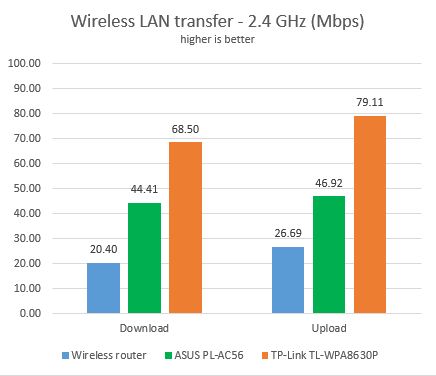
When it comes to the 2.4 GHz wireless network, our conclusion is that the TP-LINK TL-WPA8630P powerline WiFi kit can deliver very fast wireless connections.
Next, we analyzed the performance offered by the 5GHz wireless network. First, we looked at the signal strength. TP-LINK TL-WPA8630P delivered solid signal strength, even though it was not as good as its competitor.
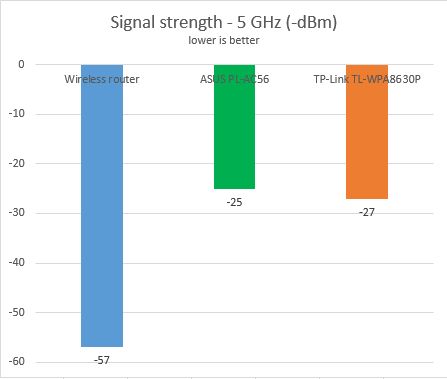
However, the signal strength doesn't tell you how fast a connection is. So we used SpeedTest to measure the speed of the internet connection offered by TP-LINK TL-WPA8630P on the 5GHz frequency. As you can see below, TP-LINK TL-WPA8630P was very fast.
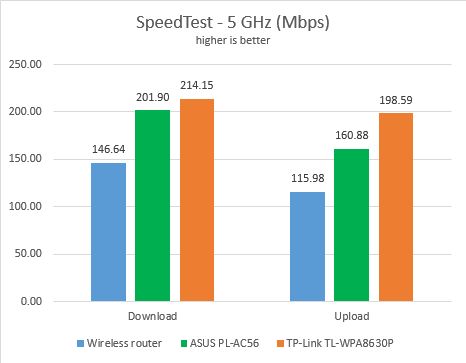
Lastly, we used LAN Speed Test Lite to measure the wireless download and upload speeds when transferring a 350MB file through the network. Again, TP-LINK TL-WPA8630P was a top performer.
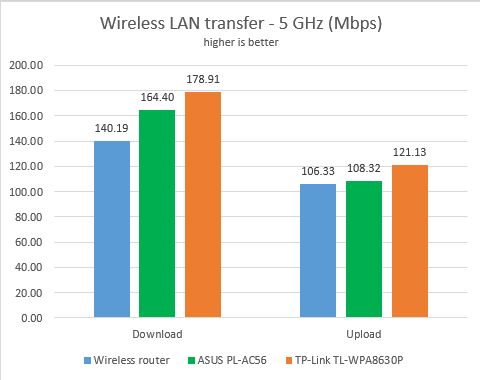
The wireless network that is broadcast by the TP-LINK TL-WPA8630P powerline kit on the 5GHz frequency is very fast.
Wired network performance
The TP-LINK AV1200 Gigabit passthrough powerline WiFi kit (TL-WPA8630P) offers three Ethernet ports so that you can connect up to three devices. In order to test the quality of the wired Ethernet connection, we used a desktop PC, equipped with an Intel Core i5 4460 processor, running at 3.20GHz, 16GB of RAM and a very fast Samsung 850 Pro 512GB SSD and a Microsoft Surface Pro 3 with an Intel Core i5-4300U processor, running at 1.9 GHz, 8 GB of RAM and a fast 256 GB SSD drive from Samsung. We connected the Surface Pro 3 to the TL-WPA8630P kit and the desktop PC to the router.
First, we measured the download and upload speeds using SpeedTest. TP-LINK TL-WPA8630P delivered an average download speed of 198.35 Mbps, which is a good result, but not as fast as what its competitor was able to deliver.
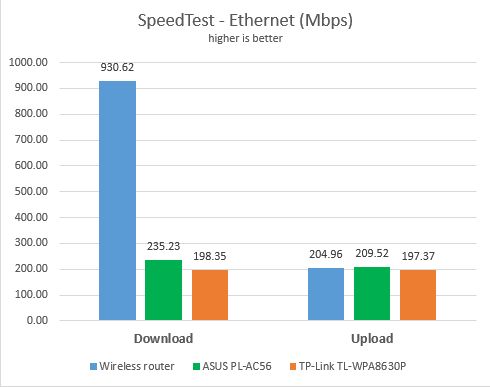
Then, we used LAN Speed Test Lite to measure the wireless download and upload speeds when transferring a 350MB file through the network. Again, TP-LINK TL-WPA8630P was slightly slower than its competitor ASUS PL-AC56, which we reviewed here.
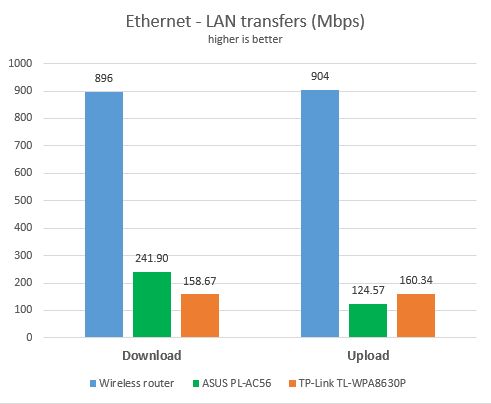
TP-LINK TL-WPA8630P is able to deliver real-life Ethernet connections of up to 200 Mbps, which is slightly slower than what other competing devices can deliver.
Extra features
When you see how simple the user interface of this device is, you might assume that it doesn't offer much in terms of extra features. However, this is not the case. The TP-LINK TL-WPA8630P has to offer the following extras:
- Mobile and desktop apps for administering the kit on Windows computers as well as smartphones with Android and iOS.
- Two guest networks: one for each wireless band (2.4GHz and 5GHz).
- A WiFi scheduler that allows you to set when the powerline kit broadcasts its wireless signal.
- A MAC filter for blocking or allowing access for certain devices to the network.
- A LED scheduler so that you can turn off the LEDs at night, so that they don't bother you when sleeping. You can also turn the LEDs off completely, at all times.
- A simple QoS (Quality of Service) feature that allows you to prioritize basic types of network traffic.
- Basic parental controls that allow you to set a schedule for when your children's devices can access the internet.
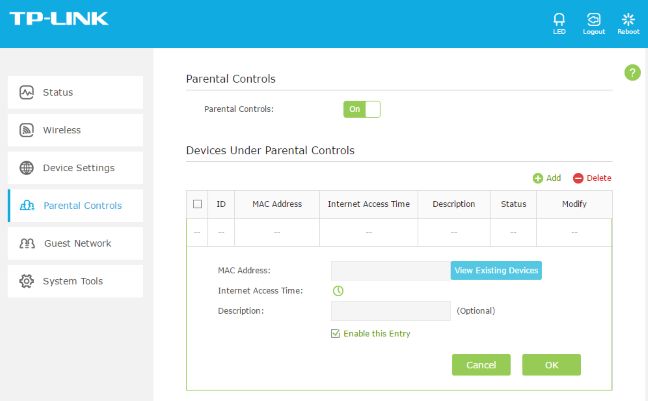
You will appreciate some of the extra features that are bundled on the TP-LINK TL-WPA8630P powerline kit. They are easy to configure and some of them may be very useful to you.
Pros and cons
The TP-LINK TL-WPA8630 P powerline kit has the following strengths:
- It allows you to extend the coverage of your network in places where your router's wireless signal doesn't reach
- It offers very fast wireless networks on both bands: 2.4GHz and 5GHz
- The user interface looks good and it is easy to use
- The documentation is easily available and it explains all the technical terms you might have issues with
- It includes useful extras like mobile apps for managing the kit, guest networks and the QoS feature
There a couple of downsides too:
- The user interface is available only in English
- The speed of the Ethernet connection offered by TP-LINK TL-WPA8630P is slower than that of competing devices
- It's expensive

Verdict
"TP-LINK TL-WPA8630P AV1200 Gigabit Passthrough Powerline AC Wi-Fi Kit" is a very long and confusing product name but that doesn't mean that the product is not good or user friendly. On the contrary, the setup of this powerline kit is relatively simple. If you follow the quick user guide that's found inside the box, you should have no issues. Also, the performance you get after configuring this device is very solid. TP-LINK TL-WPA8630P is a very good choice for those interested in extending the coverage of their wireless network in areas where their router's wireless signal doesn't arrive. It's also a perfect choice for high-speed devices that require fast network connections. So far, TP-LINK TL-WPA8630P is the best powerline WiFi kit that we have tested and we highly recommend it to all our readers.
Discussion (1)
A signal strenghts of -25 dBm is stronger than -27 dBm and far stronger than -57 dBm!