



Do you need a very fast wireless router that costs less than the equivalent of 200 USD? Do you need a fast 5GHz wireless network using the modern 802.11ac standard? Also, do you want a router that looks stylish, without any annoying LEDs and a router that can be mounted on walls? TP-LINK Archer AC2600 is one of the newest wireless routers from TP-LINK which promise to be the answer to all these questions. We tested this router for about two weeks, on a daily basis and now we are ready to share whether this router truly delivers on its promises. Read this review to learn whether it is worth buying or not.
Unboxing the TP-LINK Archer C2600 AC2600 Wireless Dual Band Gigabit Router
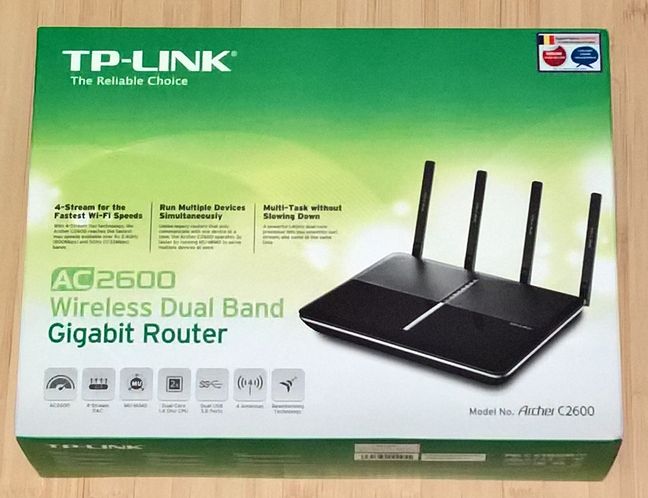
The packaging use for the TP-LINK Archer AC2600 wireless router is similar to that of other TP-LINK wireless routers. It uses a calming green color and, on the front of the box you can find a picture of the device as well as details about some of its most important features.
On the back of the box you will find a comparison with other routers from the TP-LINK portfolio. According to TP-LINK, Archer C2600 is the successor to Archer C9 and it is supposed to beat it in almost every aspect.
Inside the box you will find the router itself, four detachable antennas, a network cable, the power adapter, the quick installation guide, some technical support information and the warranty.
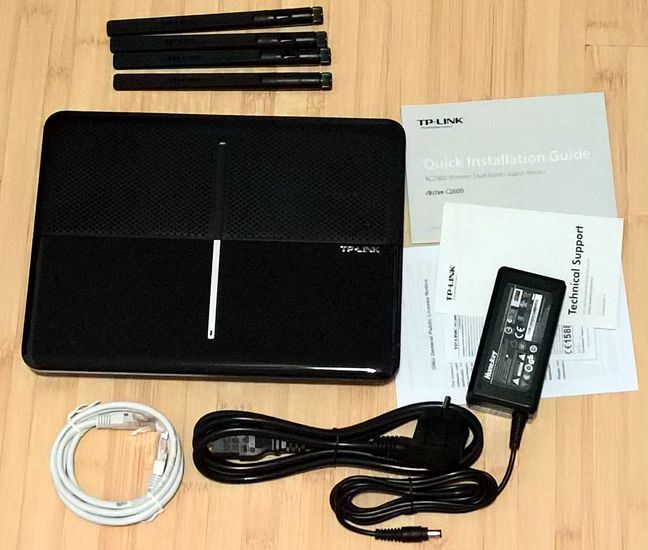
As you can see, the unboxing experience offered by TP-LINK Archer AC2600 is very similar to that of other TP-LINK routers, including more affordable ones.
Hardware specifications
TP-LINK Archer AC2600 has a Qualcomm IPQ8064 dual-core processor, running at 1.4 GHz, with 512MB of RAM memory and 32 MB of storage space. It has for dual band detachable high performance antennas which allow it to provide a maximum theoretical bandwidth of 800 Mbps on the 2.4GHz frequency and 1733 Mbps on the 5 GHz frequency, leading to a total maximum of 2533 Mbps. Obviously, it offers support for all the modern networking standards, including 802.11ac.
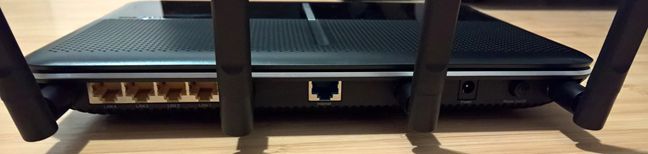
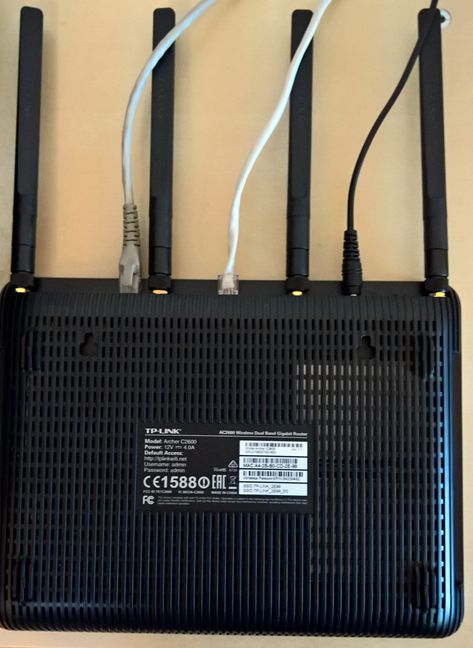
On the back side of the router you will find four Ethernet ports, one port for connecting your router to the Internet Service Provider (ISP), the power jack and a button for turning the router On and Off.
On the right side of the router you will find two USB 3.0 ports, a button for turning the wireless networks that are broadcast by the router On and Off, the WPS button and the Reset button.
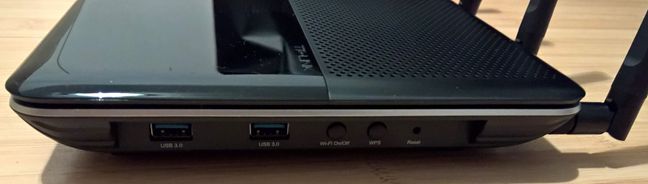
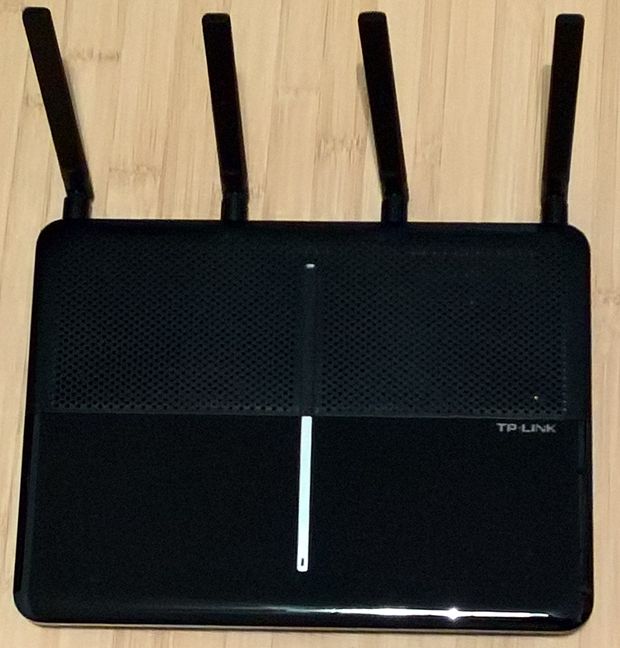
On the top of the router you will find several LEDs which indicate the status of this router's operation. TP-LINK Archer AC2600 is relatively large, but not bigger than other wireless routers with similar specifications. It has a size of 10.4 x 7.8 x 1.5 inches or 263.8 x 197.8 x 37.3 mm and a weight of 67.51 ounces or 1914 grams.
You can view the official specifications of this wireless router, here: TP-LINK Archer AC2600 Specifications.
Setting up and using the TP-LINK C2600 Archer AC2600 Wireless Dual Band Gigabit Router
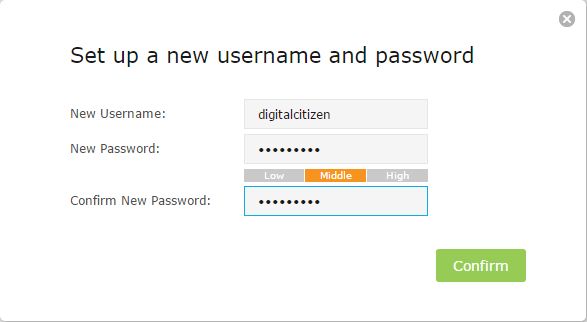
When you set up the TP-LINK Archer AC2600 wireless router for the first time, the Quick Setup Wizard starts by asking you to change the default username and password. This a very good security precaution.
Then, you are asked to select the region and the time zone that you are in. The Quick Setup Wizard continues by allowing you to select which type of Internet connection you have. It can also auto detect it for you, if you want that.
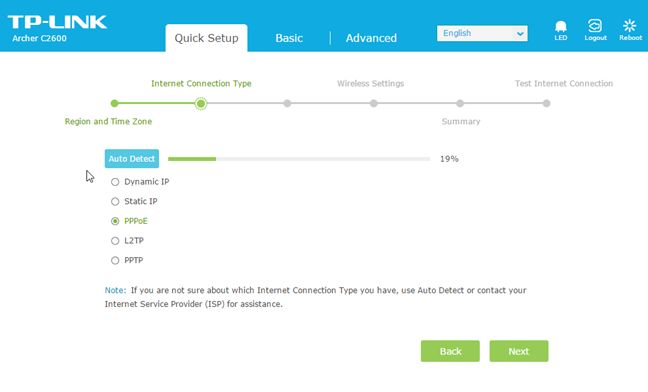
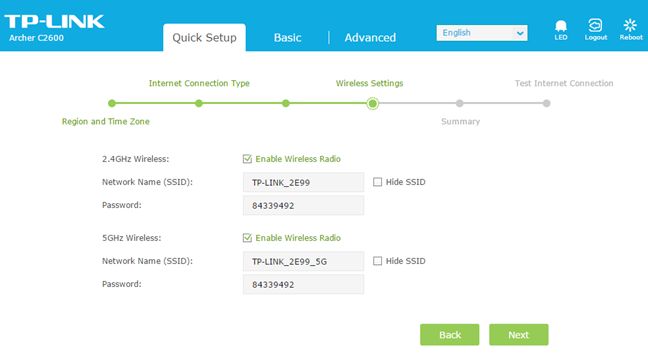
At the next step, you are asked to enter the details of your Internet connection. After you enter the necessary connection details, you can configure the two wireless networks which are broadcast by the router.
A summary is then shown for the settings that you have made and the Internet connection is tested.
Once the initial configuration is done, you can view the administration user interface and start configuring more settings in detail. As you can see, the user interface looks good and it's rather minimalist. One downside to it is that it is available only in English. There's no multi-lingual support. We believe that TP-LINK should improve this aspect of their user interface and offer support for multiple languages.
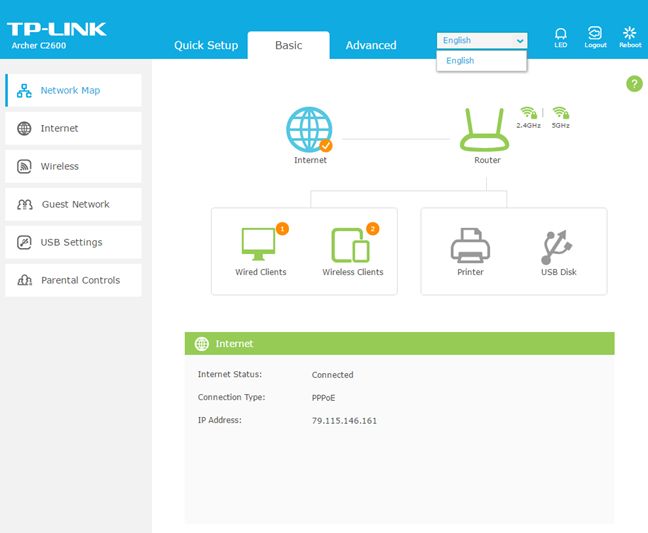
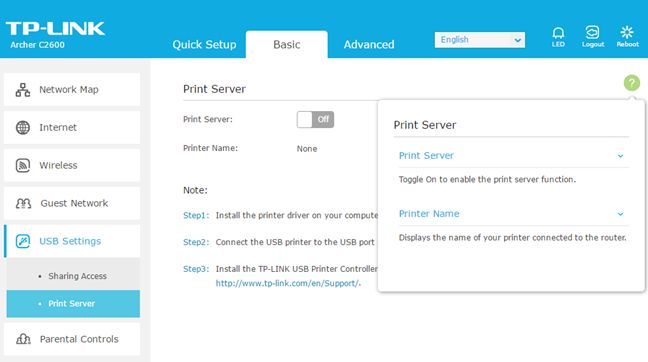
By default, only the basic settings are shown for most of the important features of the TP-LINK Archer AC2600. They are small in number and generally easy to understand and configure. Users will also appreciate the fact that the Help documentation is available with a single click on the question mark shown on the top-right corner of the user interface. If you click on it, it displays information about the options shown on the screen.
When you click the Advanced tab in the administration interface, you get access to all the configuration options that are available. As you can see below, here you get lots of data about the operation of your wireless router and you can configure everything in detail.
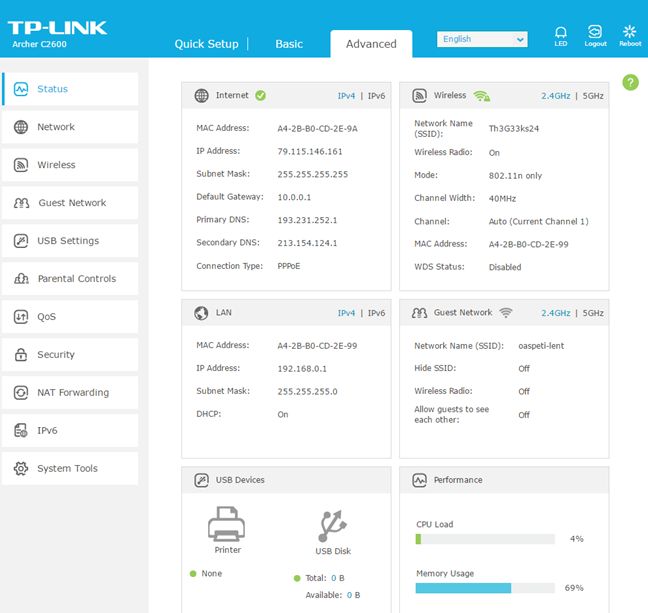
Both casual users and advanced users will appreciate this approach. Beginners get the basics in an easy to navigate format while advanced users are one click away from getting access to everything that TP-LINK Archer AC2600 has to offer.
Once the setup was out of the way, we started connecting our wireless devices to the network that was broadcast by TP-LINK Archer AC2600. We did not have any trouble connecting wireless and wired devices to the network and everything worked smoothly.
When using this router, we noticed several practical aspects you should be aware of:
- Even though the TP-LINK Archer AC2600 wireless router is quite sleek and elegant in its looks, its shiny surface is a magnet for dust and fingerprints.
- The LEDs which indicate the status of the router and its operation, are quite discreet and won't annoy you even during the night. However, if that does happen, you can easily turn them off.
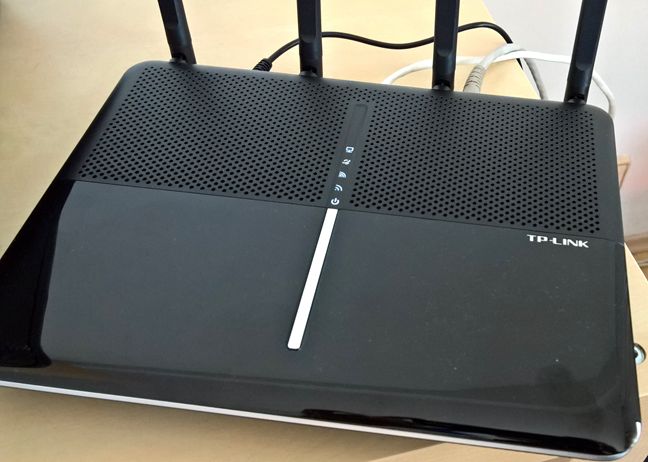
- TP-LINK Archer AC2600 can be mounted on walls. On the back side of the router you will find two mounting holes with slots that allow you to use screws that will fit in the holes.
We are pleased with how easy it was to set up the TP-LINK Archer AC2600 wireless router and the amount of control offered by the user interface for administering it. The user interface looks great, is easy to use and it offers a great deal of customization, if you go to its Advanced tab. Beginners and casual users will appreciate the fact that the default view offers only the basic settings, so that they won't feel overwhelmed or lost when trying to set things up. Overall, TP-LINK Archer AC2600 worked very well during our testing and we did not encounter issues with stability and performance.
To learn more about the real-world performance offered by this router, read the next page in this review.
Wireless network performance
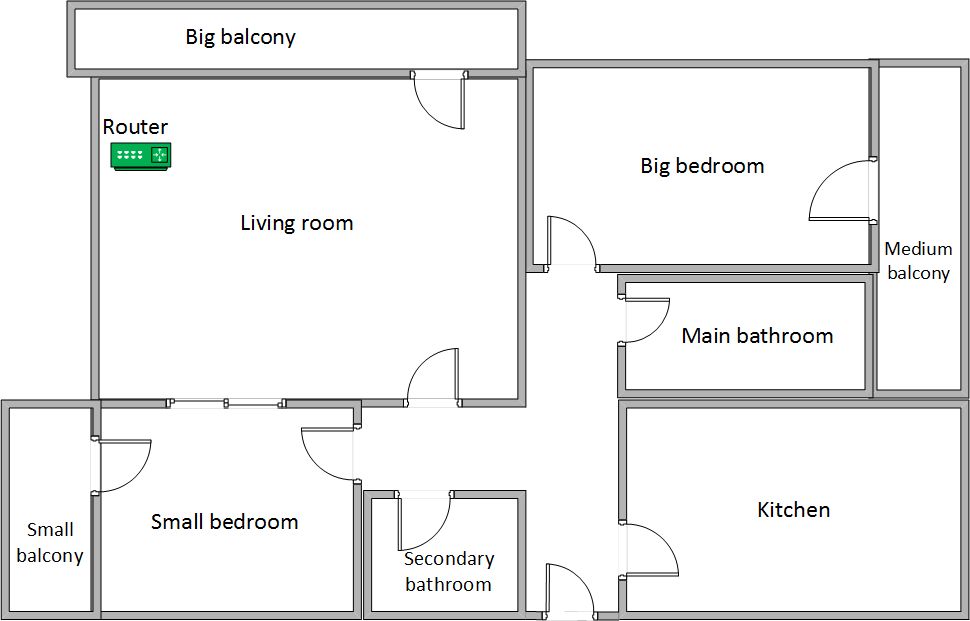
First, let's take a look at the apartment that was used in our testing and how it is set up. You can see that the router is placed in the living room. With most wireless routers, the signal strength is not that great in rooms like the Kitchen and the Medium balcony .
Our testing was done using a fast 1 Gigabit Internet connection that's capable of uploads on the Internet of up to 200 Mbps. We used a Microsoft Surface Pro 3 for all our measurements and several software tools. To get a better perspective of the performance offered by TP-LINK Archer AC2600, we compared with its predecessor - TP-LINK Archer C9 - and two routers from the competition: ASUS RT-AC87U and ASUS RT-AC3200.
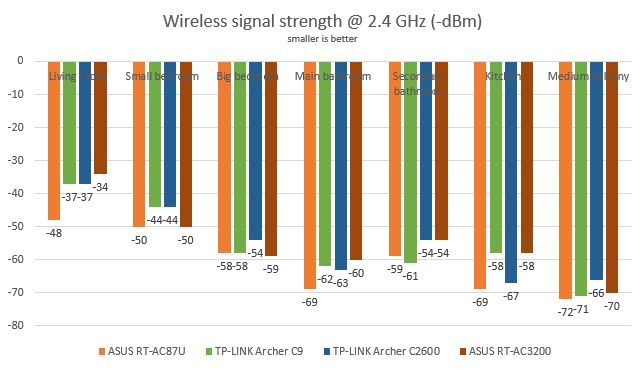
We started by evaluating the 2.4 GHz wireless network and measured the signal strength offered in each room, using a tool named inSSIDer. As you can see in the graph below, TP-LINK Archer AC2600 offered very good signal strength in all the rooms from our test apartment.
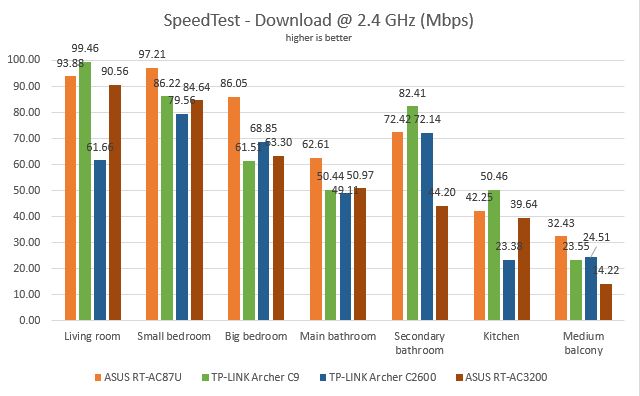
For the next set of measurements, we used SpeedTest to measure how fast the Internet connection offered by this router is when using 2.4 GHz wireless network. When measuring the download speed, TP-LINK Archer AC2600 was outperformed by its brother TP-LINK Archer C9, in most rooms.
The same was true when measuring the upload speed with SpeedTest.
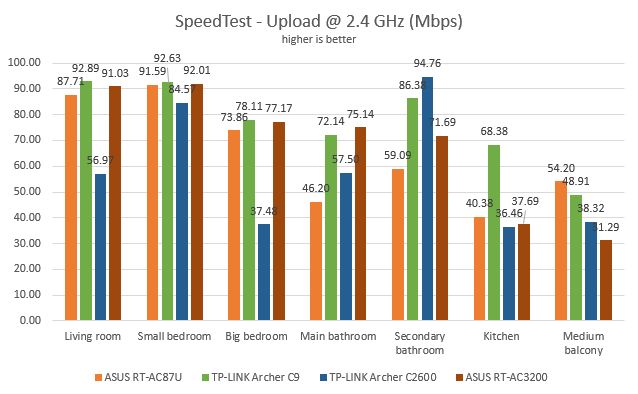
Continuing our measurements on the 2.4 GHz wireless network, we used LAN Speed Test Lite to measure downloads and uploads when transferring a 350MB file between two computers connected to the network. Just like in the previous test, TP-LINK Archer AC2600 was outperformed by its brother TP-LINK Archer C9, in most rooms.
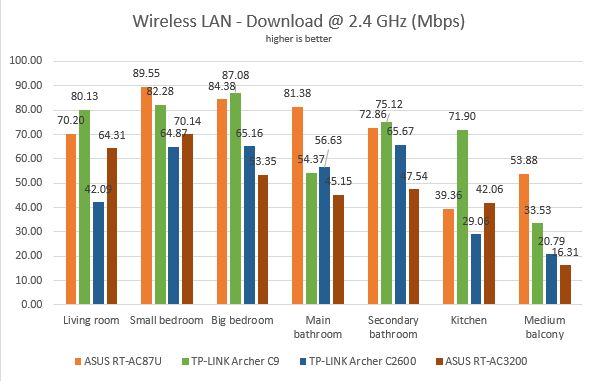
Again, the same picture was noticed when looking at the upload speed over the 2.4 GHz wireless network.
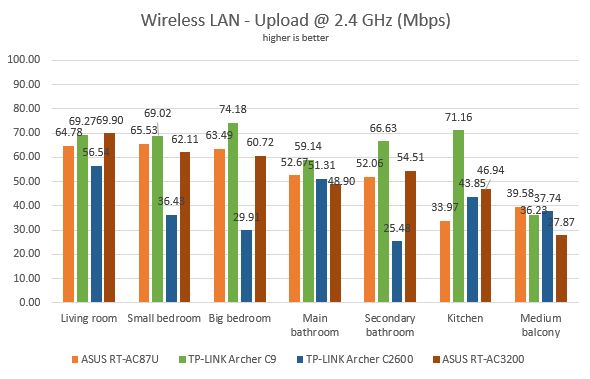
TP-LINK Archer AC2600 offers stable and fast 2.4 GHz wireless networks. However, it's more affordable brother - TP-LINK Archer C9 - is slightly better in this regard.
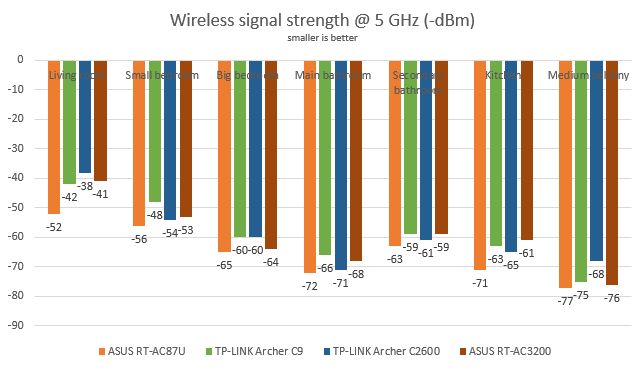
Next, we analyzed the performance offered by the 5GHz wireless network. First, we looked at the evolution of the signal strength, from room to room. As you can see below, TP-LINK Archer AC2600 was a solid performer but it did not manage to stand out in any way. It's performance was similar to that of other routers.
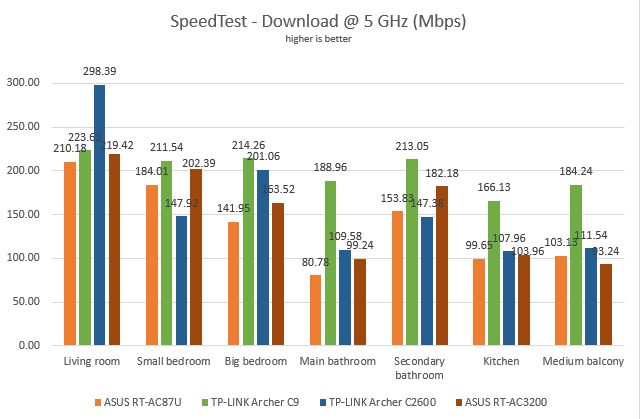
Next, we used SpeedTest to measure the speed of the Internet connection on the 5GHz wireless network. In the download speed measurement, TP-LINK Archer AC2600 was the fastest router only in the room where the router is placed. In other rooms, TP-LINK Archer C9 managed to beat it.
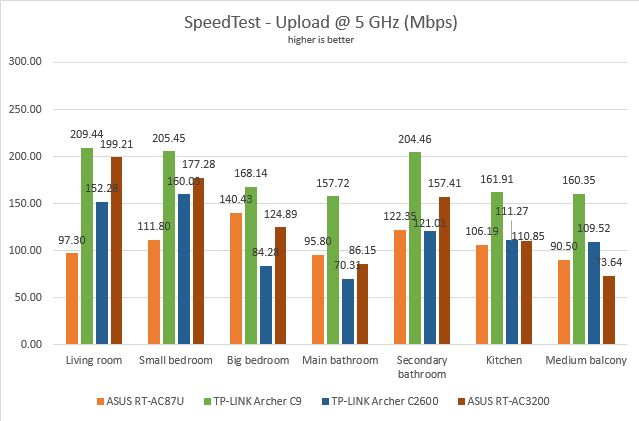
When looking at the upload speed, TP-LINK Archer C9 managed to beat TP-LINK Archer AC2600 in an even more dramatic fashion.
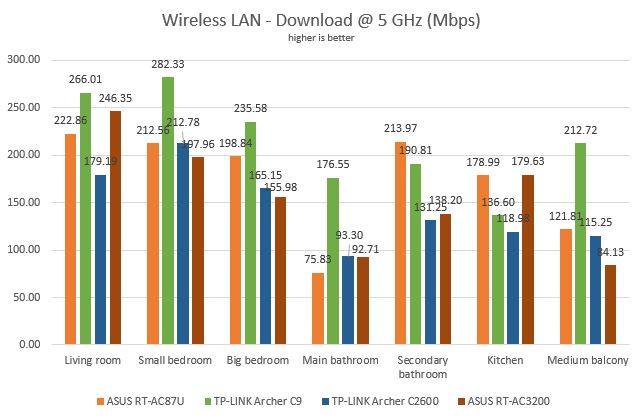
Lastly, we used LAN Speed Test Lite to measure downloads and uploads when transferring a 350MB file between two computers connected to the network. When measuring the download speed, TP-LINK Archer AC2600 was outperformed both by TP-LINK Archer C9 and ASUS RT-AC87U.
When measuring the upload speed, TP-LINK Archer AC2600 was the slowest of the bunch.
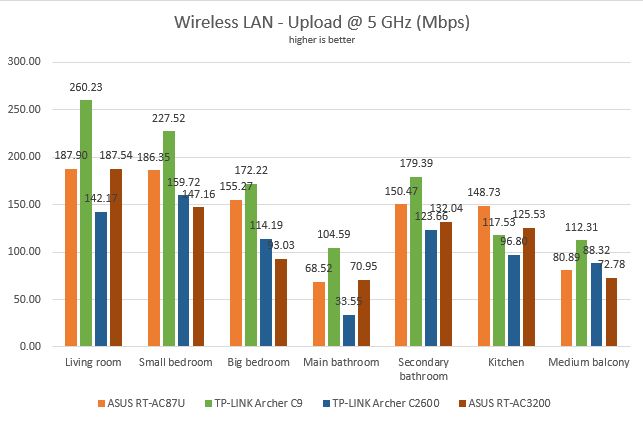
TP-LINK Archer AC2600 is capable of delivering fast 5GHz wireless connections. However, it's competitors are slightly better, including its more affordable brother, TP-LINK Archer C9.
Wired network performance
In order to test the quality of the wired Ethernet connection, we used a desktop PC, equipped with an Intel Core i5 4460 processor, running at 3.20GHz, 16GB of RAM and a very fast Samsung 850 Pro 512GB SSD and a Microsoft Surface Pro 3 with an Intel Core i5-4300U processor, running at 1.9 GHz, 8 GB of RAM and a fast 256 GB SSD drive from Samsung.
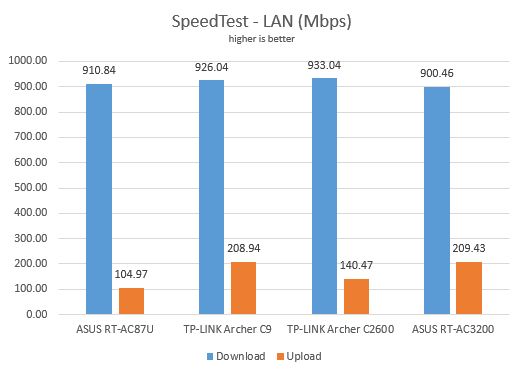
First, we measured the download and upload speeds using SpeedTest. As you can see below, TP-LINK Archer AC2600 managed to beat the other routers in terms of download speed. However, it was behind ASUS RT-AC3200 and TP-LINK Archer C9 in terms of upload speed.
For the last measurement, we transferred an 883 MB file between the same two computers connected to the network, both of which were using an Ethernet cable. Here, TP-LINK Archer AC2600 was faster than TP-LINK Archer C9 but not faster than the ASUS routers we used for comparison.
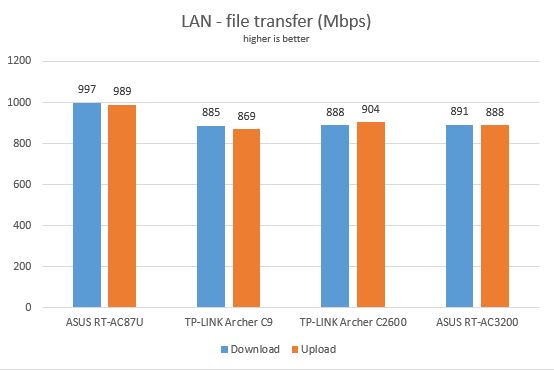
Looking at our measurements, it is very clear that TP-LINK Archer AC2600 is capable of delivering true 1 Gbps Ethernet connections.
Extra features
Being a premium wireless router, TP-LINK Archer AC2600 offers quite a few extra features:
- Guest network - you can enable up to two guest networks, one for each band that is broadcast by the router. You can set each guest network to allow guests to see each other or to access the local network. However, we advise against it. Guests should not be allowed to access your network, for increased security and privacy.
- QoS - a standard Quality of Service service that helps prioritize Internet traffic based on your needs and rules.
- USB applications - which allow you to connect USB storage devices like an external hard disk or a printer and share them with the network.
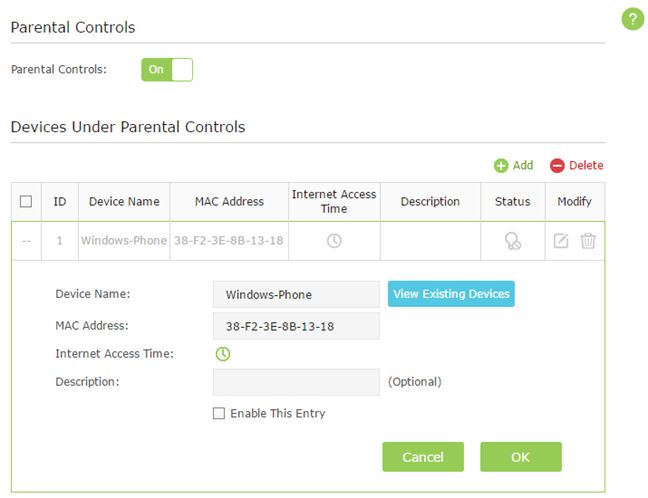
- Parental Controls - this module allows you to control the Internet access of devices on your network as well as block access to certain websites.
- Dynamic DNS - allows you to assign a fixed host and domain name to a dynamic IP address. TP-LINK Archer AC2600 can work with the No-IP and DynDNS service providers.
- Night mode - allows you to set a schedule for when the LEDs on the top side of the router are turned On and Off.
- TP-LINK Tether App – an Android and iOS app that allows you to manage the router from your smartphone. Unfortunately, there is no version for Windows Phone.
TP-LINK Archer AC2600 offers quite a few extra features that are useful to its users. However, there's one miss that might be important to some users: the router doesn't offer a VPN server feature.
Verdict
TP-LINK Archer C2600 AC2600 is a good wireless router that offers solid signal strength, good wireless coverage, and reasonably fast wireless networks. However, from a performance perspective, it doesn't stand a chance to TP-LINK Archer C9. In our measurements, it was easily outperformed by its more affordable brother, which remains one of the best performers that we have tested so far. On the plus side, when compared to its predecessor, TP-LINK Archer AC2600 offers a more stylish look, more extra features that may be useful to you and a system for mounting it on walls.
Discussion (0)
Be the first to comment.