After acquiring the Motorola brand from Google, Lenovo has been struggling to maintain its share in the mobile handsets market. Even with the two brands mostly aimed at different markets (Motorola for the US and Latin America and Lenovo for Asia and emerging markets), the Chinese manufacturer has decreased its sales substantially, especially in its home country. Surprisingly, it's not the quality of its products that is at fault, but rather the marketing decisions.
The current flagship of the Lenovo brand, the Lenovo X3 Vibe, is the perfect example for this argument: with its 5.5 inch screen, a hexa-core processor and a 21 MP camera, it's a beautiful handset with solid performance and a good price point. However, compared to the competition, it has a clear disadvantage in terms of advertising and reach. In this review, let's take a closer look at the Lenovo X3 Vibe and learn whether its level of performance is up to flagship standards:
Packaging, design and build quality of the Lenovo X3 Vibe
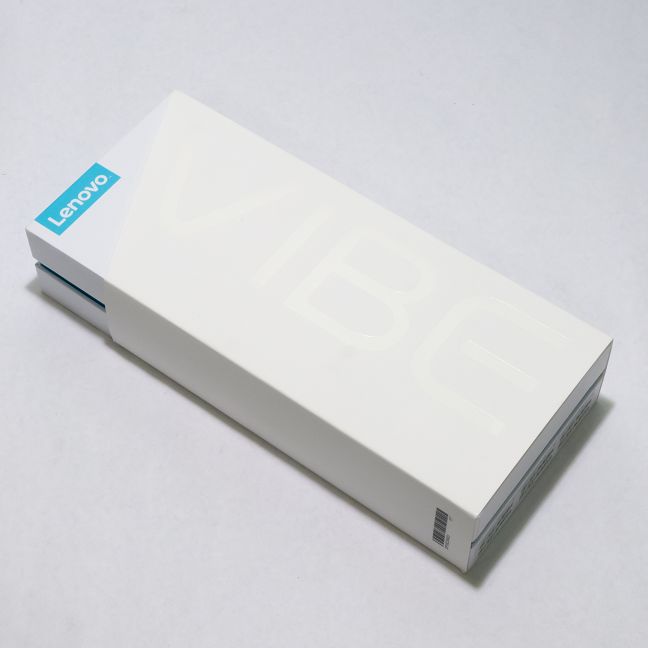
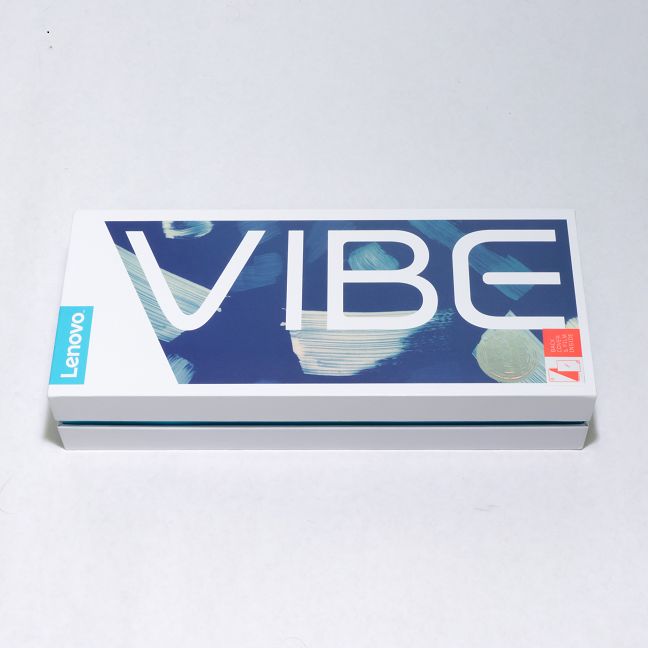
At first, the white box isn't that eye-catching, with only the brand name and the Vibe name imprinted on the top...
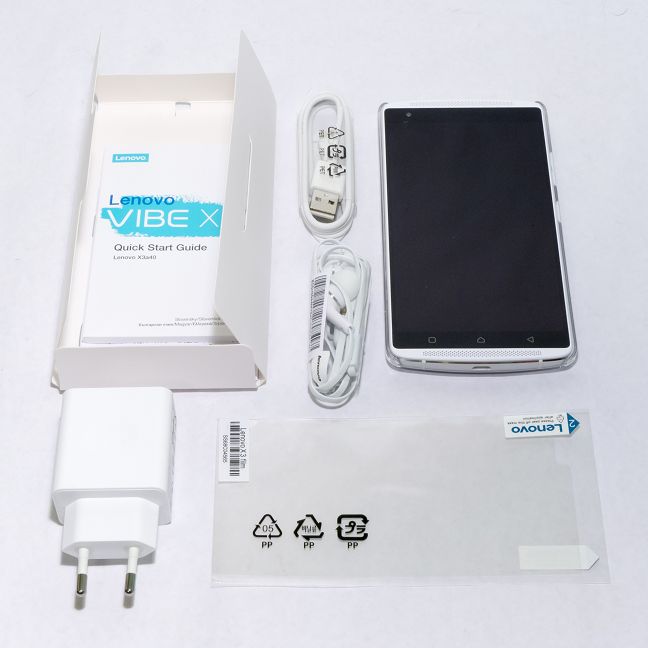
… but once you start unpacking you can clearly see it's premium packaging. The sturdy white box opens smoothly and the whole presentation is refreshingly nice compared to other smartphones we reviewed.
Inside, you will find the smartphone and the usual accessories: the charger (rated at 2A), the USB cable, the earphones and the manual, which is packaged in a smaller box which also contains the SIM tray removal tool. You also get some bonus accessories: a see-through back cover and a screen protector. Depending on your location, you might not easily find third-party solutions for protecting your Lenovo X3 Vibe, so the addition of the two items is welcome.
The smartphone only comes in white, a color which suits it just fine. For those of you who wish to put it in their front pocket, the Lenovo X3 Vibe is not a device for you. It measures 6.06 inches in length, 3.01 inches in width and is 0.37 inches thick. That's 154 x 76.5 x 9.3 mm in metric units. It's also quite heavy as it weighs 6.2 ounces (175 grams).
The aluminium unibody and the large 5.5 inch screen adds even more "premium" to the already gorgeous looks. You should also note that the screen is protected by Corning Gorilla Glass 3.
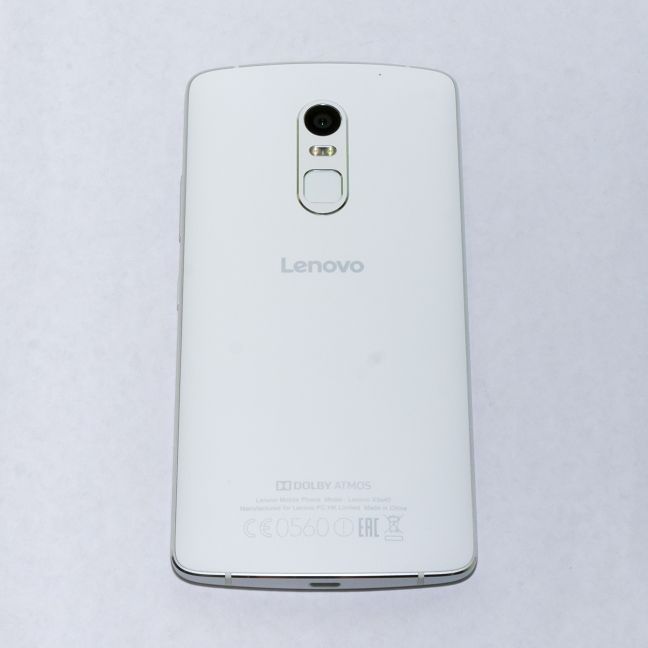
The materials used and the shapes feel and look very good, reminiscent of the HTC unibody design: aluminium frame, synthetic resin on the rounded back, if there wasn't a "Lenovo" inscription on the back you might think you're looking at a member of the HTC One series.
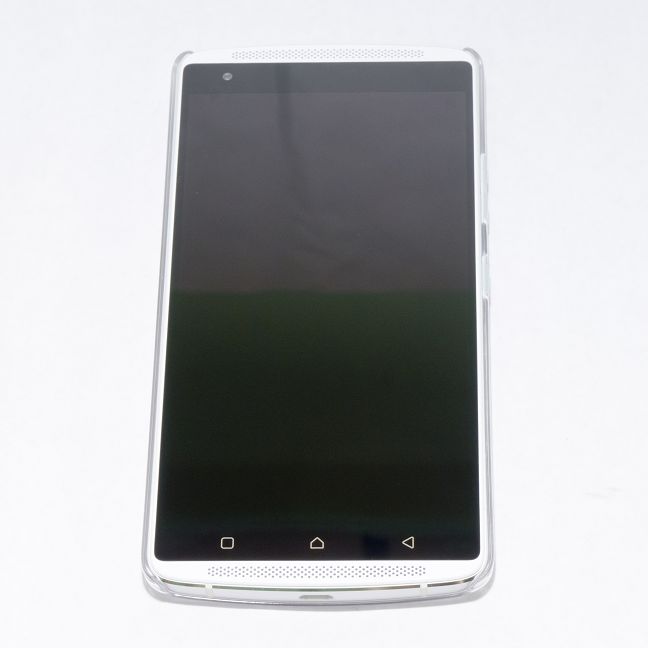
The front of the Lenovo X3 Vibe is highly symmetric, with speakers both on top and on the bottom. The only way to know when it's upright and when it's not, looking just at the front of the phone, is by locating the capacitive buttons (which sadly don't have backlighting) or the front-facing camera, the only two features that are visible on the front.
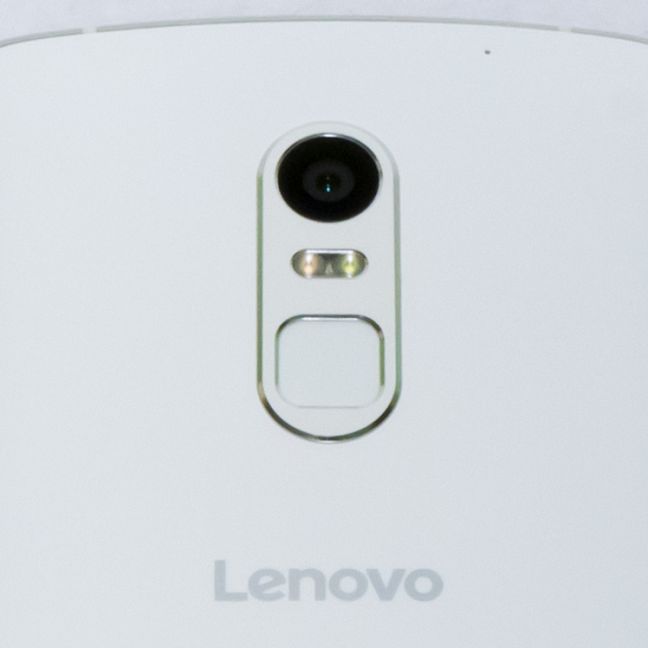
While this is simple enough during daytime, in poor lighting you'll need to find clues on the back or on the sides in order to tell the orientation of the smartphone. It's not that much of a problem, though, since once you grab the phone, you will feel the position of the fingerprint reader on the back. The reader, along with the 21 MP PDAF (Phase Detect Autofocus) camera and the dual-color LED flash protrude slightly from the rounded back of the Lenovo X3 Vibe. On the upper section of the back you will find one of the two noise suppression microphones.
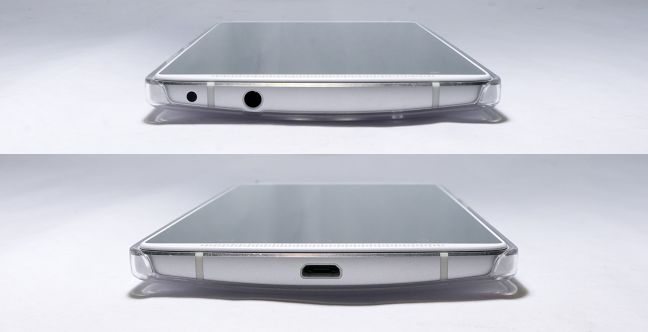
On the top of the Lenovo X3 Vibe you will find the earphone jack and the infrared emitter, while the bottom of the phone only houses the USB port. We put the protective cover on the smartphone for the two pictures below in order to give you an idea of the total size and looks of the phone with the cover on.
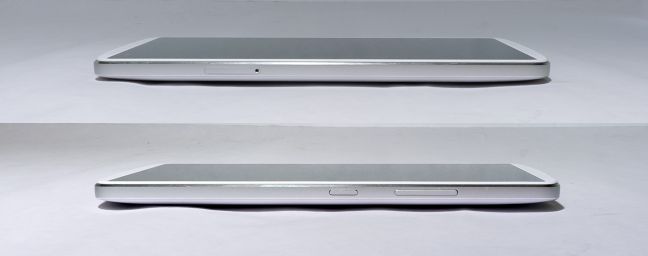
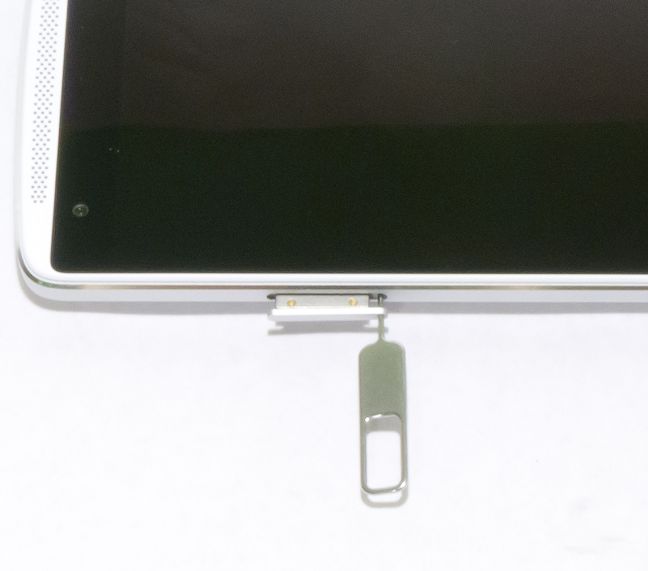
The left side of the phone houses the SIM tray, while on the right side you will find the power button and the volume rocker. The feedback from the buttons is good and their height is just right.
The SIM tray accepts either two SIMs or a SIM and a MicroSD card. While this might be a problem for more demanding users who need both two SIMs and plenty of space, the Lenovo X3 Vibe comes with 32GB of internal memory, enough for most usage situations.
The package of the Lenovo X3 Vibe looks and feels premium, and the bonus contents of the package are surely welcome. The smartphone, although large and heavy, is extremely well built and apart from the lack of backlighting for the capacitive buttons, we liked the design choices of the Lenovo team.
Hardware specifications of the Lenovo X3 Vibe
The specs of the Lenovo X3 Vibe are very encouraging. Although not the top performer in terms of raw processing power, the 64-bit Qualcomm Snapdragon 808 hexa-core processor (with two cores running at a frequency of 1.8 GHz and the other four at 1.2 GHz) is a powerful chip and a good choice for a flagship, coupled with 3GB of RAM memory. The Adreno 418 graphics processor follows suit, with good performance in 3D applications. And it would be a shame if the graphics performance didn't match the screen, since the 5.5 inch, Full HD (1920 x 1080 pixels) IPS LCD screen used on the Lenovo X3 Vibe is absolutely gorgeous. With a pixel density of ~401 pixels per inch, a viewing angle of 178 degrees and a contrast ratio of 1500:1, the screen is one of the best ve'we seen. The brightness is powerful to the point where it can be used as a flash for taking selfies (and this is actually the case, since the Lenovo X3 Vibe has a feature that allows the screen to be used as a flash). The colours are a bit saturated, but that's not necessarily a bad thing, if it's not overdone (AMOLED Samsung phones, we're looking at you).
The internal storage is 32GB and we get support for MicroSD cards of up to 128 GB. Inserting a MicroSD card will not allow you to use the dual SIM feature, but as we stated before, if you really need to use two SIM cards, the 32 GB internal storage should be enough for most users.
The camera has a 21MP Sony IMX230 sensor with phase detection autofocus. It has a 6 piece f/2.0 aperture 27mm composite lens and allows 4K Ultra HD video recording. The dual-LED, dual color flash is powerful and can help produce more accurate colors on night shots. The phase detection autofocus promises faster autofocus times and smoother focus. Rather surprisingly, the camera lacks optical stabilization, a must-have for this price point in our opinion. The secondary camera is an 8MP fixed focus unit.
The Lenovo X3 Vibe is LTE CAT6 capable, with theoretical speeds of up to 300 Mbps for download and 50 Mbps for upload. Other connectivity options include NFC, 802.11 a/b/g/n/ac Wi-Fi, Bluetooth 4.1, GPS, FM radio and an infrared emitter. Quite a complete range of connection options, indeed. The smartphone has a fingerprint sensor, as well as a compass and a gyro.
Lenovo X3 Vibe features two front-facing 1.5 W speakers which use the Dolby Atmos technology to deliver immersive sounds. When you connect a headset, the smartphone uses the proprietary amplifier unit, together with a high-grade digital-analog converter and a Wolfson WM8281 audio codec to further enhance the sound experience. Furthermore, three microphones are used to suppress the environmental noises when talking in noisy environments.
The battery has a capacity of 3500mAh, which is pretty good even considering the size of the screen. Depending on the market, it also has quick-charging capability. You can find additional information on the Lenovo X3 Vibe by visiting the product page.
The specs are really good, but before we get to testing the actual levels of performance, let's have a quick look at the software found on the Lenovo X3 Vibe.
The software and the user interface of the Lenovo X3 Vibe
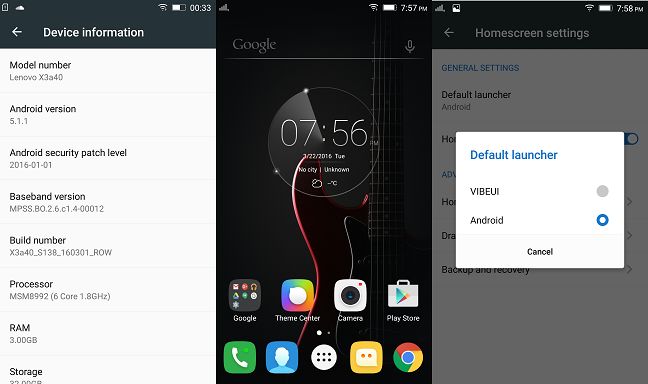
The Lenovo X3 Vibe comes with the Android 5.1 (Lollipop) operating system, with a custom user Lenovo interface, called VIBEUI. The interface looks very similar to the stock Android Launcher, and that's not necessarily a bad thing: coming from another Android smartphone, you are instantly "at home" when using the Lenovo X3 Vibe. If you don't like the custom launcher, you also have the option to switch between the stock Android launcher and the VIBEUI.
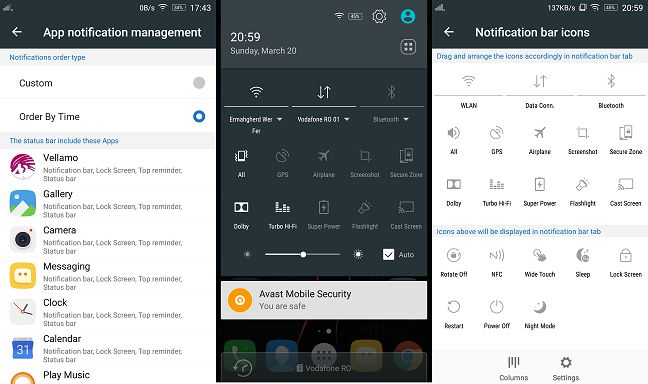
Out of the box, the available storage space is roughly 23 GB, a good value if you cannot install a MicroSD. The user has access to advanced notification options, from the way the shortcuts are arranged in the notification tray to the individual notification permissions for each app.
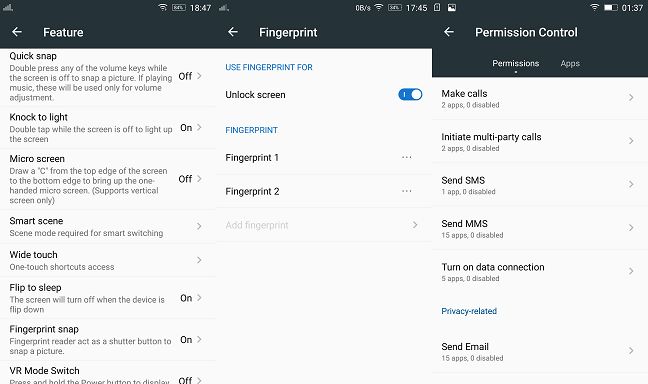
Also, the user can customize gesture control, app permissions and can register two fingerprints which can be used to unlock the smartphone or take pictures.
A useful feature for those who need to protect their battery or need to be "off the grid" for a while is the scheduled on/off setting, which powers down the device and turns it on at set times.
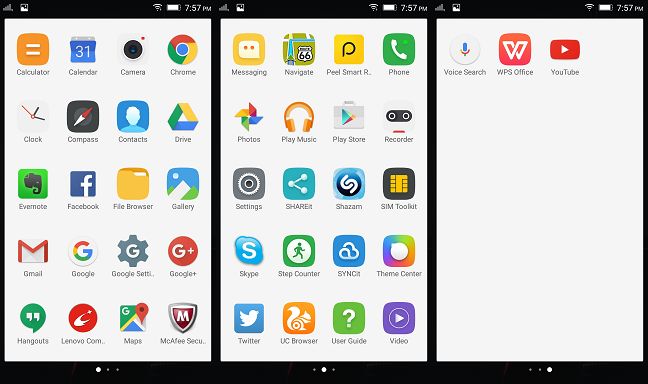
We were pleasantly surprised by the software bundled with the Lenovo X3 Vibe, or the lack thereof. In times when other manufacturers throw in loads of mostly useless apps on their handheld devices, Lenovo has chosen to have just the basic tools installed on the X3 Vibe.
A total of 43 apps are installed, and this includes the system apps and the Google suite of apps. The additional apps installed are:
Calculator, Calendar - the usual applications, but with customized looks
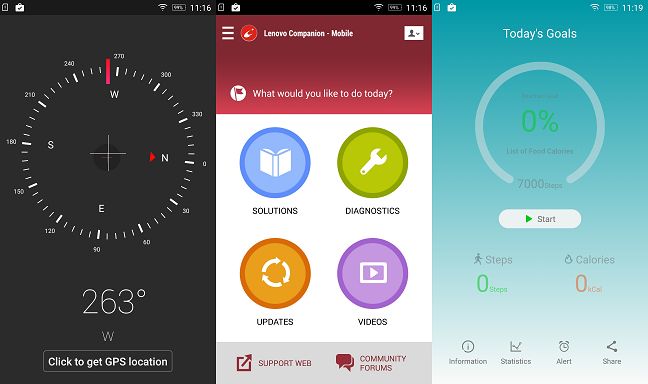
Compass - You never know when you might get lost at sea 🙂
Evernote -The popular note-taking service
File Browser - efficiently manages the files and folders on the device
Facebook - the daily social drug 🙂
Lenovo Companion - for troubleshooting and updating your Lenovo X3 Vibe
McAfee Security - Your very average antivirus. It's definitely average if you ask us
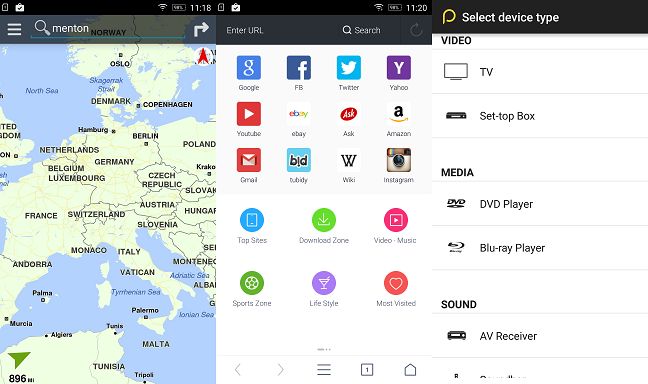
Navigate - an alternative to using Google Maps for navigation
Peel Smart Remote - a clever remote control app which can interact with a large number of appliances, including air conditioning units, TVs and HiFi systems
SHAREitwith SYNCit - a free file sharing application
Shazam - the popular app for identifying songs
Step Counter - a fitness application which can count how many steps you take every day, as well as set goals and display other info
Twitter - the Instagram for words 🙂
UC Browser - an alternative to the Chrome web browser
WPS Office - an excellent application suite for viewing and editing office documents
Yes, that's all. There are no useless system apps which can't be uninstalled and looking at what some other manufacturers are doing, we are really happy that Lenovo decided to let users decide what apps to have on their device.
We did not find any bugs or issues with the installed apps. The Gallery application is easy to use, as are the other system tools. We played around with the Peel Smart Remote , and after rigorous testing we decided that it's really fun to change the channel on your unsuspecting friend's TV with your mobile phone.
The user interface of the Lenovo X3 Vibe is clean and efficient. It is bug-free and so are the bundled applications. The handset has very few installed applications and almost all of them are useful, with few exceptions.
Turn to the next page of this test to see the performance level of the Lenovo X3 Vibe and the results it obtained in real-life usage scenarios.
Benchmark performance of the Lenovo X3 Vibe
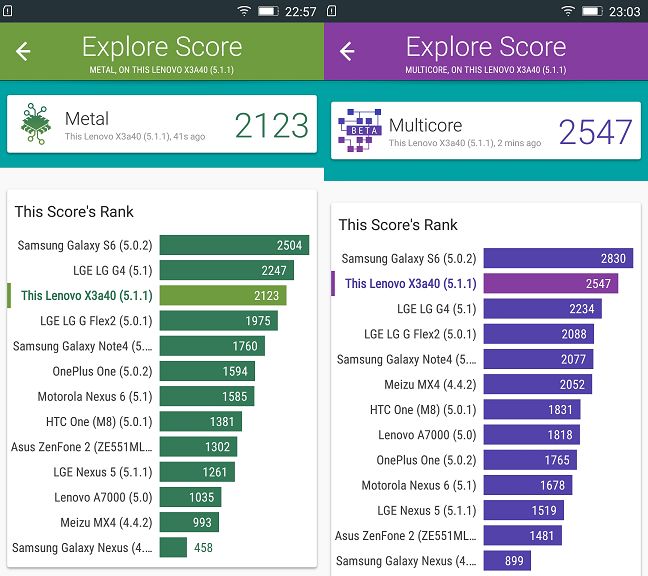
The Lenovo X3 Vibe has the second-best Snapdragon chipset, so the expectations are quite high. We start off with the Vellamo suite and its Metal and Multicore tests. Metal tests the single-core performance, while Multicore puts all six cores through their paces.
While the Metal test result of 2123 offers no surprise, with the Lenovo X3 Vibe being just below the LG G4 (which has the same chipset, but with the cores running at higher frequencies), the Multicore test offered the first pleasant surprise: with 2547 points, the Lenovo X3 Vibe was 14% better than the LG G4 and only 10% slower than the higher specced Samsung Galaxy S6. It's an excellent result from the Snapdragon 808 chipset, nearing its more powerful sibling, the Snapdragon 810.
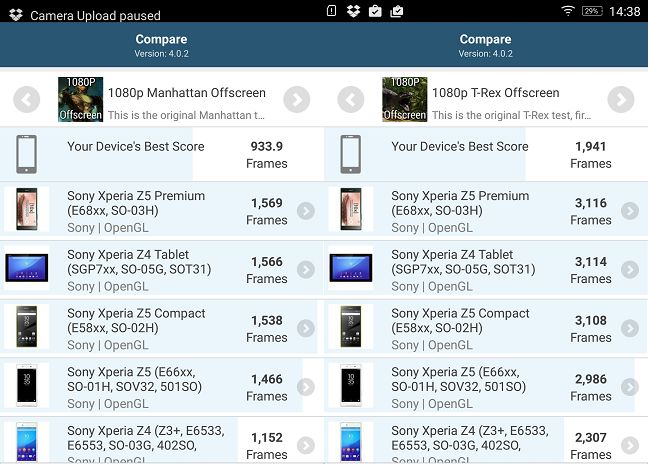
Next, we tested the graphics subsystem using the GFX Bench GL Benchmark suite. The Lenovo X3 Vibe obtained solid results in all the tests, thanks to the Adreno 418 graphics processor. Both Manhattan Offscreen (934 frames) and T-Rex Offscreen (1941 frames) test results are similar with the LG G4, and a bit below the Samsung S6, so no surprises this time.
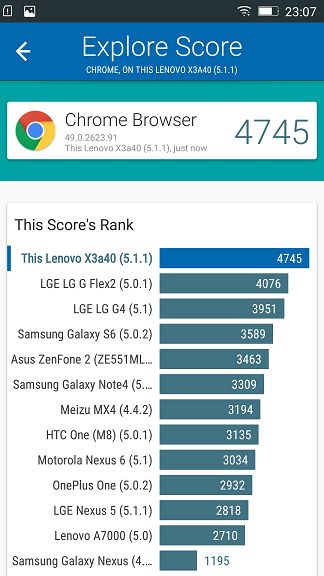
We come back to the Vellamo suite for the Browser test, which we ran for the Chrome browser in order to evaluate the browsing experience. The result was excellent: the Lenovo X3 Vibe managed a score of 4745, significantly better than the LG G4.
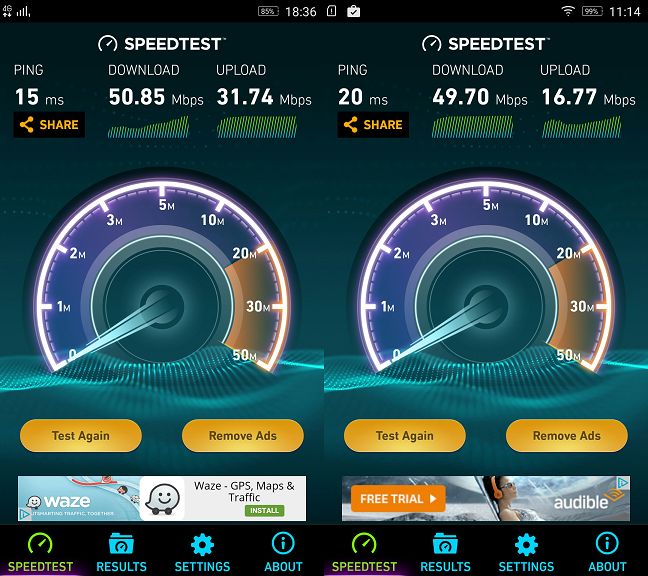
The next test is a rather imprecise one, since it depends on the strength of the signal and various other settings. Nevertheless, here are the results obtained by the Lenovo X3 Vibe the Speedtest.net by Ookla , both on the 4G (LTE) network (left) and using WiFi (right). The numbers give you a good idea on what to expect on your average usage situation. The 4G speeds may easily be higher, depending on the technology and bandwidth limits provided by your network operator, since the device is LTE CAT6 capable, supporting up to 300 Mbps download rates. Similarly, since the device supports the 802.11 ac standard, the WiFi speed can be substantially higher.
Finally, we ran the Work battery life test from PCMark to see how much juice the battery can provide. The result was again a pleasant surprise, the Lenovo X3 Vibe managing a solid 9 hours and 55 minutes, with an average score of 4209 points. It's still nowhere near the amazing result of the ASUS Zenfone Max , but it's well above the average for a smartphone this size and with this level of performance.
The benchmarks show a good performance level for the Lenovo X3 Vibe. The raw performance is one step lower than the current top performers, but the results are very respectable and sometimes even surprising, considering the hardware. The good web browsing results show that Lenovo has invested a lot of effort into ensuring a good level of integration of the hardware and software components.
The smartphone experience on the Lenovo X3 Vibe
Between the good first impression and the the excellent benchmark results, we had high expectations from the Lenovo flagship and, well, the expectations were fully met. Although this smartphone is very large, it doesn't feel and look bulky, thanks to its rounded back and clean design. One-hand operation is a difficult task for people with average-sized hands, but users who buy this device know what to expect from a smartphone with a 5.5 inch screen.
Telephony is very good: the noise suppression system works really well in noisy environments and the earpiece is sufficiently loud. We had no reception issues.
The screen is beautiful, with rich colors and extreme viewing angles. The blacks are not perfect, but the sharpness and the brightness are excellent. When you combine the excellent screen with the Dolby Atmos front-facing speakers, you get a really enjoyable device for watching video, a quality which isn't usually on the list for a mobile phone. The Dolby feature really works and gives depth to the sound. Once we activated it we never turned it back off, since the quality of the experience is so much better. The speakers are seriously loud, although a bit more bass would have made them perfect.
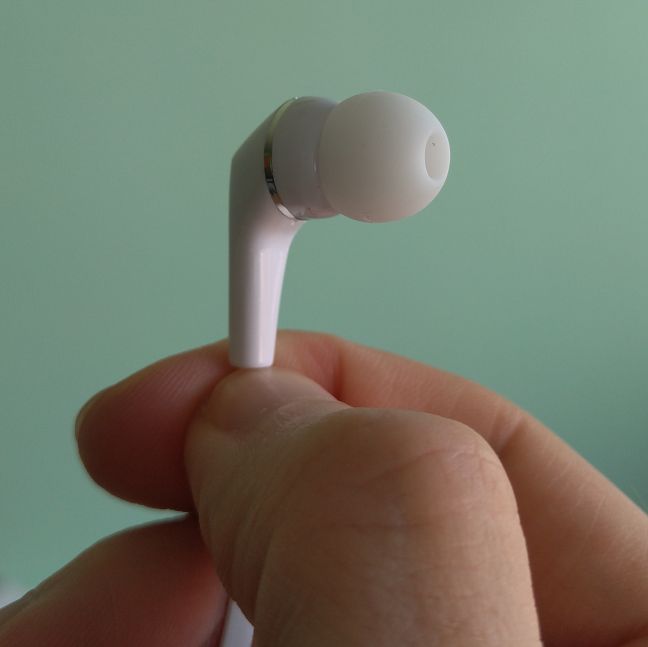
Using headphones or externally amplified sound sets, the quality of the output is beyond reproach. The difference between the two settings, HiFi and Turbo HiFi can only be discerned using high-end headsets or speakers, but really, the HiFi setting is already close to perfect. Not that you would notice it using the included earphones, which are mediocre at best.
We never encountered any slowdowns, even when using multiple apps at once. When used for 3D games, the smartphone doesn't get hot.
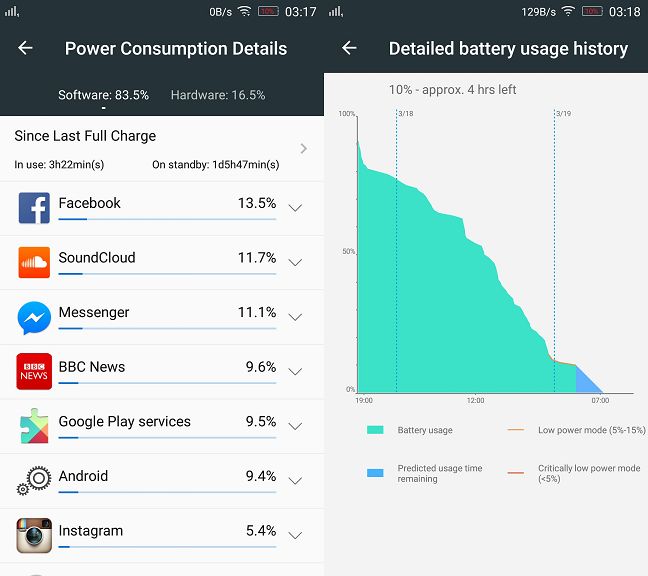
The battery lasted more than 24 hours with average usage. You should expect to easily get a full day of use from the Lenovo X3 Vibe. It has a power saving mode which can be activated at a set threshold.
We really tried hard to find issues with the Lenovo X3 Vibe in normal usage, but the only complaints were regarding the materials used, and not the performance of the device. First of all, we think that the inclusion of a protection cover is not only a marketing gimmick. The machined aluminium frame is very soft and even with careful usage you can easily dent it. Second, the cover itself is pretty frail. The problem is not that it's not rigid, it's quite the opposite: the fact that it's too rigid makes it hard to remove (which is mandatory if you want to insert a SIM or a MicroSD card) and brittle. A more flexible cover would eliminate these issues.
In conclusion, the smartphone experience on the Lenovo X3 Vibe is excellent and there isn't much more we could ask from a device at this price point. It has good looks, an excellent screen, powerful sound and a decent battery life.
The camera experience on the Lenovo X3 Vibe
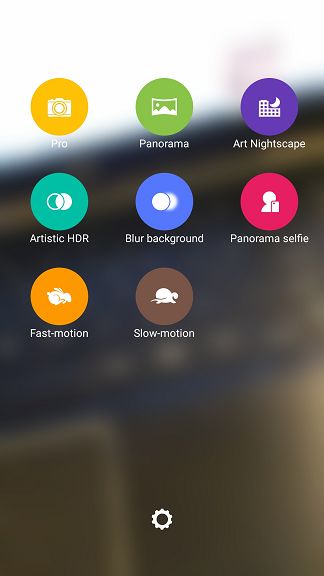
The camera interface is simple and straightforward. You have the option to take a picture, record a video or use one of the eight presets:
Pro, which allows the user to adjust settings like ISO and aperture
Panorama, which stitches multiple photos
Art Nightscape, which uses high sensitivity
Artistic HDR, which can improve the dynamic range or create crazy-coloured pictures, depending on the settings selected
Blur background, which uses the largest aperture setting for a very narrow area of focus
Panorama selfie, useful for a group selfie
Fast-motion video recording
Slow-motion video recording
The more advanced settings are not easily accessible, but we doubt many of the users will want to fiddle with the settings too much.
The 21 MP main camera uses a phase detection autofocus, and what this means in laymen's terms is that the camera focuses the image quicker and spends less time out of focus, even when moving from a close subject to a far away one. The feature is easily apparent in good lighting, when the camera focuses much faster than your average phone camera.
At this point we found what we think is the most important (and one of the few) disadvantages of the Lenovo X3 Vibe. The camera has no optical image stabilization, a must-have feature for a smartphone at this price level. There is a software image stabilization, but it's not nearly as efficient as the optical one. That being said, the images obtained in good lighting are good, with nice colors and good sharpness.
We tested the dynamic range by taking pictures which included both shaded and well lit areas and we found that the camera usually overexposes the well-lit areas. We say "usually", because the settings were somewhat inconsistent.
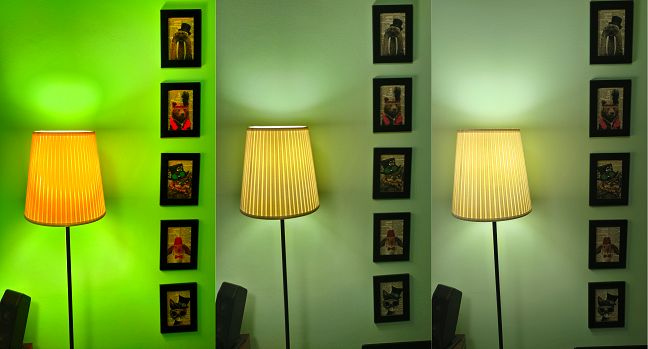
The HDR works reasonably well, but distorts colors, depending on the settings used (Automobile, City, Portrait or Still Life). Below you can see the results of Automobile, Portrait and Still Life.
In low light, the quality of the photos deteriorates rapidly, but this is no surprise for a smartphone camera. The images are still usable, but the autofocus is much slower and the motion blur is omnipresent. Night shots are not advised on the Lenovo X3 Vibe, since the images are either blurry or lacking detail.
Macro shots are pretty good, although the camera won't focus closer than 4 inches (10 cm) from the subject. We found the same inconsistency in camera settings from one shot to the next, maybe due to a software bug. Below you can see two macro shots taken in quick succession.
The dual-LED, dual-color flash does a good job, fills the scene nicely and the colors remain relatively accurate thanks to the two color tones used.
The 8 MP front facing camera has a fixed focus and is only good for selfies. It struggles under low light but takes decent photos under the right conditions. You also have the option to "beautify" your selfies, a setting which in essence decreases the sharpness and smoothens skin features.
The camera can be controlled by using the fingerprint reader. Since the reader is situated on the back of the device, it is ideally placed for taking selfies. You can also take a picture by waving at the camera or making a "V" sign with your hand. The camera doesn't always sense the gestures, though, and you might look a bit… weird trying to make the camera take a photo using this method.
The videos made with the Lenovo X3 Vibe have a good quality, with good detail and nice colors. Although the autofocus is fast, unfortunately the lack of an optical image stabilization system becomes obvious while filming. Below you have two 1080p videos of the same scene (including static and fast moving objects). The first one is without software stabilization.
The second one is with the stabilization turned on.
The results are mediocre. Basically what the software stabilization does is use a crop of the image from the sensor, trying (most of the time unsuccessfully) to stabilize the image. When filming static scenes, it works, but when you start panning the camera, it fails miserably. The bitrate of the videos is pretty high at 20.6 Mbps and the frame rate is relatively constant around the 30 frames per second mark. The ability to shoot 4K videos is a nice bonus, although 4K screens are not yet common.
As usual, you can take a look at the pictures we made with the Lenovo X3 Vibe. Expand the album below to view them.
Overall, the camera experience was not on the same level as the rest of the smartphone. The lack of optical stabilization and the inconsistencies between pictures overshadow the simple interface and the quality of the pictures in good lighting conditions.
Pros and cons of the Lenovo Vibe X3
Summarizing our findings, we liked the following:
Elegant design and good choice of colors and textures
Excellent screen
Excellent sound output both from the speakers and the headphone jack
Good performance, especially when browsing the Web
No bloatware
However, there were also some things that we didn't like:
This smartphone is rather heavy
It has capacitive buttons without backlighting
The camera doesn't offer optical image stabilization
Product rating4/5
Verdict
The Lenovo X3 Vibe is an excellent smartphone, with good looks, offers good performance, an excellent screen and a powerful sound system. It's one step behind the current flagship standard but there's plenty of performance under the hood while the battery can last you a bit more than a day. Under the right conditions, both cameras perform well. Apart from the lack of optical image stabilization, the Lenovo X3 Vibe doesn't have any significant weakness. We recommend this smartphone to users who want good performance and excellent multimedia capabilities at a reasonable price. Users who want a lightweight device should look elsewhere.




















Discussion (0)
Comments are closed.