



We are about to review one of the most modest devices we have ever tested: the Edimax BR-6428nS V3 wireless router. The only thing that makes this router stand out is its price: at a price point that's generally below 50 USD, it's hard to find routers that are less expensive than this and which work well. We just received it for testing and we took it for a spin. If you are curious to learn what you get from one of the world's lowest priced routers, read this review:
Unboxing The Edimax BR-6428nS V3 Wireless Router
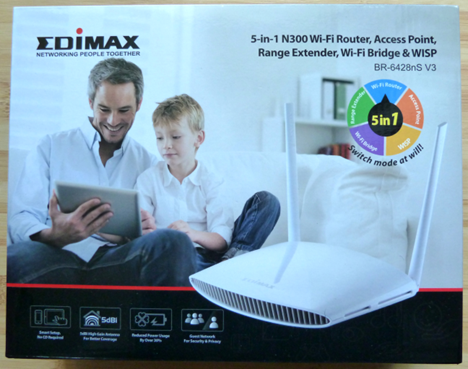
The packaging used for the Edimax BR-6428nS V3 wireless router is similar to that of other Edimax devices. On the front of the box you can see a picture of the device, as well as some of its specifications.
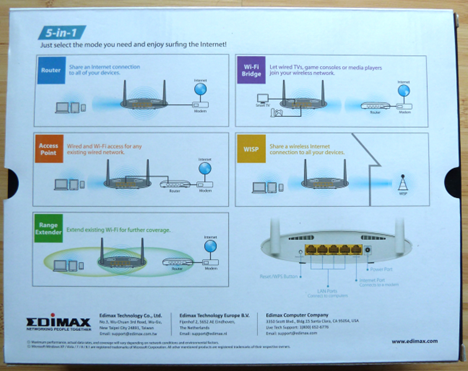
On the back side of the package you learn that this device can be set to run as a router, access point, range extender, Wi-Fi Bridge and wireless Internet service provider (WISP).
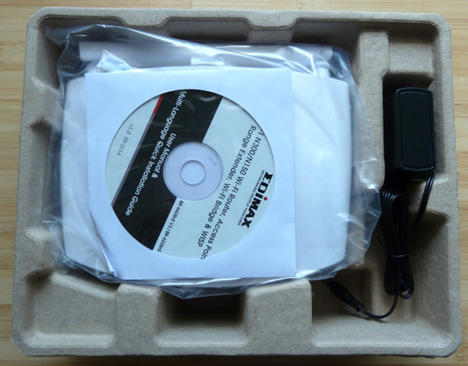
Once you open it, you get to see some of the contents of this package.
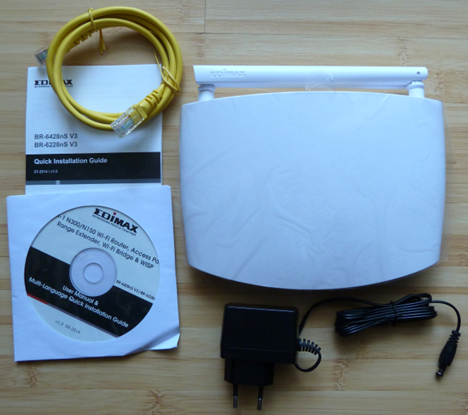
After you unpack everything, you should find the following items: the router, the Quick Installation Guide, a CD with the setup wizard, the Quick Installation Guide and the User Manual in 15 languages, the power adapter and an Ethernet cable.
Now that we've gotten the unboxing out of the way, let's see what this affordable wireless router offers in terms of specifications.
Hardware Specifications
Since this is a very affordable router, it doesn't impress anyone in terms of specifications. Edimax BR-6428nS V3 is a single-band wireless router that only works using the 2.4 GHz frequency. The wireless signal is broadcast using its two external antennas, which are easy to set in any position you want.
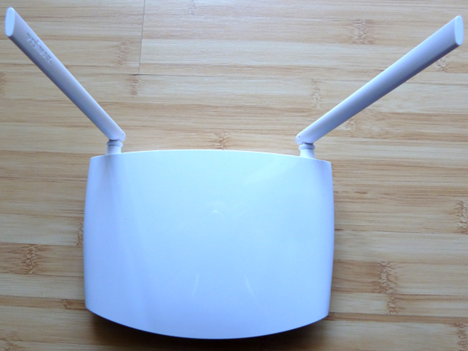
One aspect that is not very clear from its official specifications is that the router only works using the 802.11 b+g+n standards simultaneously. This means that it is compatible with a large range of wireless devices, including older ones, but you can't set it to use only the 802.11n standard, for example. This automatically translates into lower speeds.
In terms of hardware, Edimax BR-6428nS V3 has 4 MB of storage space and 32 MB of RAM. No information is provided about the processor powering it but we assume it's a low-voltage single core processor.
The router is not exactly big. It has a size of 190mm x 162mm x 42mm or 7.4 x 6.3 x 1.65 inches and it weighs only 245 grams or 0.5 pounds.
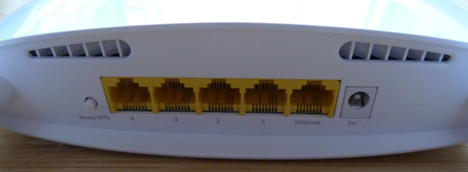
On the back of the device you will find a button for resetting the router and turning on WPS, four fast Ethernet LAN ports and one fast Ethernet WAN port. The word "fast" is a bit misleading in our view, as this router offers only 100 Mbps wired connections, not 1 Gbps connections like more expensive routers.
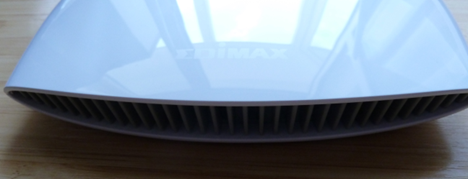
On the front of the device you see the Edimax logo and several ventilation vents. In the middle there are a couple of blue LEDs signaling whether the device is turned on, whether the wireless network works, whether the Internet connection works and whether WPS is turned on or not.
You can find the complete list of official specifications here: BR-6428nS V3 specifications.
Setting Up & Using The Edimax BR-6428nS V3 Wireless Router
Edimax BR-6428nS V3 is relatively easy to set up. Once you connect it to the Internet and to one of your computers, you can run the setup wizard in your favorite web browser. The user interface is available in 15 languages, which you can see in the screenshot below. The only downside is that it includes a few typos, at least when using English as your language.
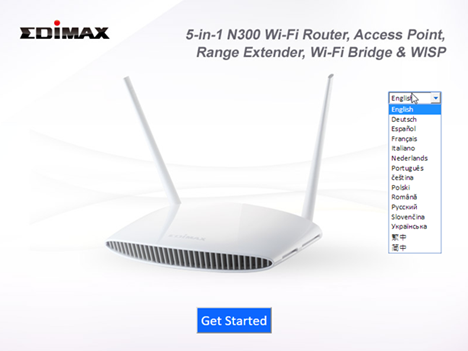
The setup wizard detects your Internet connection type and then asks for the appropriate connection details. Then, you get to configure your wireless network. At the end, you get a summary of your settings.
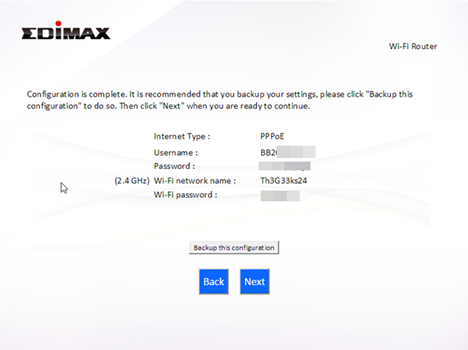
Unfortunately, Edimax is not proactive about recommending that users change the default username and password (admin/1234). Therefore we highly recommend that you change the default password, as soon as you get your network up and running, to make sure that unwanted people stay away from your router and the way it is configured.
The user interface offered by Edimax is quite spartan and it doesn't include many configuration options. However, it's relatively well organized and you won't have issues in finding your way.
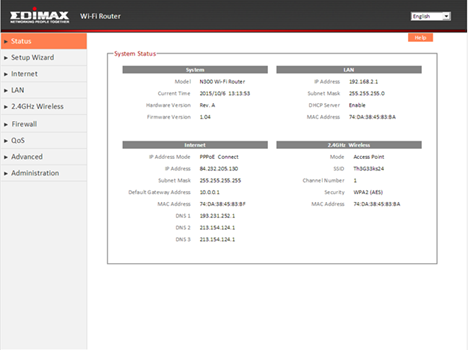
One downside that we identified is that the Help system available in the configuration menus doesn't explain much. Less knowledgeable users will have to consult the user manual if they don't understand what certain settings mean and do.
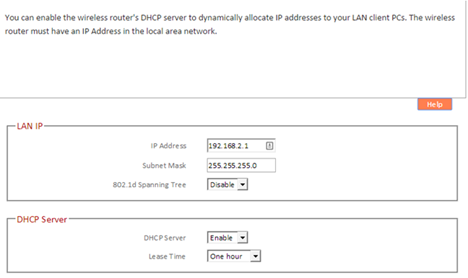
In terms of configuration options you get the basics you expect but not much else. Geeks and knowledgeable users will want more options for sure but then again, they might not be the intended audience for this device.
The most important downside we have identified when configuring this router, is the fact that we can't set the standard used for the wireless network. Edimax BR-6428nS V3 works only using the 802.11 b+g+n standards simultaneously. You can't set it to use only the 802.11n standard, which provides the fastest connections. This translates into lower speeds but broader device compatibility.
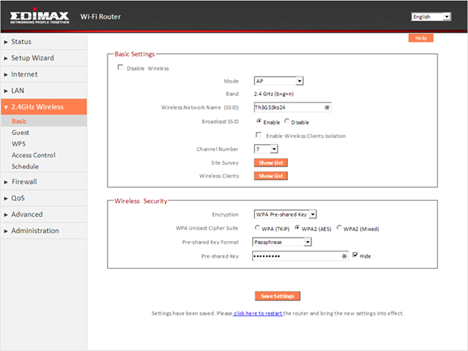
After we configured the router the way we wanted, we quickly updated the firmware to the latest version available at the time of our testing: v1.08. This is to make sure that we benefited from the latest set of improvements provided by Edimax. The original firmware was version 1.04.
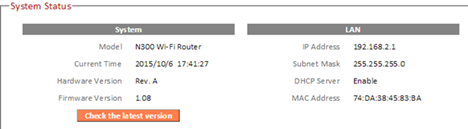
Then we connected our home devices to the network and started using them. We did not have any issues with wireless connections, we were able to share content over the network and everything worked smoothly.
Edimax BR-6428nS V3 is a very straightforward wireless router: it's very affordable and it offers only the basics you need to set up a network in your home. Don't expect complex features, detailed configuration options and so on. At this price, you can't get them.
Wireless Network Performance
Before we share the results of our measurements, let's take a look at the apartment that was used in our testing and how it is set up. You can see that the router is placed in the living room. The apartment is quite large, with many rooms and balconies.
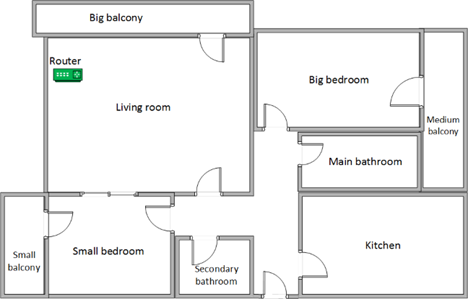
Our testing was done using a fast 1 Gigabit Internet connection that's capable of uploads on the Internet of up to 200 Mbps. We used a Microsoft Surface Pro 3 for all our measurements and several software tools. Since we have not tested a router this affordable before, we decided not to compare it with more expensive models which outperform it easily.
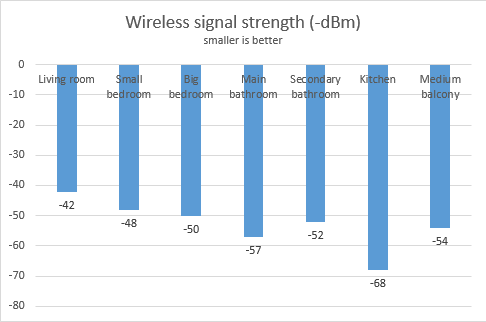
We started by measuring the strength of the wireless signal across the apartment, using inSSIDer. Below you can see how the signal strength evolves from room to room when using the 2.4 GHz wireless network. As you can see, the numbers are OK in all rooms.
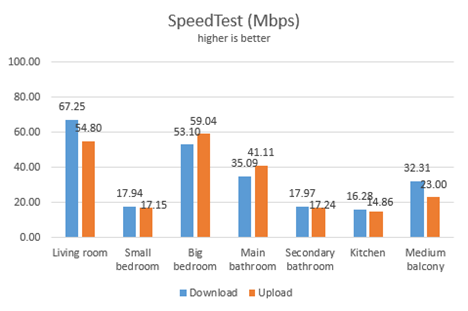
Next, we measured how fast the Internet connection was, using SpeedTest. Below you can see how the download and upload speeds evolve from room to room. The numbers are not exactly spectacular. What we can easily see is that Edimax BR-6428nS V3 delivers fast connections in the rooms that are closer to it and slow connections in those which are further away from it. Also, the number of walls between the router and a certain room influences a lot the speed you get from your Internet connection. The bigger the number of walls separating them, the slower the speed gets.
For our last set of measurements on the wireless network, we used LAN Speed Test Lite to measure downloads and uploads when transferring a 350 MB file between two computers connected to the network. Below you can see a chart with the average download and upload speed in each room. It's clear that local network transfers work faster than when downloading from the Internet. However, the distance between each room and the router, as well as the number of walls separating them, matters a lot and the speed decreases dramatically in certain rooms.
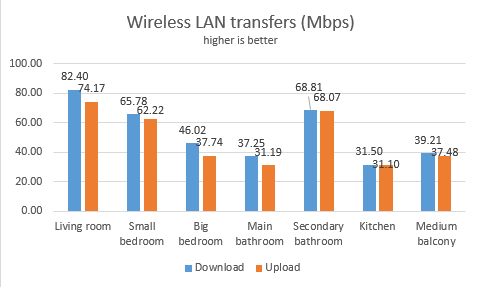
Edimax BR-6428nS V3 is capable of providing reasonably fast wireless connections only in small spaces, without too many rooms and too many walls separating each room from the router.
Wired Network Performance
In order to test the quality of the wired Ethernet connection, we used a desktop PC, equipped with an Intel Core i5 4460 processor, running at 3.20GHz, 16GB of RAM and a very fast Samsung 850 Pro 512GB SSD and a Microsoft Surface Pro 3 with an Intel Core i5-4300U processor, running at 1.9 GHz, 8 GB of RAM and a fast 256 GB SSD drive from Samsung.
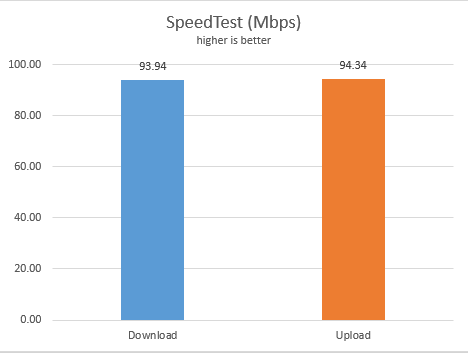
First, we measured the download and upload speeds using SpeedTest. As you can see, Edimax BR-6428nS V3 delivers only 100 Mbps wired connections, not 1 Gbps connections. Therefore, we could not take advantage of the performance offered by our test computer.
Lastly, we used LAN Speed Test Lite to measure downloads and uploads when transferring a 350 MB file between two computers connected to the network. The results were quite similar to the previous set of measurements and they proved one more time that Edimax BR-6428nS V3 delivers 100 Mbps wired network connections.
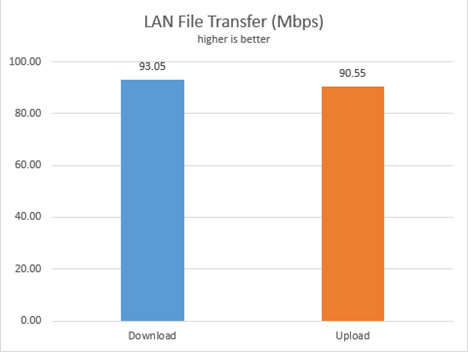
Edimax BR-6428nS V3 is capable of offering only 100 Mbps wired network connections. If you have a fast computer with an SSD drive, you won't be able to enjoy fast network transfers because of this router's limitations.
Extra Features
Edimax BR-6428nS V3 includes a couple of useful extra features:
-
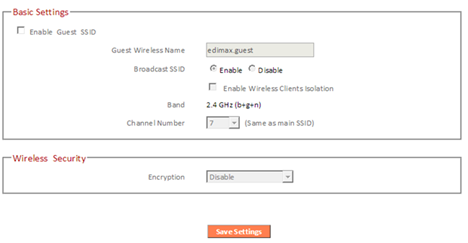
Guest network - allows you to create a separate wireless network for your guests, so that they can access the Internet without getting access to your local network.

Edimax BR-6428nS V3, router, access point, wireless, range, performance, benchmark, test, review - Wireless Schedule - allows you to set when the router turns on the wireless network. You can set a different schedule for each day of the week.
- Wireless Site Survey - this tool scans for available wireless networks and shows you their name, band, channel, encryption type and so on. You can use it to identify a free channel that you can set for your own wireless network, so that you avoid some of the congestion on the 2.4 GHz wireless spectrum.
Verdict
Edimax BR-6428nS V3 is one of the least expensive routers you can find on the market. In most shops it costs less than 50 USD and for this price, it delivers what you expect: a wireless network that works, which isn't very fast but it is straightforward to use and configure. Don't expect any bells and whistles, advanced options, fast 5GHz wireless connections and so on. Edimax BR-6428nS V3 is a good choice for those on a very tight budget, who need a working wireless network that is going to be used in small spaces and with a low number of devices. If you want speed and you have many wireless devices, you should put more money aside and invest in a router that is more expensive. We have reviewed plenty of such devices.
Discussion (0)
Comments are closed.