People who want a fast network, for many devices and on a large area, need to invest not only in a great router but also in a range extender or powerline kit. ASUS has recently launched one of their fastest repeaters ever: ASUS RP-AC87. This device can work as a range extender, access point, or media bridge. If you need a flexible networking tool, with high performance, then you should read this review about ASUS RP-AC87:
What is the ASUS RP-AC87 wireless AC2600 repeater good at?
ASUS RP-AC87 is a great choice for:
Users who want the fastest downloads possible from a range extender
Homes and areas with many devices that use the wireless network at the same time
People who want a range extender with support for the latest wireless technologies that are included in the 802.11ac Wave 2 standard, including MU-MIMO
Pros and cons
The ASUS RP-AC87 range extender has many strengths:
ASUS RP-AC87 has top-notch hardware with support for the latest wireless technologies (802.11ac Wave 2)
Excellent download speeds on both 2.4 GHz and 5GHz bands. In some download tests, it broke all records we measured so far in our tests
You can set up and manage the range extender from your smartphone or tablet, through a mobile app available for Android and iOS
The administration user interface is easy to use
Documentation is easily available
The multi-lingual support is excellent
There are also a few weaknesses to consider:
Lower than average upload speeds on both 2.4 GHz and 5GHz bands
The mobile app does not work from the internet, only from the local network
The size of this range extender is massive
There is no USB port
Verdict
ASUS RP-AC87 is a remarkable networking device for its size, hardware, and features. It is massive, heavy, and has a top-notch hardware configuration. When it comes to download speed, it delivers some of the fastest downloads that we measured when testing a range extender. However, its performance is average when measuring the upload speed. The firmware is easy to use, with great multi-lingual support and easy to access documentation. You also get a mobile app so that you can set it up using your smartphone or tablet. Overall, ASUS RP-AC87 is a great performer, even though it is not the best in all areas. If you can afford it and you want the fastest possible downloads, then this device is an excellent choice for you.
Unboxing the ASUS RP-AC87 AC2600 repeater
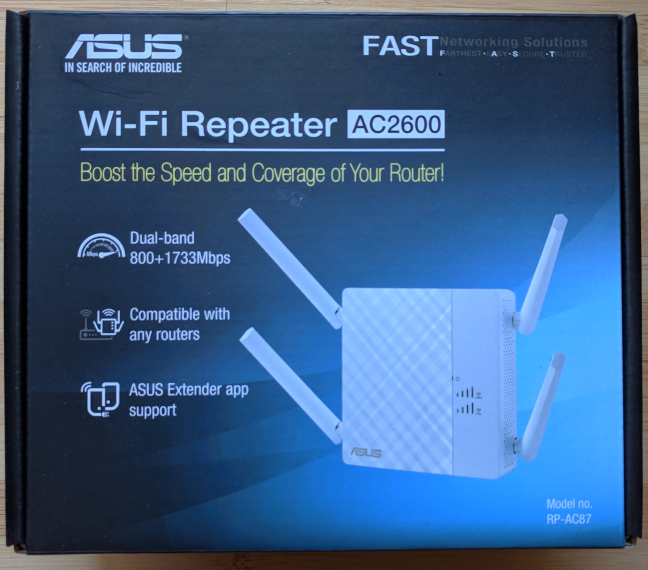
The ASUS RP-AC87 dual-band wireless repeater comes in a large cardboard box. On the top, you can see a picture of the devices and some of its most important features.
ASUS RP-AC87
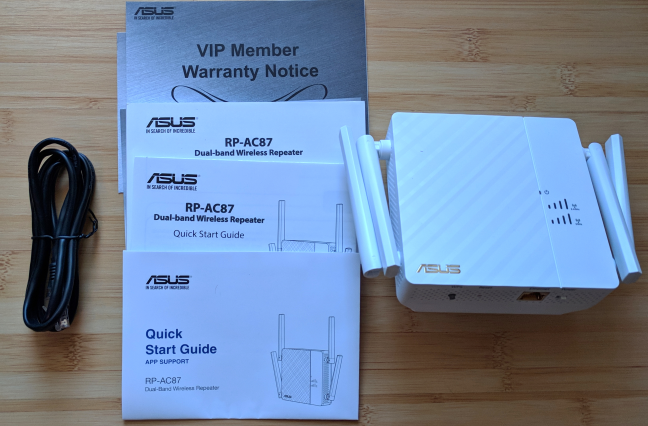
On the back of the box, you can find useful information about how to set up the repeater. When you unbox everything, you find the following items: the dual-band repeater, a network cable, the quick start guide in several variations, and the warranty.
ASUS RP-AC87
The unboxing experience is quick and painless. The packaging includes a network cable that can be useful in many scenarios, including the initial setup of the ASUS RP-AC87 repeater.
Hardware specifications and design
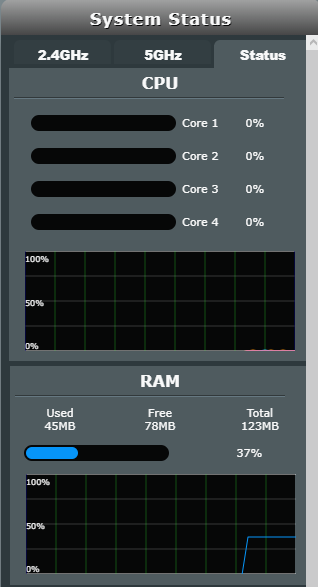
ASUS RP-AC87 has a powerful quad-core processor from MediaTek, 128 MB of RAM and 16 MB of storage space for the firmware. The exact model of the processor is not specified by ASUS. ASUS RP-AC87 is also is the first repeater that we tested with full support for the 802.11ac Wave 2 standard the 4x4 MU-MIMO. This means that it should be able to deliver impressive speed on WiFi. The maximum theoretical bandwidth is of 800 Mbps for the 2.4 GHz frequency and 1734 Mbps for the 5GHz frequency. This is a lot, for a range extender.
ASUS RP-AC87
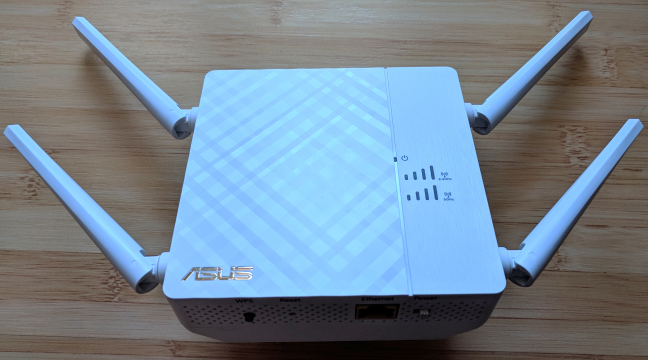
As you can see, we are dealing with a huge device, with four external antennas. The antennas can be rotated but they cannot be detached. The total size is 4.6 x 4.6 x 1.6 inches or 118 x 118 x 43 mm in length, width, and height. It weighs 330 ounces or 936 grams.
ASUS RP-AC87
On the front, ASUS RP-AC87 has three LEDs: one for indicating whether it is turned on, one for the 2.4 GHz wireless frequency, and another for the 5 GHz one. The last two LEDs help you position the range extender correctly in your home because they indicate how strong the signal from the router is. If one or both LEDs indicate a weak signal, change its position to another place and see how the signal strength evolves.
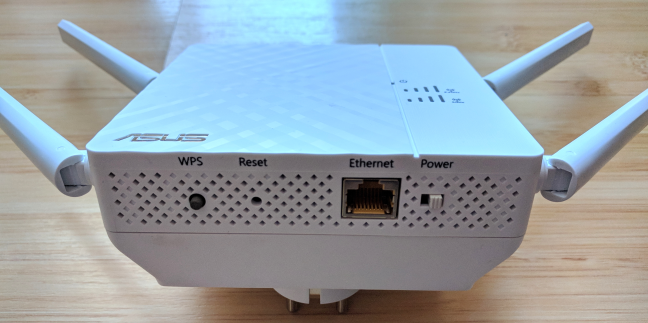
On the bottom of the ASUS RP-AC87, you find the WPS button, the Reset switch, an Ethernet port working at 1 Gbps, and the Power button.
ASUS RP-AC87
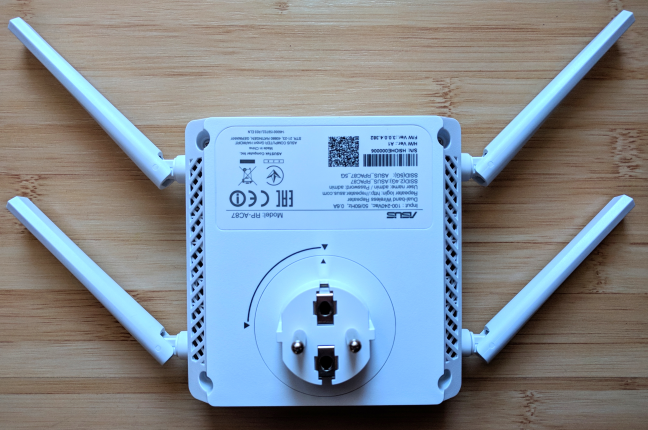
One neat little trick is that the mains plug can be rotated. This is a welcome feature considering the size of this networking device.
ASUS RP-AC87
ASUS brags about the fact that this device is multi-functional. It can be used as a repeater (range extender), access point or media bridge. Users with more complex networking scenarios will appreciate this feature.
If you want to see all the official specifications of this product, go to this page: ASUS RP-AC87 Specifications.
Setting up and using the ASUS RP-AC87 AC2600 repeater
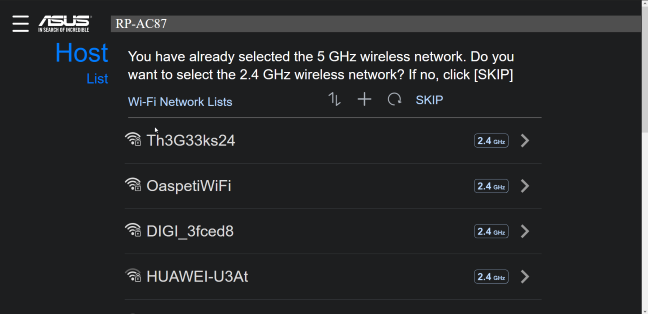
Setting up the ASUS RP-AC87 can be done in three ways: through the ASUS Extender mobile app for Android and iOS, using a network cable and a web browser on a computer, and through the WPS button. We used the first two methods, and they worked well. However, we prefer using a network cable and a PC instead of the mobile app. The setup was faster, and we could configure more in a matter of minutes. The initial setup involves choosing a username and password for managing the device, choosing the wireless networks that will be extended, and providing the connection passwords.
ASUS RP-AC87
Once these steps are performed, ASUS RP-AC87 starts doing its job. If you want to, you can further access its administration user interface in a web browser.
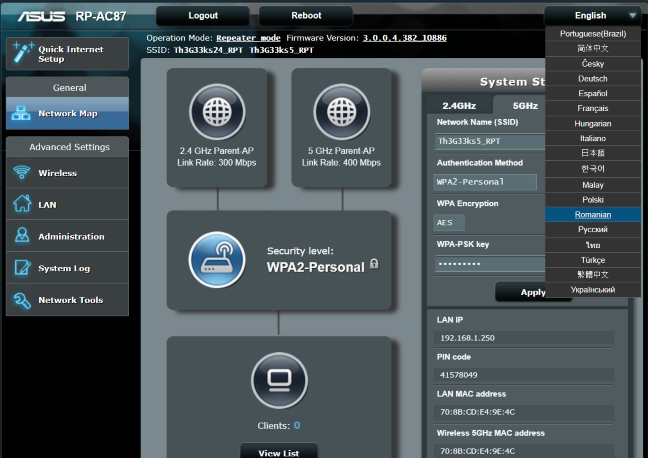
This interface looks good, and it is nicely organized in logical sections. One positive is the fact that it is available in 19 languages, which you can see listed below.
ASUS RP-AC87
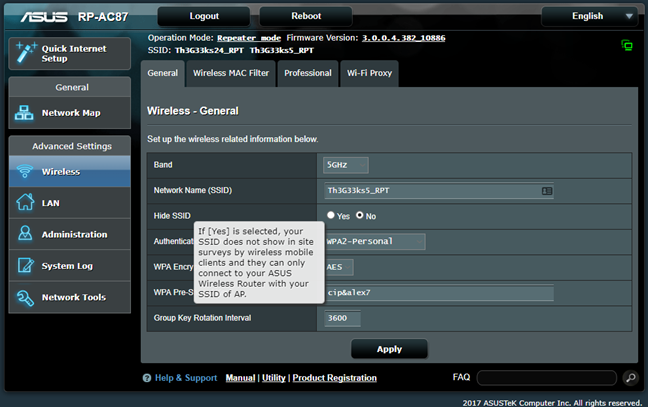
ASUS RP-AC87 includes few advanced settings, and there are few things you might want to change. Its default configuration works well in most situations. If you do need to change a setting and you do not understand what it does, move the mouse cursor on top if its name. When a question mark is shown, click on it and a tooltip is displayed with more information about that settings. This is a neat way to help users.
ASUS RP-AC87
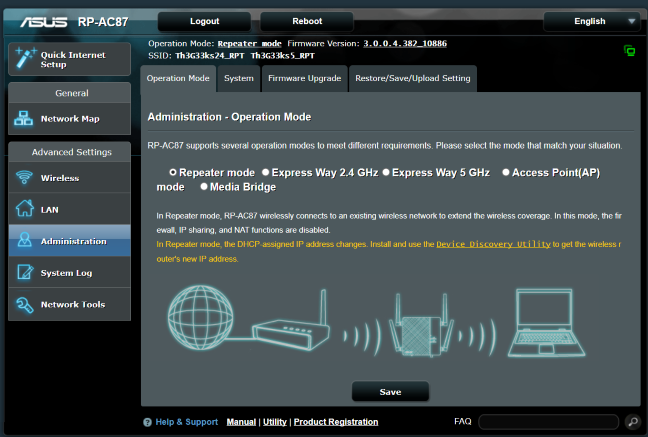
As we mentioned, ASUS RP-AC87 is a multifunction device that can be used as a repeater (range extender), access point, and media bridge. You can see all operation modes in the screenshot below. For our testing, we used it as a repeater.
ASUS RP-AC87
After setting up everything we wanted about the ASUS RP-AC87 repeater, we were able to connect to its WiFi all kinds of devices: laptops, tablets, smartphones, consoles and wireless printers. Network sharing worked well too, and we had no issues in transferring files across the devices on the network.
Overall, we are pleased with how well ASUS RP-AC87 works and how easy it is to setup and configure.
If you want to know more about the speed of this device, how it fared in benchmarks and what extra features it bundles, go to the second page of this review.
Wireless network performance
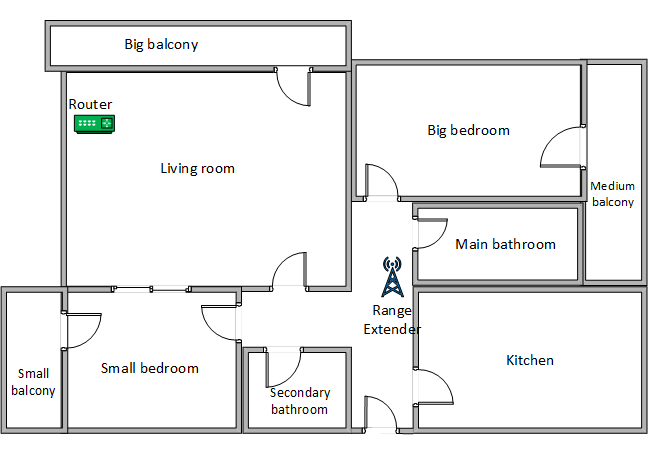
Below you have a diagram of how our test apartment is set up. It is a reasonably large apartment and, if you do not have a good router, the wireless coverage can get rather weak in rooms like the Kitchen, Main Bathroom, and Medium Balcony which are far away from it, and with several walls separating them from the WiFi signal emitted by the router. You can see that we have placed the router in the Living Room and the range extender in the hallway. The router that we used is ASUS RT-AC88U. We mounted the range extender in the hallway, to improve the wireless coverage in the rooms that we mentioned earlier.
ASUS RP-AC87
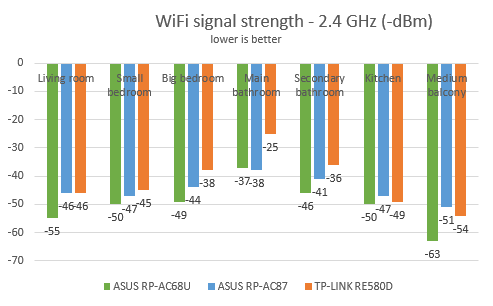
For a better perspective, we compared the results measured for the ASUS RP-AC87 repeater with those offered by TP-LINK RE580D (an AC1900 range extender from its main competitor) and ASUS RP-AC68U (one of the most advanced range extenders from ASUS).
We started by evaluating the 2.4 GHz wireless network and the signal strength of this network, using a tool named inSSIDer. As you can see below, the signal strength was good in all rooms.
ASUS RP-AC87
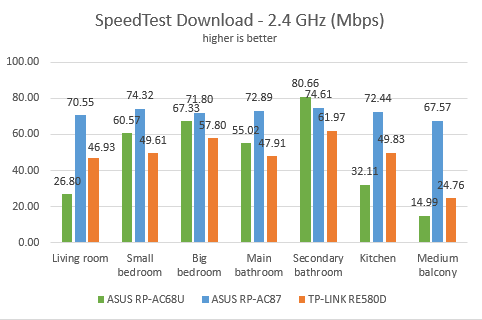
Then, we used SpeedTest to see how fast the internet connection is when using the 2.4GHz wireless network. The download speed offered by ASUS RP-AC87 was excellent in all rooms, and it outperformed the range extenders we compared it to.
ASUS RP-AC87
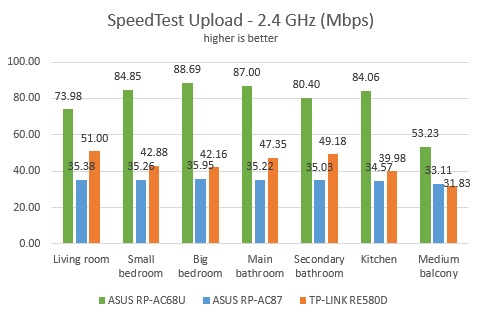
On the other hand, the upload speed was good but not as good as that offered by its competitors.
ASUS RP-AC87
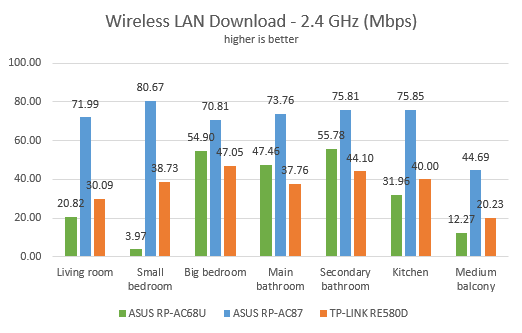
Next, we used the PassMark Performance test to transfer data between two computers connected to the network. One of them was connected to the range extender while the other was connected to the router. Again, ASUS RP-AC87 beat its competitors.
ASUS RP-AC87
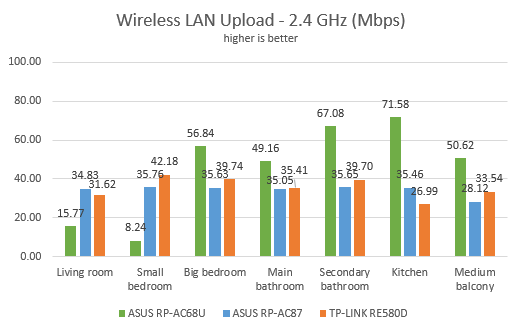
When we compared the upload speeds, ASUS RP-AC87 performed well, but it was not as good as its competitors.
ASUS RP-AC87
The download speed offered by the ASUS RP-AC87 repeater on the 2.4 GHz band is excellent. However, the upload speeds we measured were lower than those offered by its competitors.
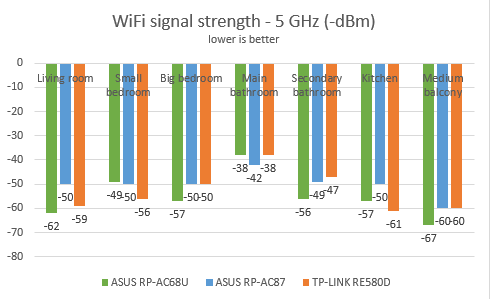
We moved on to the wireless network that is broadcast on the 5GHz frequency, and we looked at the signal strength. ASUS RP-AC87 had a signal that was more constant and degraded less than that of its competitors.
ASUS RP-AC87
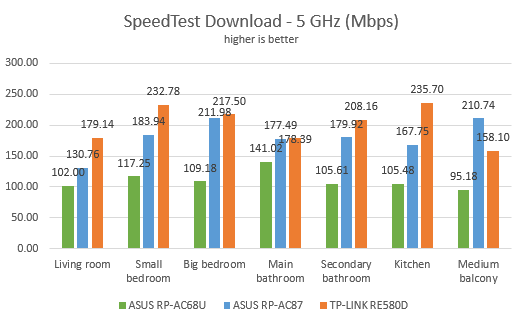
We moved on to SpeedTest to measure the speed of the internet connection on the 5GHz wireless network. We noticed that ASUS RP-AC87 was a solid performer in all rooms. In some of them, it managed to be the fastest, while in others it was the second fastest.
ASUS RP-AC87
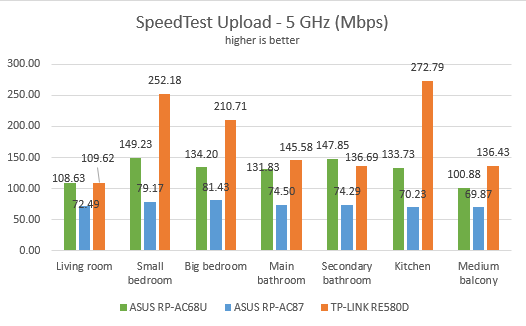
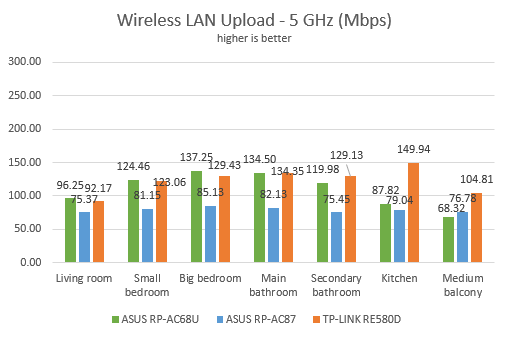
However, when we measured the upload speed offered by ASUS RP-AC87, this repeater was the slowest of the bunch.
ASUS RP-AC87
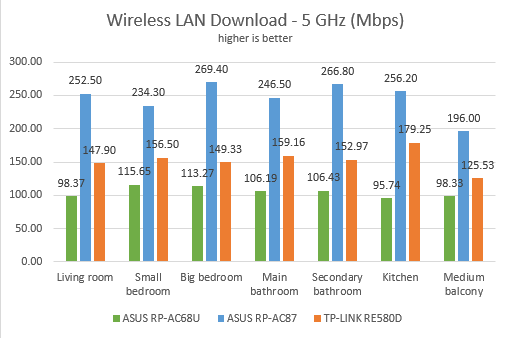
For the last measurements on the 5GHz wireless network, we used the PassMark Performance test to transfer data between two computers connected to the network. One of them was connected to the range extender and the other to the router. ASUS RP-AC87 delivered unbeatable download speeds in this test. We were impressed!
ASUS RP-AC87
The upload speed was another story, with ASUS RP-AC87 lagging behind the competition.
ASUS RP-AC87
ASUS RP-AC87 is very fast on the 5GHz band too, but only when it comes to downloads. When measuring the upload speed, it was the slowest in our comparison.
Wired network performance
To test the quality of the wired Ethernet connection, we used a desktop PC, equipped with an Intel Core i5 4460 processor, running at 3.20GHz, 16GB of RAM and a very fast Samsung 850 Pro 512GB SSD and a Lenovo Ideacentre 610s mini PC. The Lenovo Ideacentre 610s mini PC was connected to the ASUS RP-AC87 range extender using an Ethernet cable. Our desktop PC was connected to the router, using another Ethernet cable.
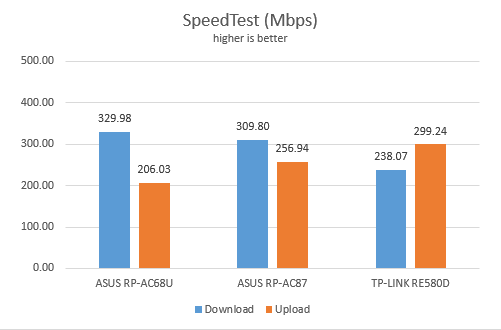
We started by measuring the download and upload speeds using SpeedTest. ASUS RP-AC87 delivered very good results: 309.8 Mbps for the download and 256.94 Mbps for the upload.
ASUS RP-AC87
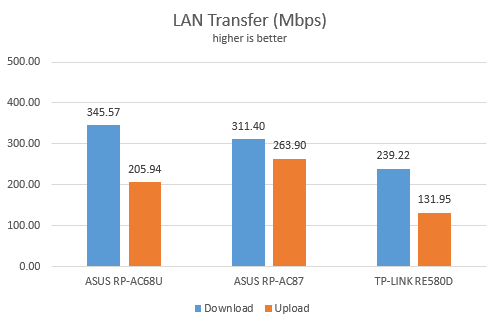
Then, we ran a network transfer between the two computers, using the PassMark Performance test. ASUS RP-AC87 delivered results similar to those in the previous test, which is very good.
ASUS RP-AC87
ASUS RP-AC87 delivers fast wired connections when using its Ethernet port.
Extra features
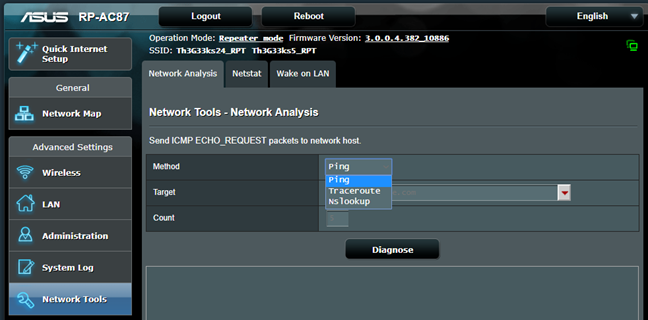
ASUS RP-AC87 does not have many extra features in its firmware. Because it lacks a USB port, there are no USB applications available, unlike what is found on ASUS RP-AC68U. You only get some network analysis and troubleshooting tools.
ASUS RP-AC87
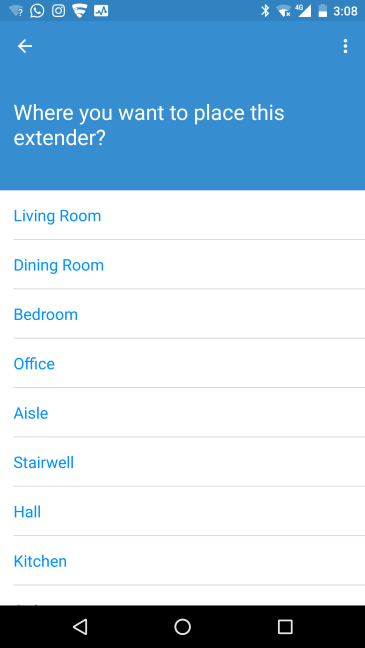
The main "extra" feature is the ASUS Extender app for Android and iOS. You can use this app to set up the range extender. We used it, and while its setup wizard is friendly, we found that the process takes longer when using the mobile app than with traditional setup methods.
ASUS RP-AC87
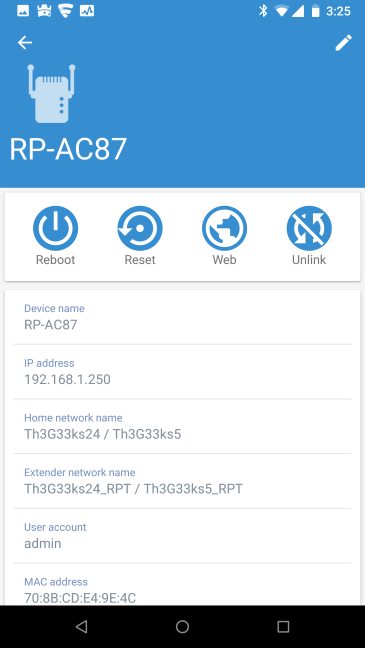
With this app, you can also see the name of the range extender, its IP address, the name of the networks that it broadcasts and those that it is extends, the admin user and other details. You can also reboot the device, reset it, unlink it from the network and access its administration user interface in the browser.
ASUS RP-AC87
While we liked this app and found it easy to use, we did not enjoy the fact that it does not work from anywhere on the internet. You can only use it while connected to the network that is extended by ASUS RP-AC87.
The ASUS RP-AC87 repeater offers very few extras. However, they work well, and they are easy to use.
What is your opinion about ASUS RP-AC87 AC2600?
Now you know our opinion about the ASUS RP-AC87 range extender. Before closing this review, let us know what you think. Is it a useful networking device? Are you considering buying it? If you already have it, what is your experience with it? Comment below and let's discuss.





























Discussion (2)
Alas, an Amazon UK item only and does not ship to the USA.
It will become available in the USA too, in the next few months. So far, it was launched in Europe.