



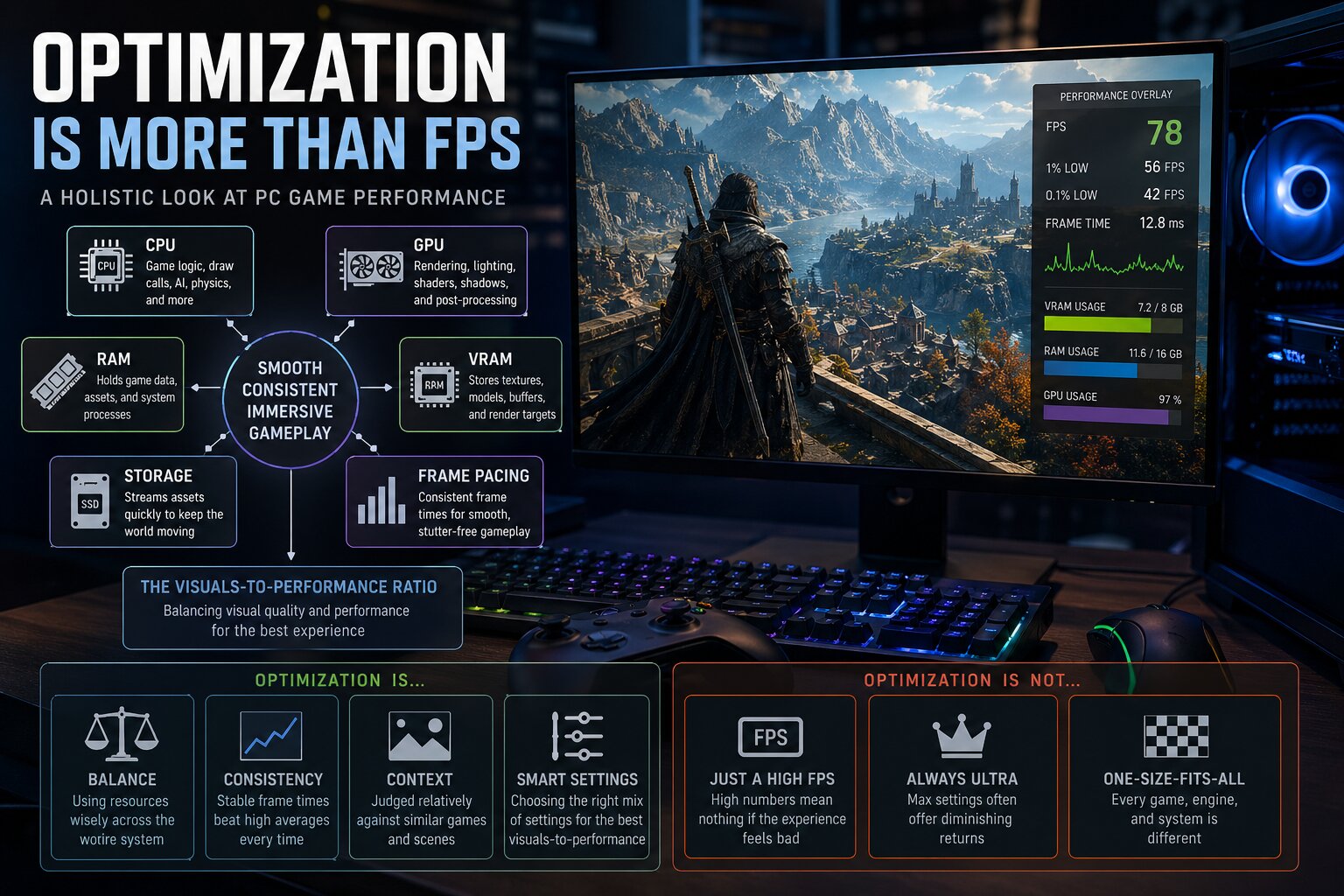
"Bad optimization” is one of the most common complaints in PC gaming, but it is also one of the most misunderstood. A new deep-dive argues that judging a game purely by FPS is overly simplistic and often misses the real reason why a game feels smooth or broken.
The reality is that modern PC game performance depends on far more than just GPU power. CPU workload, memory usage, storage speed, shader compilation, and frame pacing all play a role. That is why two games with similar FPS numbers can feel completely different to play.
FPS alone does not tell the full story of performance
Average FPS is easy to understand, but it hides important details. A game running at 90 FPS with constant stutter can feel worse than one running at 70 FPS smoothly. What matters more is consistency — how evenly frames are delivered over time.
This is where frametime comes in. Instead of counting how many frames you get, frametime measures how long each frame takes to render. Stable frametimes create smooth gameplay, while uneven ones cause stuttering.
| Metric | What it really tells you |
|---|---|
| Average FPS | Overall frame rate, but can hide stutter |
| 1% / 0.1% lows | How bad the worst performance moments are |
| Frametime | Frame consistency and smoothness |
| GPU usage | Whether the GPU is fully utilized |
| CPU usage | Whether the processor is the bottleneck |
The article compares FPS to a car’s top speed. It tells you something, but not how the car actually drives in real conditions.
Modern games stress the entire system, not just the GPU
One of the biggest misconceptions is that performance problems always come from the graphics card. In reality, modern games are system-wide workloads.
A game can be:
- GPU-bound (heavy lighting, ray tracing, high-resolution textures)
- CPU-bound (complex physics, NPC simulation, large open worlds)
- Memory-bound (running out of VRAM or RAM)
- Storage-bound (slow asset streaming causing stutter)
If the CPU is the bottleneck, lowering graphics settings may not help at all. If VRAM is exceeded, textures may stutter or pop in. If the SSD cannot stream data fast enough, traversal stutter can appear.
This is why optimization is described as a “balancing act” between all hardware components, not just pushing the GPU harder.
The real measure: visuals versus performance cost
A better way to judge optimization is what the article calls the visuals-to-performance ratio.
Instead of asking “Is the FPS high?”, the better question is:
“How much visual quality and complexity am I getting for the performance cost?”
A visually simple game hitting 120 FPS is not automatically better optimized than a detailed open-world game running at 70 FPS. What matters is whether the performance matches the visual ambition.
“Ultra settings” are not the real benchmark
Another common mistake is treating Ultra settings as the default expectation. Many games are designed with these settings for future hardware, not current systems.
In many cases, lowering a few heavy settings (like shadows or water physics) can massively improve performance with almost no visible difference.
| Setting approach | Result |
|---|---|
| Ultra / maxed out | Often unnecessary and extremely demanding |
| Optimized settings | Best balance of visuals and performance |
| Low settings | Big performance gains but visible quality loss |
The key point is that a well-optimized game gives players the tools to find that balance easily.
Common causes of stutter are often misunderstood
The article highlights several modern performance issues that are frequently blamed on “bad optimization,” but have more specific causes:
- Shader compilation stutter: Happens when shaders are built during gameplay
- VRAM overflow: Causes sudden stuttering when textures exceed GPU memory
- Asset streaming issues: Slow storage can cause hitching in open-world games
- CPU bottlenecks: Large simulations or NPC-heavy scenes can overwhelm the CPU
Technologies like DLSS, FSR, and frame generation can help performance, but they are not fixes for these underlying problems. They can hide issues, not solve them.
Optimization has never been perfect, even in older games
There is also a myth that older PC games were better optimized. In reality, many classic titles had serious performance issues at launch. They only feel smooth today because modern hardware is far more powerful and patches have improved them over time.
The bigger takeaway: optimization is about balance, not just numbers
At its core, optimization is about how well a game uses system resources. A well-optimized game:
- Scales across different hardware
- Maintains stable frame pacing
- Uses memory efficiently
- Delivers visuals that justify its performance cost
The takeaway is simple but important:
A high FPS number does not automatically mean a game is well optimized, and a lower FPS does not always mean it is broken.
Understanding that difference can make it much easier to judge new game releases more fairly and avoid jumping to conclusions based on a single number.

Discussion (0)
Be the first to comment.