



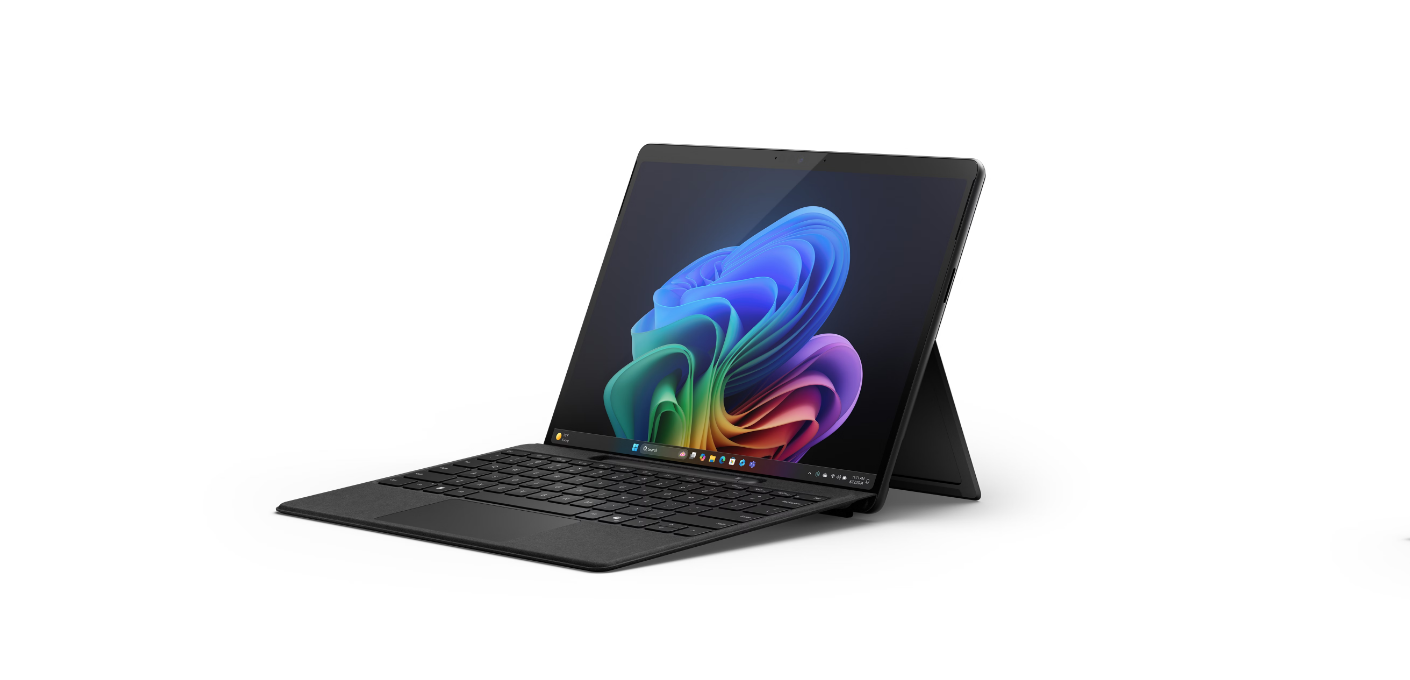
The Surface Pro lineup has always been about balance. It tries to sit between a laptop and a tablet without fully committing to either. With the Surface Pro 11, Microsoft isn’t reinventing that idea. Instead, it’s refining it in ways that are more practical than flashy.
This update focuses on performance, efficiency, and AI integration, rather than dramatic design changes. That might not sound exciting, but for a device people use daily, those improvements matter more.
What is the Surface Pro 11?
The Surface Pro 11 is Microsoft’s latest 2-in-1 device, designed to function as both a tablet and a laptop when paired with a keyboard.
It continues the familiar Surface design, with a kickstand, detachable keyboard, and touchscreen interface. If you’ve used a Surface before, this will feel instantly familiar.
What’s changed is mostly under the hood, and that’s where things get interesting.
What’s New in Surface Pro 11
The biggest shift with this generation is the move toward more efficient, AI-focused hardware.
Microsoft is leaning into ARM-based processors, similar to what we’ve seen in devices powered by Snapdragon chips. These are designed to deliver better battery life and improved efficiency compared to traditional x86 processors.
Alongside that, there’s a stronger push toward AI features, especially through Copilot and on-device processing capabilities.
You can expect:
- Improved battery life compared to previous generations
- Better thermal efficiency and quieter operation
- AI-assisted features integrated into Windows
- Continued support for pen input and touch workflows
The design itself remains largely unchanged, which isn’t necessarily a bad thing. The Surface Pro form factor is already well-optimized.
Performance: What It Feels Like in Real Use
Performance on the Surface Pro 11 depends heavily on how you use it.
For everyday tasks like browsing, office work, and media consumption, it feels fast and responsive. The efficiency gains from ARM architecture help keep things smooth without draining the battery quickly.
Where things get more nuanced is with heavier workloads.
ARM-based systems have improved significantly, but compatibility and performance for certain applications can still vary. Most modern apps work well, but some legacy software or specialized tools may not perform as expected.
So while it feels quick in general use, it’s not a full replacement for high-performance laptops in every scenario.
Battery Life and Efficiency
This is where the Surface Pro 11 stands out.
Battery life is noticeably better than many previous Surface devices. The combination of efficient hardware and software optimization allows it to last through a full workday for most users.
It also runs cooler and quieter, which makes it more comfortable to use as a tablet.
For people who value portability and all-day usage, this is one of the strongest aspects of the device.
AI Integration: Useful or Just There?
Microsoft is clearly pushing AI as a core part of the Surface experience.
Features powered by Copilot and on-device AI aim to assist with tasks like writing, summarizing content, and managing workflows.
In practice, this can be useful, but it depends on how you work.
If you already use AI tools regularly, having them integrated into the system can save time. If not, it may feel like an extra layer that you don’t fully use.
The key difference is that these features are becoming part of the operating system, not just optional add-ons.
Real-World Usage: Who Is This For?
The Surface Pro 11 makes the most sense for a specific type of user.
If you want a lightweight, portable device that can switch between laptop and tablet modes, it’s a strong option.
It’s particularly well-suited for:
- Students and professionals who need portability
- Writers, analysts, and office users
- People who value battery life and quiet operation
However, if your work involves heavy software, gaming, or intensive creative tasks, a traditional laptop may still be the better choice.
Limitations You Should Know
The Surface Pro 11 still carries some of the same trade-offs as previous models.
The keyboard is usually sold separately, which adds to the overall cost.
ARM compatibility, while improved, is not perfect. Some applications may run through emulation, which can affect performance.
And while the form factor is versatile, it’s not always as stable or comfortable as a traditional laptop for extended typing sessions.
Final Thoughts
The Surface Pro 11 isn’t trying to reinvent the category. It’s refining a formula that already works.
Better battery life, improved efficiency, and deeper AI integration make it more practical for everyday use.
But it’s still a device built around balance, and that means compromises remain.
If your priorities align with portability and flexibility, it’s a strong option. If you need raw performance or full compatibility, you may want to look elsewhere.
FAQs
Is the Surface Pro 11 a laptop or a tablet?
It’s a 2-in-1 device that functions as both, depending on how you use it.
Does it use ARM processors?
Yes, newer models focus on ARM-based chips for better efficiency and battery life.
Is it good for heavy workloads?
It handles everyday tasks well, but heavy workloads may be better suited to traditional laptops.
How is the battery life?
Battery life is one of its strongest points, often lasting a full workday.
Do I need to buy the keyboard separately?
Yes, in most cases the keyboard is sold separately, which increases the total cost.
Discussion (0)
Be the first to comment.