




If you want to hide your Instagram account, you can do it in several ways. The right option depends on whether you want to disappear completely, limit access, or hide only certain activity. This guide explains every method clearly so you can choose the one that fits your situation.
Quick chooser: Pick the right way to hide your account
- If you want full privacy from non-followers, make your account private.
- If you want to hide from one or two people, block or restrict them.
- If you want a temporary break, deactivate your account.
- If you want to disappear forever, delete the account.
Hide your Instagram account from everyone
Make your account private
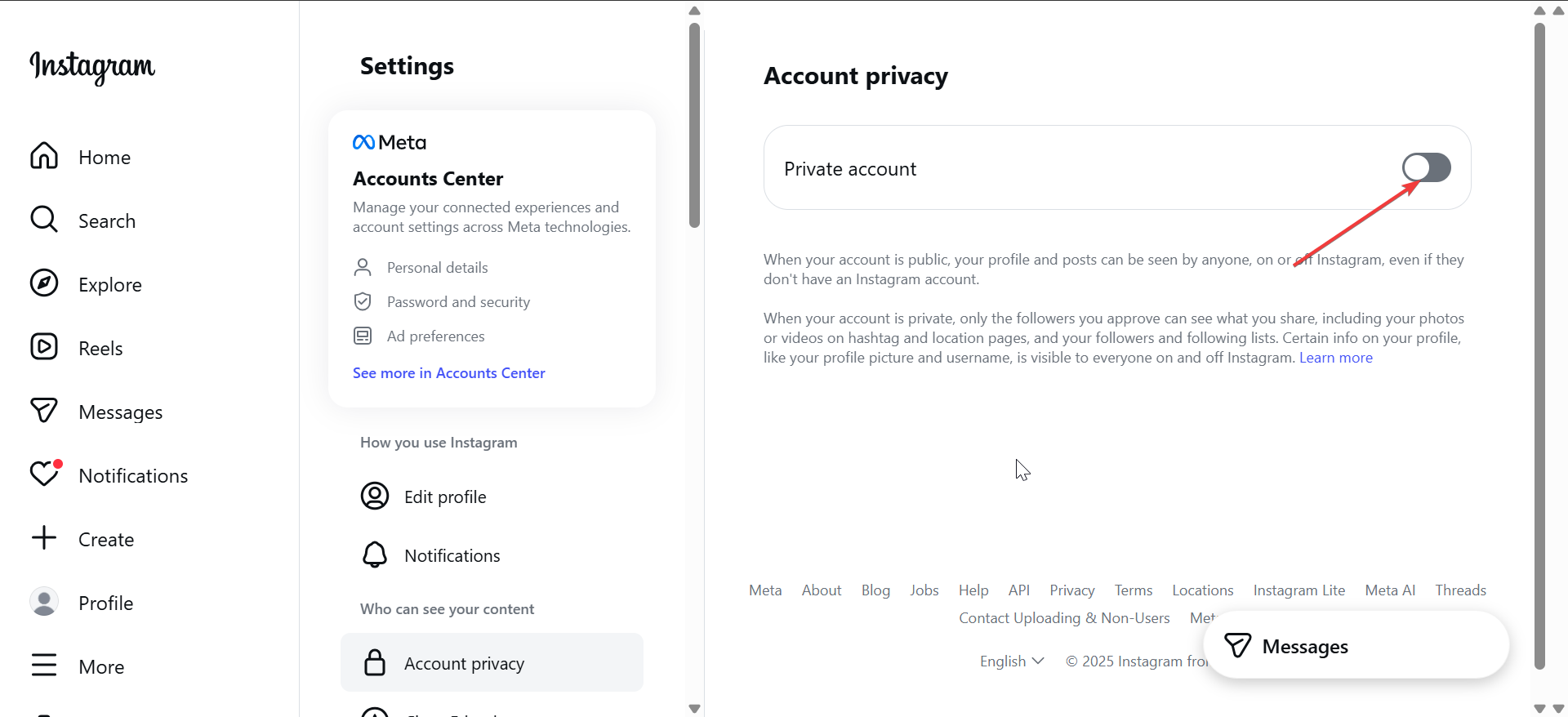
Switching to a private account hides your posts, stories, and reels from anyone who does not follow you. Only approved followers can see your content, which makes this the fastest and safest option for most users.
Open Settings, tap Account Privacy, then turn on Private account. Once enabled, new followers must send a request before they can see anything.
Remove yourself from public discovery
A private account still shows your username and profile photo in limited cases. People can see your profile if they already follow you or if you interact with them directly, and they can still find your Instagram URL. Instagram will not show your posts in Explore or public hashtag pages.
Hide your Instagram account from specific people
Block users completely
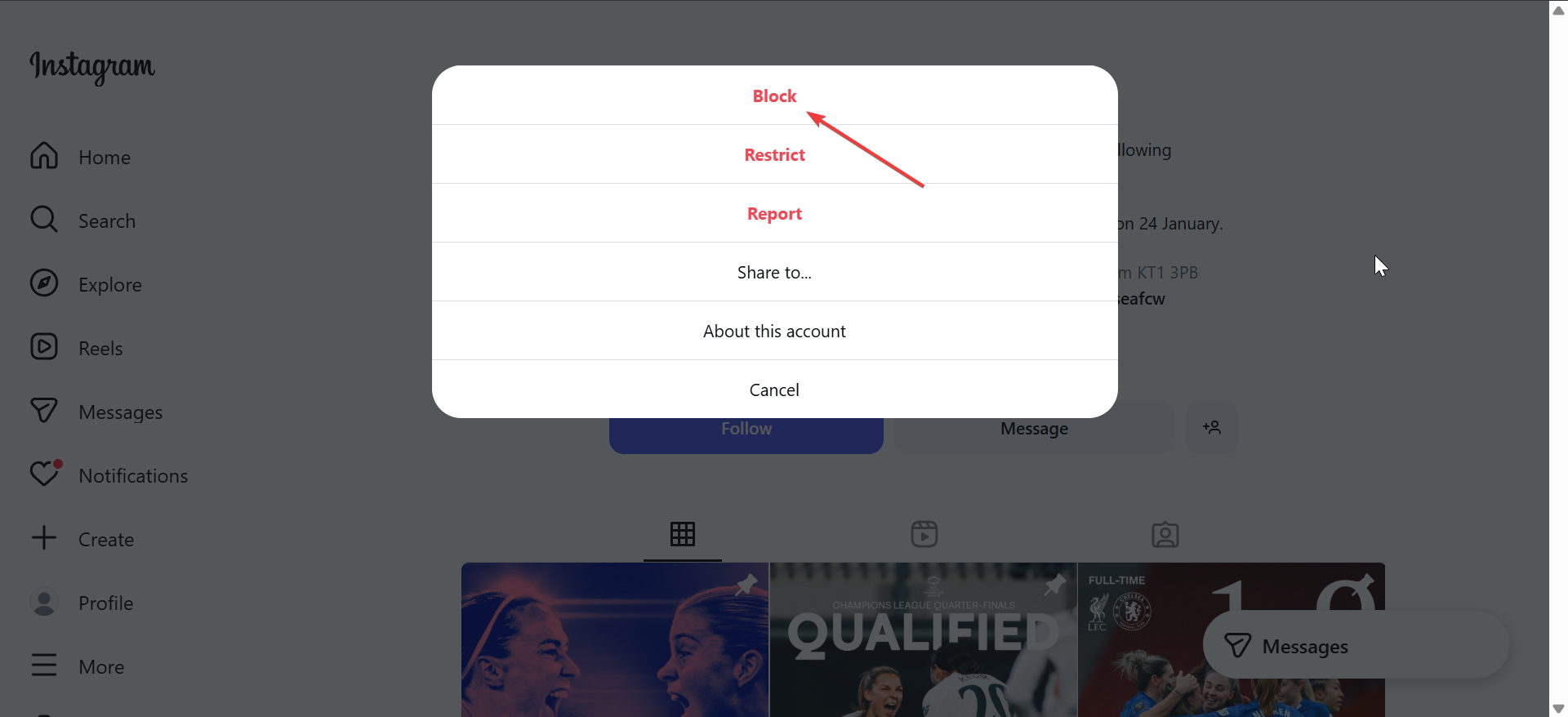
Blocking removes all visibility between you and another user. They cannot find your profile, view your posts, or send messages, and you will not see theirs either.
Go to the user’s profile, tap the three dots, then tap Block. Instagram does not notify the person when you block them.
Restrict users without alerting them
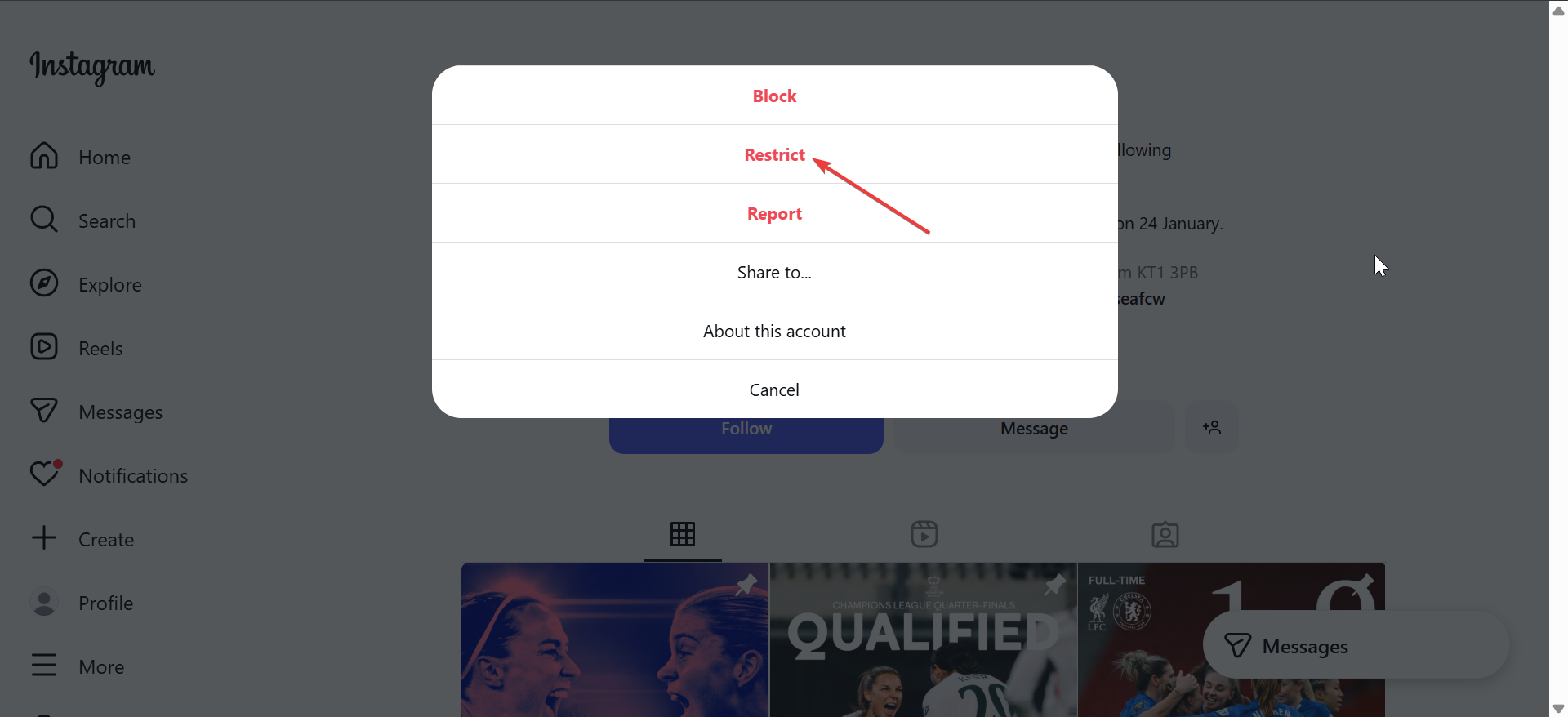
Restricting hides comments and activity without cutting contact completely. Restricted users will not see when you are online or if you read their messages.
Open the user’s profile, tap the three dots, then tap Restrict. This option works well when you want distance without confrontation.
Remove followers without blocking
You can remove someone from your followers list quietly. They lose access to your private content but can still view your public profile.
Open your profile, tap Followers, find the user, then tap Remove.
Hide Instagram activity without hiding the account
Turn off activity status
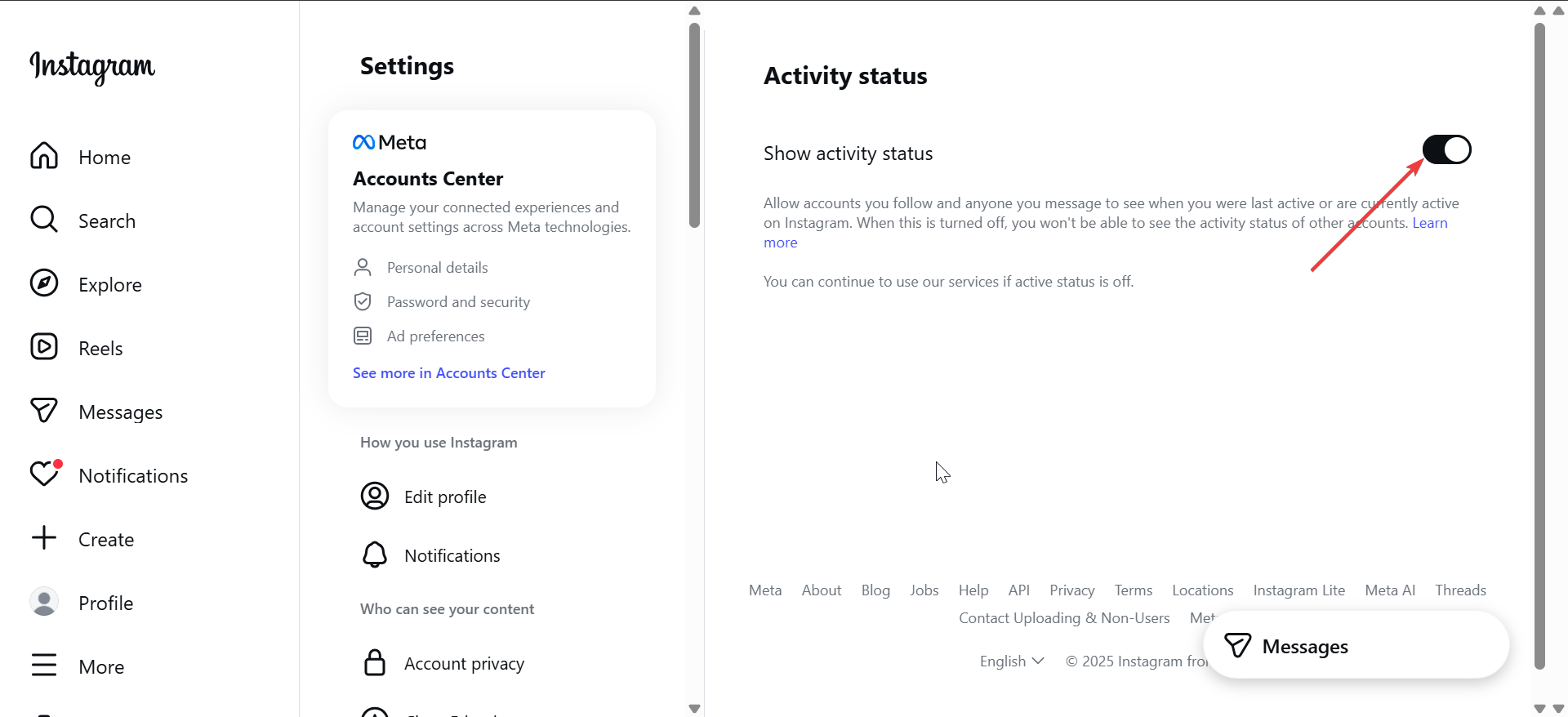
Disabling activity status stops others from seeing when you are online or last active. This setting improves privacy without changing who can see your content.
Go to Settings > Messages and replies > Show activity status, then turn off Show activity status.
Hide stories from selected users
Instagram lets you hide stories from specific people while keeping posts visible. This helps when you want to share updates with a limited audience.
Open Settings > Hide Story, then click Hide story and live from. Now add users under you want to hide your story from.

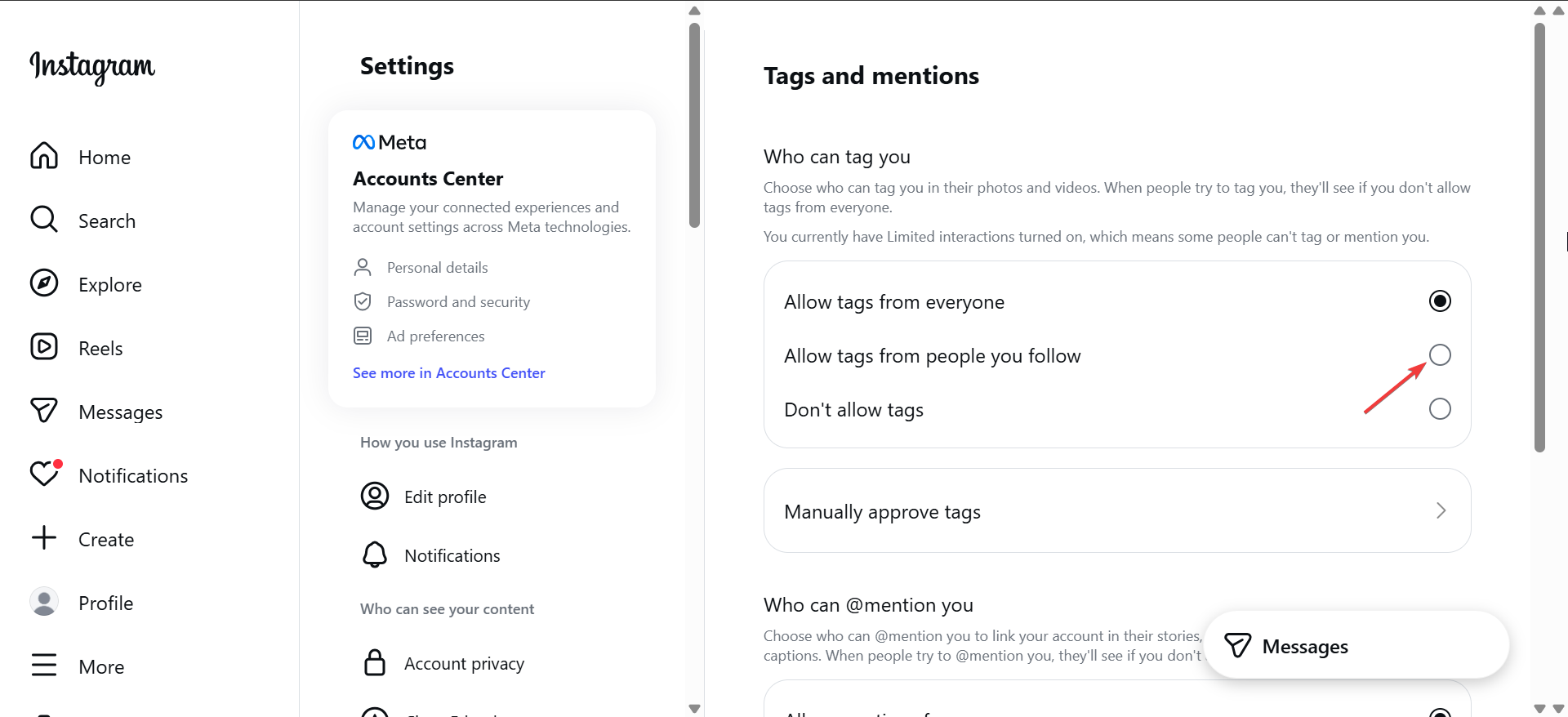
Control mentions and tags
Mentions and tags can expose your profile to others. You can limit or block them entirely to reduce visibility.
Go to Settings > Tags and mentions, then choose Allow tags from people you follow or No one.
Hide your Instagram account from search and suggestions
Change name and username visibility
Your display name and username affect how easily people find you. Using a less recognizable name reduces search visibility inside Instagram.
Edit your profile and update your Name field if you want to stay harder to identify.
Stop contact-based suggestions
Instagram suggests accounts based on contacts and connected Facebook data. Disabling contact syncing reduces these suggestions.
Go to Settings > Accounts Center, then review contact syncing and connected services.
Temporarily hide your Instagram account
Deactivate your account
Deactivation removes your profile, posts, comments, and likes until you return. This option works best if you want a break without losing data.
Visit Instagram’s account settings in a browser and choose Deactivate account. You can reactivate by logging back in.
Reactivate without losing content
When you log back in, Instagram restores your profile and content exactly as before. Privacy settings usually stay unchanged.
Permanently hide your Instagram account
Delete your account
Deleting your account removes your profile and content permanently after Instagram’s grace period. You cannot recover anything after this point.
Start the deletion process from Instagram’s account deletion page and confirm your choice.
Know the point of no return
Instagram delays final deletion for a short time. After that window closes, all data disappears permanently.
Common mistakes that prevent full privacy
Many users forget to turn off activity status or story visibility after going private. Others stay discoverable because contact syncing remains enabled. Review all privacy sections to avoid partial hiding.
Summary
- Decide whether you want full privacy, selective hiding, or a temporary break.
- Use Private account for fast protection from non-followers.
- Block or restrict users to hide from specific people.
- Disable activity status, story access, and mentions for extra privacy.
- Deactivate or delete only if you want complete invisibility.
Hiding an Instagram account works best when you match the setting to your goal. Start with a private account, then tighten activity and interaction controls as needed. If privacy concerns persist, temporary deactivation or permanent deletion gives you total control over your visibility.


Discussion (0)
Be the first to comment.