




Adobe Illustrator is a leading vector design tool for pros and beginners. You can try it free for a short time through Adobe’s official trial. This guide shows how to download, install, and use Adobe Illustrator for free on your computer or tablet.
But before downloading, verify your device meets these basics:
- Windows: 64-bit Windows 10 or later, 8 GB RAM, Intel or AMD processor, 2 GB free disk space.
- Mac: macOS 12 or later, 8 GB RAM, Apple Silicon or Intel processor, 2 GB free disk space.
Once you are sure, you can proceed to the download steps in this guide.
1) Download Adobe Illustrator free on PC or Mac
Go to the official Adobe Illustrator page and sign in with your Adobe ID. If you’re new, select Create account and register with your email. Next, click Start free trial under Illustrator and add your payment details.

You won’t be charged until the seven-day trial ends. From here, download the Creative Cloud installer and run it. Now, click the Apps tab, find Illustrator, and select Install.
When installation completes, open Illustrator from Creative Cloud or your desktop shortcut. Sign in if prompted to activate the trial.
2) How to use Adobe Illustrator without paying
After the trial, you can still design with limited options. Use mobile and web versions that remain free with restrictions.
Use the free mobile version (Illustrator for iPad)
Illustrator for iPad includes essential drawing tools and Creative Cloud sync. The base experience is free, with optional upgrades.
Try the web beta (Illustrator on the web)

Adobe sometimes offers a browser-based version for light editing and collaboration. It runs in your browser without extra downloads.
3) How to cancel your Illustrator trial before it charges you
If you don’t plan to continue, cancel before day seven. To do this, open your Adobe account dashboard and select Plans and Payments. Next, choose Manage Plan next to Illustrator, then select Cancel Plan.
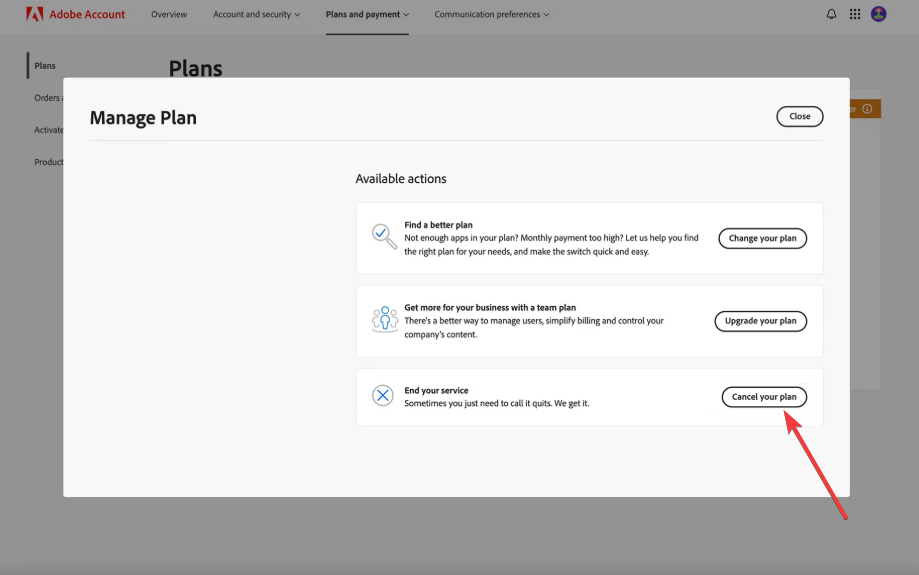
Confirm cancellation. You can still access your saved files in the cloud or export them locally.
4) What you get with the Adobe Illustrator free trial
The free trial gives you the full desktop app for seven days. You get advanced vector tools, brushes, and typography with no feature limits. It’s perfect for testing before you subscribe.
Key benefits of the free trial
- All premium features, not a limited demo.
- Cloud storage for saving and syncing designs.
- Automatic updates via Adobe Creative Cloud.
- Works on Windows and macOS.
Tips for first-time Illustrator users
- Start with templates to speed up your workflow.
- Practice the Pen Tool to master anchor points.
- Turn on Autosave to protect your work.
- Try beginner tutorials inside Creative Cloud.
FAQs about downloading Adobe Illustrator free
Is the trial version fully functional? Yes. The seven-day trial includes every feature of the paid plan.
Can I use Illustrator offline during the trial? Yes, but you must sign in online once to activate the trial.
What happens after seven days? Adobe bills your card unless you cancel. You can still view files, but can’t edit them without a plan.
Is there a student discount after the trial? Yes. Eligible students and teachers can get a discounted plan.
Summary
- Sign up on Adobe’s site.
- Start the seven-day Illustrator trial.
- Install via Creative Cloud.
- Cancel before renewal if you won’t subscribe.
- Use mobile/web versions or free alternatives afterward.
Conclusion
Downloading Adobe Illustrator for free is straightforward when you use the official trial. It lets you explore pro tools without paying up front. If you like the workflow, move to a plan or keep creating with free alternatives.


Discussion (0)
Be the first to comment.