




Many Cash App users want to deposit physical cash directly at an ATM. While it seems convenient, Cash App doesn’t currently support cash deposits through any ATM network. Still, you can quickly load money to your Cash App Card using verified methods that work in 2025. This guide covers the options available to you, including adding cash via retail partners and direct transfer from a linked bank.
1) Why you can’t deposit money at an ATM
Cash App operates as a financial technology service, not a full-service bank. Because of that, it doesn’t partner with ATM networks that handle cash deposits. ATMs require routing through a linked checking account, which Cash App doesn’t provide directly.
2) Verified ways to add money to your Cash App card
Even though ATM deposits aren’t available, you can still load funds easily. Cash App offers three safe options that work nationwide.
Add Cash via Retail Partners (paper money deposit)
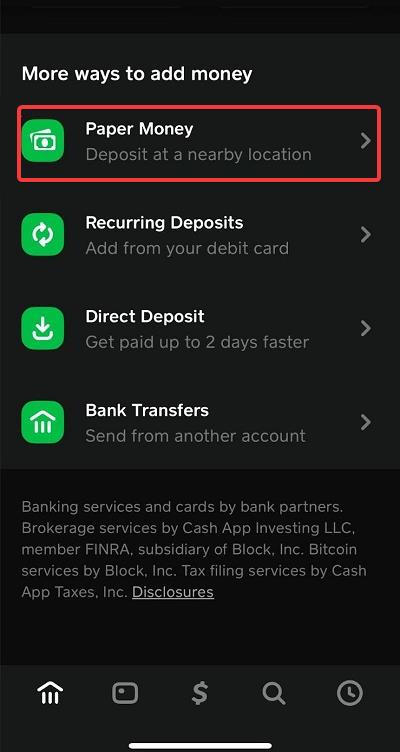
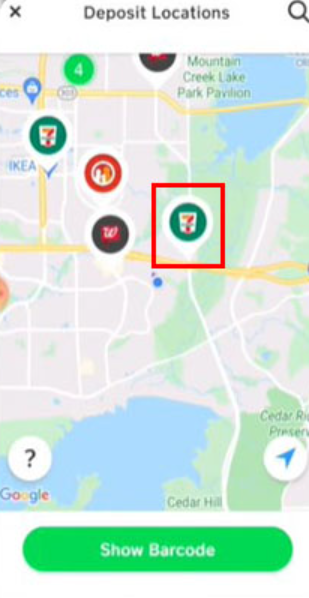
Open Cash App, tap the Bank tab, and choose Paper Money. A map appears on your screen and a Show barcode button. Click the button, show it to a cashier at stores like Walmart, Walgreens, or CVS, hand over your cash, and the money appears in your account instantly or within minutes.
Most stores charge a small fee per transaction, and deposits are limited per 7-day and 30-day periods.
Transfer from a linked bank account
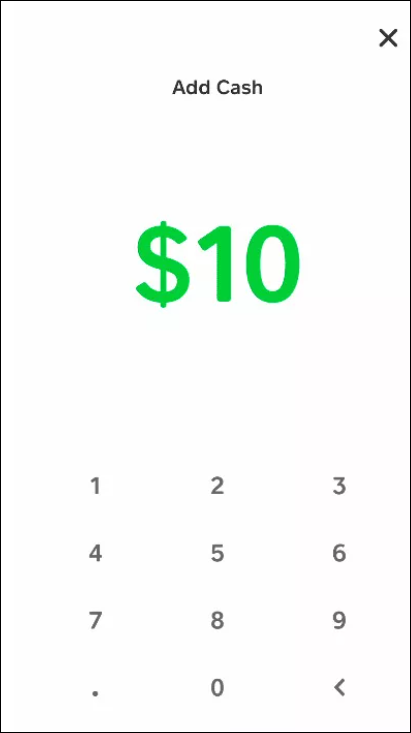
You can link your checking account to Cash App and transfer money directly. Tap Banking > Add Cash, choose an amount, and confirm with your PIN. Transfers from linked accounts are free and usually instant, depending on your bank’s support.
Receive money from other Cash App users
Ask friends or family to send you money via Cash App. Once you receive funds, they instantly appear in your balance and can be used with your Cash App Card anywhere Visa is accepted.
3) Where you can load cash in person
You can deposit physical cash at more than 70,000 partner retail locations across the U.S. Major options include Walmart, Walgreens, 7-Eleven, Family Dollar, Rite Aid, and Dollar General. Use the Cash App map to find the nearest location that supports Paper Money Deposits.
4) How to find the nearest cash deposit location
In Cash App, tap Bank > Paper Money. The app shows a map of nearby stores that accept deposits. Some smaller stores within the same chain may not participate, so confirm before visiting.
5) What to avoid when trying to deposit cash
Don’t attempt to insert cash into an ATM slot for your Cash App Card - it won’t work. Bank tellers also can’t deposit funds directly into your Cash App account. Be cautious of online third-party load services that claim to fund your Cash App balance; many are scams.
6) ATM Features you can use with your Cash App card
While you can’t deposit cash, you can withdraw money from most ATMs that display the Visa or Mastercard logo. Each withdrawal has a fee, though Cash App reimburses fees for direct-deposit users who receive at least $300 per month in paychecks.
7) Troubleshooting common deposit issues
- Store scanner can’t read your barcode: Restart the app and try again.
- Deposits not appearing in balance: Review your receipt and contact Cash App Support through the app’s Help > Report an Issue section.
Tips for managing Cash App deposits
- Track your deposit limits in the Paper Money section.
- Always verify your linked account before transferring money.
- Turn on deposit notifications for real-time updates.
- Keep your in-store receipts until funds show up.
FAQs about depositing money on Cash App
- Can I deposit a check? Yes. Use the mobile check deposit option if available in your app version.
- What are the deposit limits? Up to $1,000 every 7 days and $4,000 every 30 days for Paper Money Deposits.
- Are there fees? Retailers may charge up to $4 per deposit.
- Will ATM deposits ever be supported? Cash App hasn’t announced any plans for this feature yet.
Summary
- ATM deposits aren’t supported on Cash App Cards.
- Use Paper Money Deposits at participating retailers.
- Link a bank account for free instant transfers.
- Receive funds directly from other Cash App users.
- Withdraw cash from ATMs displaying Visa or Mastercard logos.
Conclusion
Cash App Cards can’t accept ATM deposits, but funding your account is still simple. Use your app barcode at major retailers or transfer from your bank for quick results. With these trusted methods, you’ll always have funds ready to spend on your Cash App Card.



Discussion (0)
Be the first to comment.