




Your SIM card number, also known as an ICCID, identifies your phone’s connection to your carrier’s network. You might need it when activating service, switching phones, or contacting support. Fortunately, finding it only takes a few seconds, whether you use Android, iPhone, or eSIM.
1) What is a SIM card number and why it matters
Your SIM card number, or ICCID, is a 19–20 digit code unique to your SIM. It helps your mobile carrier verify your account and track your subscription. This number is often required when porting your number, replacing a SIM, or managing prepaid plans.
2) How to find your SIM card number on Android
Most Android phones let you view the SIM number directly in settings. If it’s missing, you can still retrieve it through the carrier app or on the SIM itself.
Using Settings
Open Settings on your Android device and select About phone, then choose Status. Tap SIM status or SIM information. Lastly, scroll until you see ICCID or SIM serial number.

Checking via carrier app or dial code
Some carriers display your SIM card number inside their app. You can also try dialing *#06# to bring up a list of identifiers, including ICCID on certain phones. This is useful if your settings don’t show the number.
Reading the number directly from the SIM card
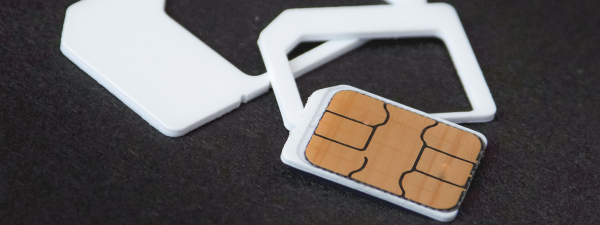
If you prefer, eject the SIM tray using a pin or paperclip and read the printed digits. Handle the card gently to avoid bending the metal contacts. If the numbers are small, use your phone camera to zoom in for clarity.
3) How to find your SIM card number on iPhone
Apple devices make it simple to locate your ICCID within the Settings app or through Finder/iTunes on a computer.
To find it using the Settings app, open Settings, tap General and go to About. Now, scroll down until you find the ICCID field - this is your SIM card number.
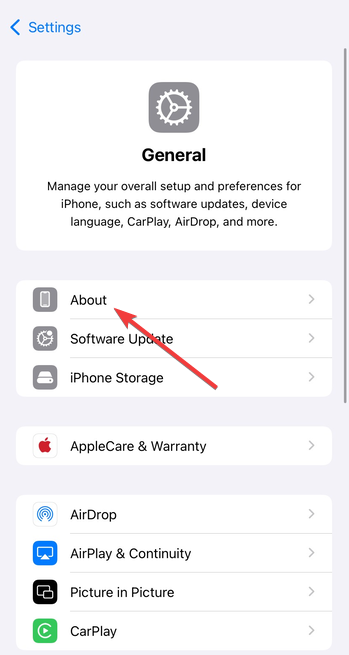
You can also connect your iPhone to a Mac or PC, open Finder or iTunes, and select your device. The ICCID appears in the Summary section along with other identifiers like IMEI and serial number.
4) How to find your eSIM number
Phones with eSIMs store the ICCID digitally instead of on a physical card. You can still access it within your device’s network settings.
On Android with eSIM, open Settings > Mobile networks. Choose your eSIM profile and look for ICCID under SIM details.
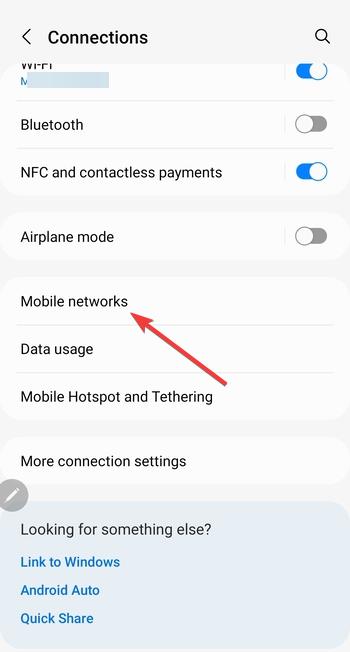
For iPhone with eSIM, go to Settings > Cellular and tap your eSIM plan. Scroll down to view the ICCID listed near the bottom of the screen.
5) Carrier codes and manufacturer differences
Device menus vary slightly by manufacturer. For example, Samsung uses SIM manager, while Google Pixel places ICCID under About phone. Some carriers let you dial short codes such as *#06# or check their mobile app to see your SIM information directly.
6) Understanding the digits in your ICCID
An ICCID isn’t random - it encodes key data. The first two digits identify the issuing network, followed by the country code, issuer identifier, and a unique serial segment. Knowing this structure helps confirm if your SIM belongs to your current carrier.
7) What to do if your SIM number isn’t showing
If you can’t find the ICCID, it may be hidden by your carrier or a temporary software glitch. Try these quick fixes.
- Restart your phone to refresh the network connection.
- Remove and reinsert the SIM card securely.
- Enable and disable Airplane mode to reset detection.
- Check the original SIM packaging for the printed number.
- Insert the SIM into another unlocked phone to read its ICCID.
- Contact your carrier’s support to retrieve it from your account profile.
Privacy and security tips
Your SIM number can’t unlock your phone, but it still connects to your carrier profile. Avoid posting it online or sharing it in screenshots. Keep your old SIM cards secure or destroy them before disposal.
FAQ
Is the SIM card number the same as my phone number? No. The ICCID identifies your SIM card, while your phone number links to your service line.
Can I find my SIM number without removing the card? Yes. Both Android and iPhone devices display the ICCID in their settings. You only need to remove the card if the entry is missing.
Does every SIM have a unique ICCID? Yes. Every SIM, including eSIMs, has a unique ICCID that distinguishes it from all others in your carrier’s network.
Summary
- Check your SIM number in Settings (Android: About phone; iPhone: About).
- Use *#06# or your carrier’s app if not visible in settings.
- Read the digits printed on your SIM card if accessible.
- Find the ICCID under your eSIM plan or computer connection if applicable.
- Contact your carrier for help if the number doesn’t appear.
Conclusion
Finding your SIM card number takes only a few taps, and knowing where to look saves time when setting up or troubleshooting your phone. Whether you use a physical SIM or eSIM, your ICCID is always stored securely in your device or available on the card itself. Keep it private, note it for future reference, and you’ll be ready whenever your carrier needs it for verification or activation.

Discussion (0)
Be the first to comment.