The ASUS ROG Crosshair VIII Impact motherboard has a special form factor called mini-DTX and it shows off with some impressive specifications and a cool design. If you're looking for a small motherboard to build a small monster gaming computer, and you want to have every "trick or treat" available in the world of AMD 3rd Gen of Ryzen processors, check out our review. You might have found the motherboard that you were looking for:
ASUS ROG Crosshair VIII Impact: Who is it good for?
The ASUS ROG Crosshair VIII Impact should be in your to-buy list if:
You aspire to build a powerful mini-PC using the mini-DTX form factor
You are a gamer who wants to play the newest titles
You want a motherboard that is optimized to work with AMD's 3rd Gen Ryzen processors
You want solid overclocking options on your motherboard
Pros and cons
There are many things that we like about the ASUS ROG Crosshair VIII Impact motherboard:
It looks fantastic, and the layout is well designed
It handles the fastest AMD 3rd Gen Ryzen processors
Supports very high RAM frequencies
It allows you to mount two M.2 SSDs
It has plenty of fast USB 3.2 Gen 2 ports
It has RGB LED headers and supports ASUS' Aura lighting system
The cooling system is excellent at its job and is also quiet
The only drawback is this motherboard's price, which might be too high for many users.
Product rating5/5
Verdict
We love the small but powerful ASUS ROG Crosshair VIII Impact motherboard. It has a cool design, it is powerful, and generous in the number of ports and goodies that it has to offer. It can handle even the fastest of the Ryzen 3000 processors, it supports extremely high frequencies for the RAM modules, and the way it lets you add two solid-state drives on a vertical mount is quite ingenious. If its high price is not an issue for you, and you want a small motherboard that fits any top-tier two-slot graphics card, you should consider buying the ASUS ROG Crosshair VIII Impact. It is a great motherboard for your next mini-monster gaming PC!
Unboxing the ASUS ROG Crosshair VIII Impact
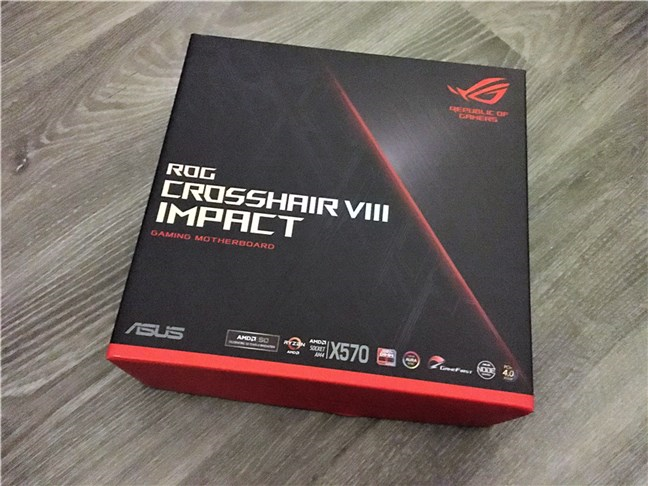
ROG Crosshair VIII Impact is a motherboard released by ASUS under their premium gaming brand Republic of Gamers. As such, its packaging is premium too. It comes in a medium-sized box made of hardened cardboard, and it features the ROG red and black colors with Mayan-inspired lines.
ASUS ROG Crosshair VIII Impact: The box
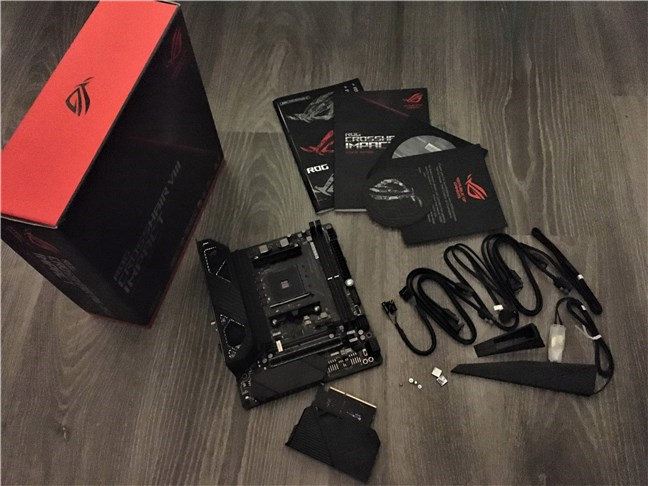
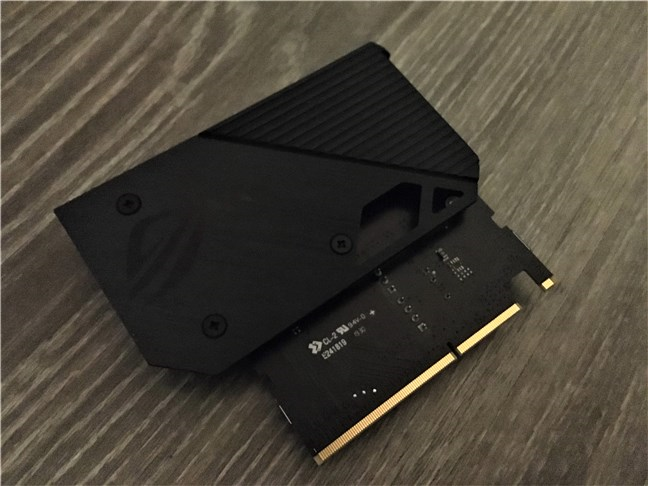
On the back of the box, there are a lot of details about the specifications and features of the motherboard, plus more than a few images of it and its main components. When you open the box, you get to see everything that you've paid for: the motherboard, the user manual, 4 SATA 6Gb/s cables, one DVD with drivers and software, one ROG big sticker, two M.2 screw kits with short screws and mounts, one Wi-Fi antenna, one extension cable for RGB strips with a length of 80 cm, one extension cable for Addressable LED, one panel cable, one ROG coaster, a ROG "Thank you!" card, one ROG SO-DIMM.2 with heatsinks, and one 2-in-1 rubber pad.
ASUS ROG Crosshair VIII Impact: The contents of the box
Unboxing the ASUS ROG Crosshair VIII Impact is a delight worthy of a premium device. The motherboard looks exquisite from the first encounter, and the bundle of accessories is generous.
Hardware specifications and design
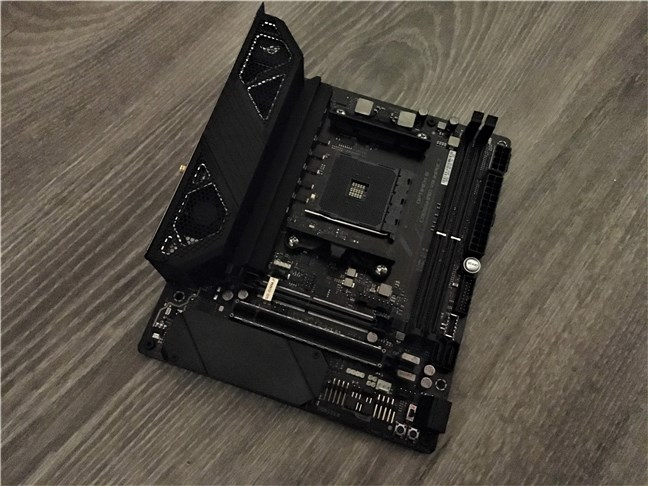
The form factor for ASUS ROG Crosshair VIII Impact is mini-DTX, which is a format that's somewhat unconventional. It is a bit larger than mini-ITX, which is the most common form factor for small computer cases. What does that mean for you as a user? Well, it means that, before you buy this motherboard, you should check whether it fits your small PC case. ASUS ROG Crosshair VIII Impact is 8 inches long and 6.7 inches wide or 20.3 x 17 cm.
A view of the ASUS ROG Crosshair VIII Impact
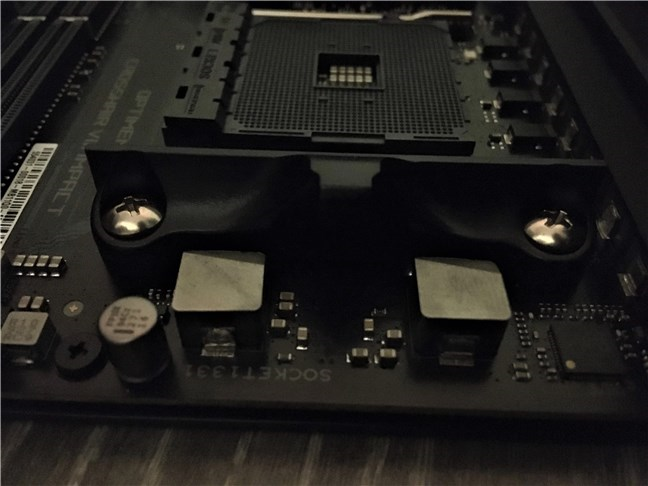
The motherboard is based on AMD's newest X570 chipset and supports AMD Ryzen processors from the 3rd and 2nd generations, and AMD Ryzen with Radeon Vega Graphics processors from the 2nd and 1st generations. Evidently, the motherboard uses the Socket AM4 specification. If you want to check the full list of officially supported processors, you can do so here: ASUS ROG Crosshair VIII Impact - CPU Support.
ASUS ROG Crosshair VIII Impact: Socket AM4 and VRMs
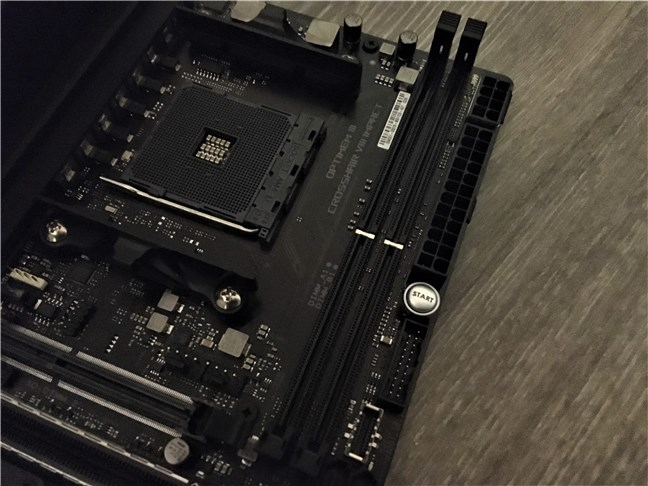
The ASUS ROG Crosshair VIII Impact can also accommodate 2 DIMM RAM modules with a total capacity of 64GB and a maximum frequency of 4800 MHz in overclocking mode, together with a 3rd Gen Ryzen CPU. With a 2nd Gen Ryzen CPU, the maximum RAM speed is 3600 MHz.
ASUS ROG Crosshair VIII Impact: There are 2 DIMM slots
Because the Mini-DTX form factor is bigger, it offers more space than mini-ITX. ASUS ROG Crosshair VIII Impact takes advantage of this specification by offering enough space for you to mount a two-slot external PCIe 4.0 x16 graphics card. One small aspect that we couldn't help but notice is the fact that ASUS's designers were inspired and chose to reinforce the GPU slot with a metal frame, to accommodate even the heaviest graphics cards.
ASUS ROG Crosshair VIII Impact: The GPU slot is reinforced with metal
Right underneath the graphics card slot, there is also another PCIe 4.0 x4 M.2 slot, but this one is already used by the hardware audio codec built-in on the motherboard. The audio chipset is one of ASUS' top-range choices: a SupremeFX S1220A HD audio codec with ESS ES9023P DAC.
The SupremeFX audio chipset
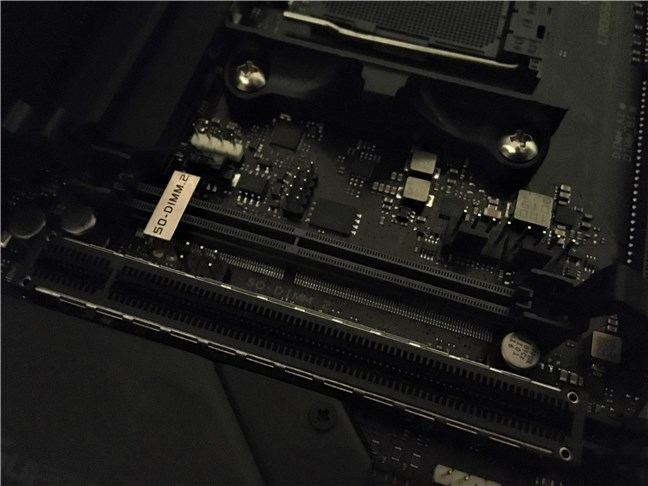
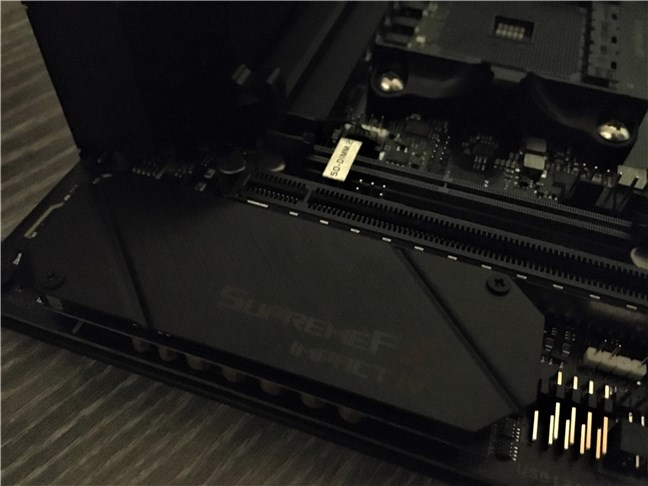
Above the graphics card slot, ASUS chose to do a rather interesting thing: it mounted a dual M.2 riser module, otherwise known as a SO-DIMM.2 slot. If you are wondering what this is, you should know that it's a small card that can fit two PCIe 4.0 x4 M.2 solid-state drives and which you mount in its slot vertically, thus saving quite a lot of space on the motherboard.
The SO-DIMM.2 slot that accommodates up to two M.2 SSDs
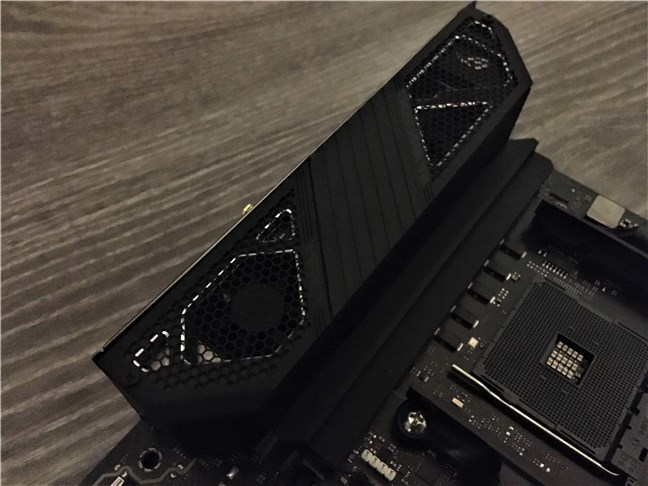
Another interesting design choice is how ASUS chose to create the cooling system. On top of the input/output panel, there are two fans that take the heat from the processor's VRMs and from the X570 chipset and blow it out of the case. The cooling system not only looks good, but it is also efficient at its job.
The active cooling system has two silent fans
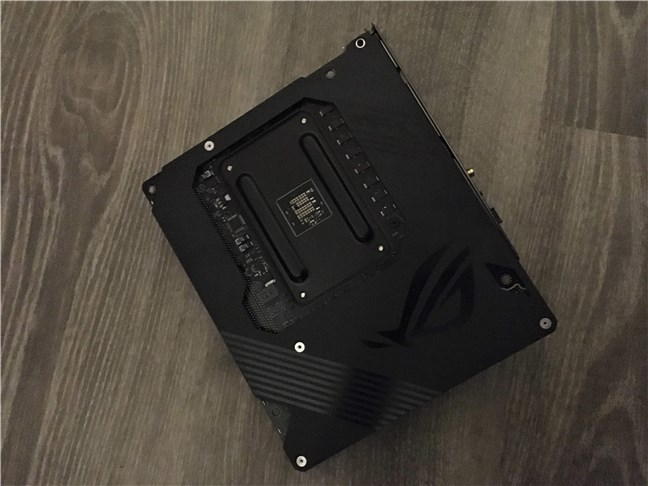
To help with heat dissipation, the motherboard also has a large metal backplate. Besides its utility factor, it comes with a cool design, as you can see in the picture below.
There's a backplate on the back of the motherboard
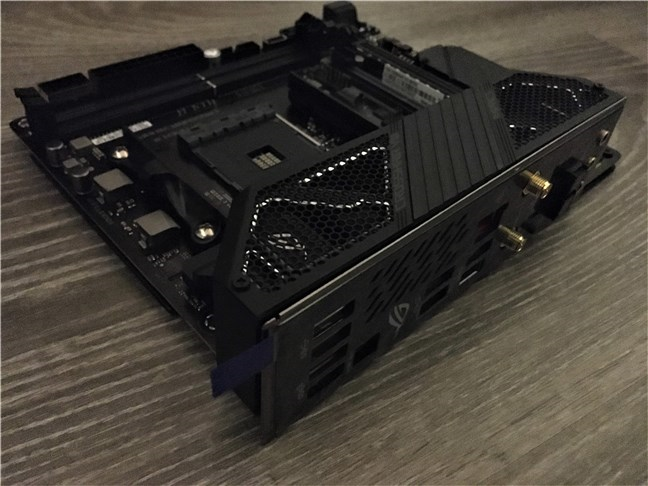
And, as we reached the input-output panel, we should also check the ports and connectivity options available on this motherboard. You can't be anything but satisfied when you get so many options on such a small motherboard: Intel 802.11ax Wi-Fi 6, Bluetooth 5.0, Gigabit Ethernet, six USB 3.2 Gen 2 ports (one of them is Type-C), four SATA 6 Gbps ports, and two M.2 SSD slots that we've already mentioned (on their special vertical mount).
On its IO panel, the motherboard also comes with a BIOS POST code display, a button for clearing CMOS, one for USB BIOS Flashback, and one for reset. Additionally, directly on the motherboard plate, you also get buttons for power, retry POST, and load failsafe BIOS settings.
ASUS ROG Crosshair VIII Impact: The IO panel
The ASUS ROG Crosshair VIII Impact looks and feels premium, and the build quality is exquisite. We were impressed not only by how beautiful it is, but also by its premium specifications and the generous number of ports, connectivity options, and features.
On the next page of this review, you see the benchmark results we got from the ASUS ROG Crosshair VIII Impact.
ASUS ROG Crosshair VIII Impact - Benchmark results
We tested ASUS ROG Crosshair VIII Impact motherboard together with the following hardware and software:
We also compared the results we got on the ASUS ROG Crosshair VIII Impact with another premium motherboard, also made by ASUS, the ROG Crosshair VIII Hero (Wi-Fi).
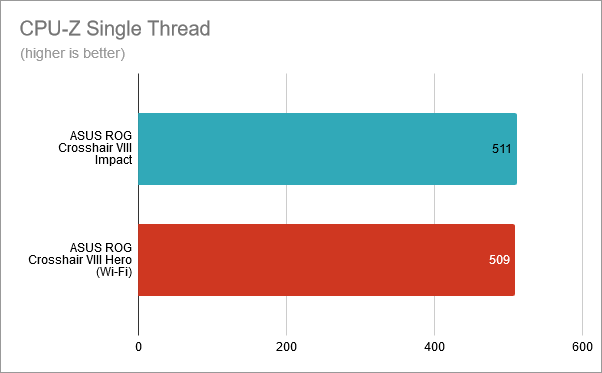
We started by running the benchmark offered by CPU-Z. In the Single-Thread test, using the ASUS ROG Crosshair VIII Impact motherboard, the Ryzen 7 3700X processor scored 511 points, while on the ASUS ROG Crosshair VIII Hero (Wi-Fi) it scored 509 points. It's a similar result, within the testing variability zone.
CPU-Z Single-Thread: ASUS ROG Crosshair VIII Impact vs. Crosshair VIII Hero
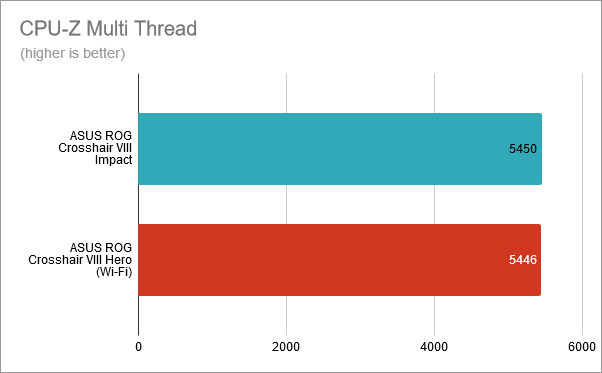
In CPU-Z's Multi-Thread test, which measures the multi-core performance of the processor, we got 5450 points on the Crosshair VIII Impact and 5446 on the Hero (Wi-Fi) motherboard. Again, similar results.
CPU-Z Multi-Thread: ASUS ROG Crosshair VIII Impact vs. Crosshair VIII Hero (Wi-Fi)
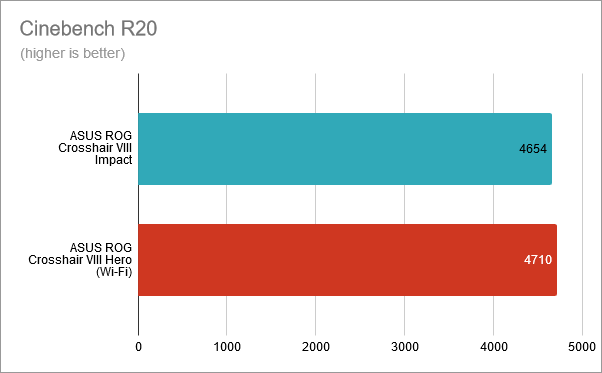
Next, we ran Cinebench R20, a benchmark that measures the computer's rendering speed. Using the ASUS ROG Crosshair VIII Impact, we obtained a score of 4654 points, while on the ASUS ROG Crosshair VIII Hero (Wi-Fi), we got 4710 points.
Cinebench R20: ASUS ROG Crosshair VIII Impact vs. Crosshair VIII Hero (Wi-Fi)
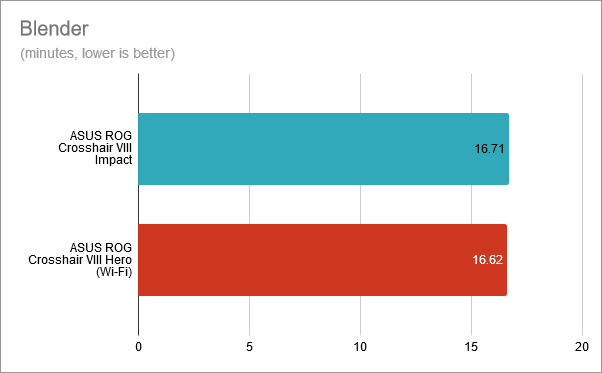
Blender measures the time needed by the computer to render two different scenes, and the lower the result, the better. Using the Crosshair VIII Impact motherboard, the benchmark finished in 16.71 minutes. On the Crosshair VIII Hero (Wi-Fi), it finished in 16.62 minutes.
Blender: ASUS ROG Crosshair VIII Impact vs. Crosshair VIII Hero (Wi-Fi)
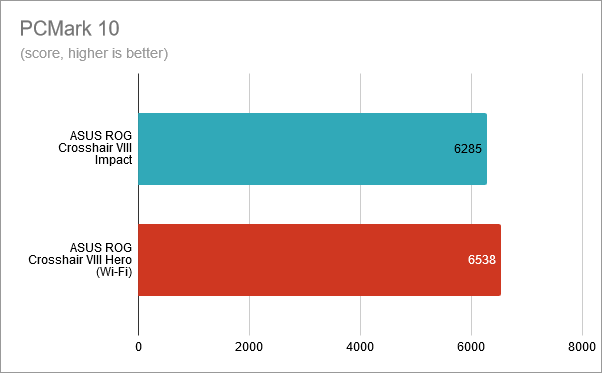
We also ran PCMark 10, a benchmark that measures the computer's performance in common daily tasks such as web browsing, video conferencing, app start-up times, productivity, and digital content creation. This time, there was a visible difference in performance between the two motherboards: on the Crosshair VIII Impact, we got 6285 points, and on the Crosshair VIII Hero (Wi-Fi), we got 6538 points.
PCMark 10: ASUS ROG Crosshair VIII Impact vs. Crosshair VIII Hero (Wi-Fi)
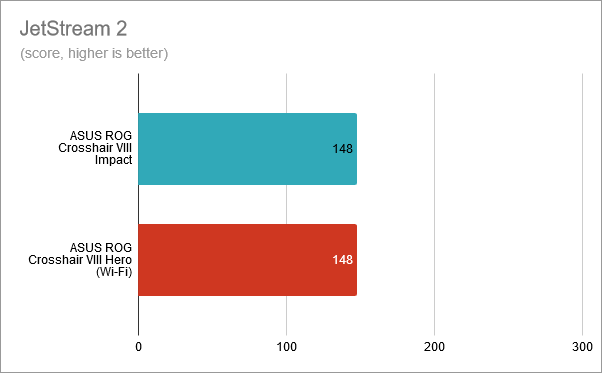
In JetStream 2, a web browsing test that we ran in Google Chrome, the performance score for both motherboards was the same: 148 points.
JetStream 2: ASUS ROG Crosshair VIII Impact vs. Crosshair VIII Hero (Wi-Fi)
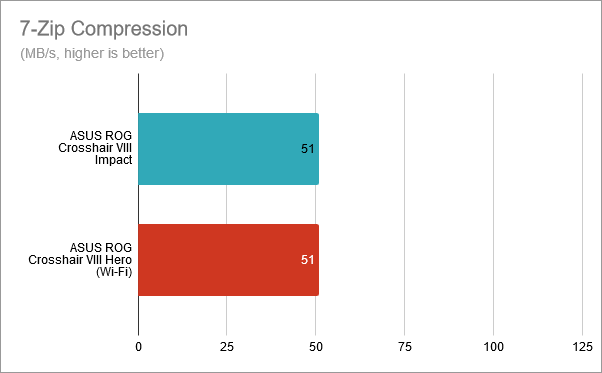
7-Zip also has a benchmarking tool, and it's a good indicator of how fast the processor is. In the compression test, our results showed that the Ryzen 7 3700X was just as fast on the Crosshair VIII Impact as it was on the Crosshair VIII Hero (Wi-Fi).
7-Zip Compression: ASUS ROG Crosshair VIII Impact vs. Crosshair VIII Hero (Wi-Fi)
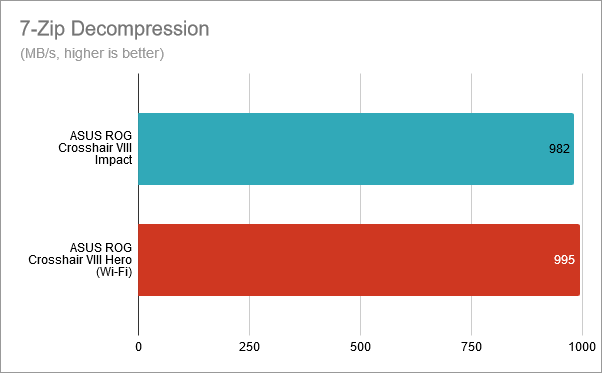
In 7-Zip's decompression test, the Ryzen 7 3700X was a bit faster on the Crosshair VIII Hero (Wi-Fi). However, the difference was insignificant and within the testing variability area.
7-Zip Decompression: ASUS ROG Crosshair VIII Impact vs. Crosshair VIII Hero (Wi-Fi)
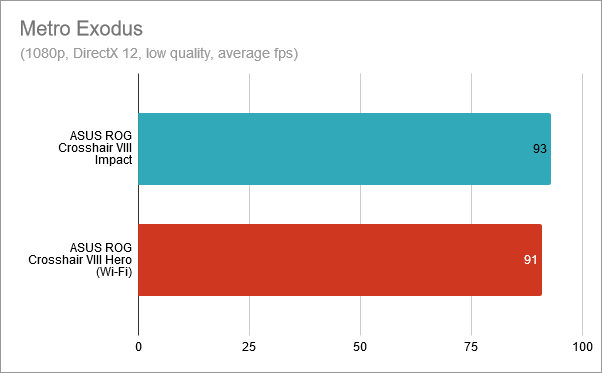
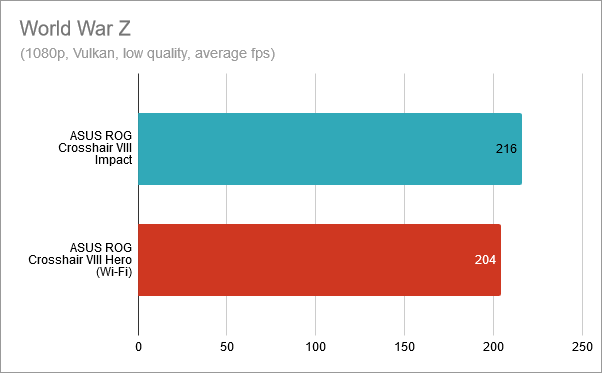
We also tested a few games: Shadow of the Tomb Raider, Metro Exodus, and World War Z.
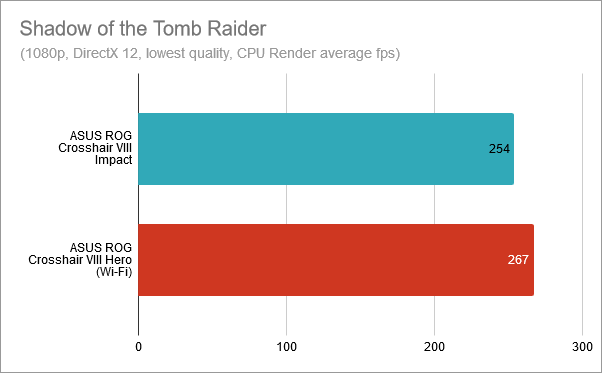
In Shadow of the Tomb Raider, the CPU Render benchmark result showed that the Ryzen 7 3700X, together with the ASUS ROG Crosshair VIII Impact motherboard, was able to render 254 frames per second. On the ASUS ROG Crosshair VIII Hero (Wi-Fi) motherboard, it was able to render 267 frames per second.
Shadow of the Tomb Raider: ASUS ROG Crosshair VIII Impact vs. Crosshair VIII Hero (Wi-Fi)
In Metro Exodus, the ASUS ROG Crosshair VIII Impact motherboard seemed to offer a bit more performance (2 frames more) compared to the ASUS ROG Crosshair VIII Hero (Wi-Fi).
Metro Exodus: ASUS ROG Crosshair VIII Impact vs. Crosshair VIII Hero (Wi-Fi)
Finally, in World War Z, the ASUS ROG Crosshair VIII Impact also seemed to be faster than the ASUS ROG Crosshair VIII Hero (Wi-Fi) motherboard: 216 fps versus 204 fps.
World War Z: ASUS ROG Crosshair VIII Impact vs. Crosshair VIII Hero (Wi-Fi)
After finishing benchmarking the ASUS ROG Crosshair VIII Impact motherboard, we came to the conclusion that it's just as powerful as our favorite ASUS X570 motherboard: the ROG Crosshair VIII Hero (Wi-Fi). Although it has a small form factor, the ASUS ROG Crosshair VIII Impact offers top-notch performance.
The software bundled with ASUS ROG Crosshair VIII Impact
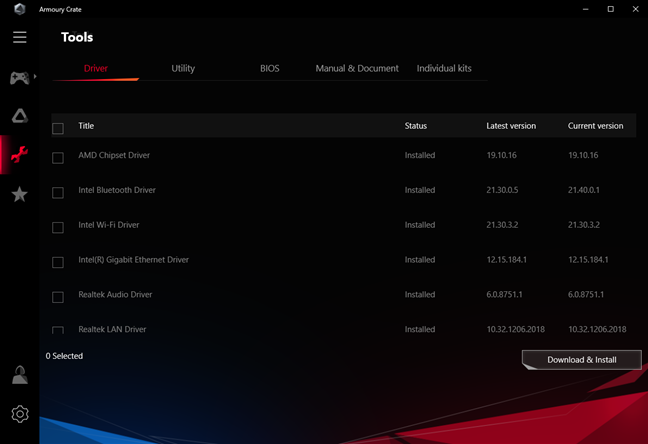
ASUS provides several different apps, but the essential settings and features are all available via an app called Armoury Crate. After you install Windows 10, you are prompted to install it, but, even if you don't, you can later get it from the Microsoft Store.
Armoury Crate: A hub for drivers, tools, and settings
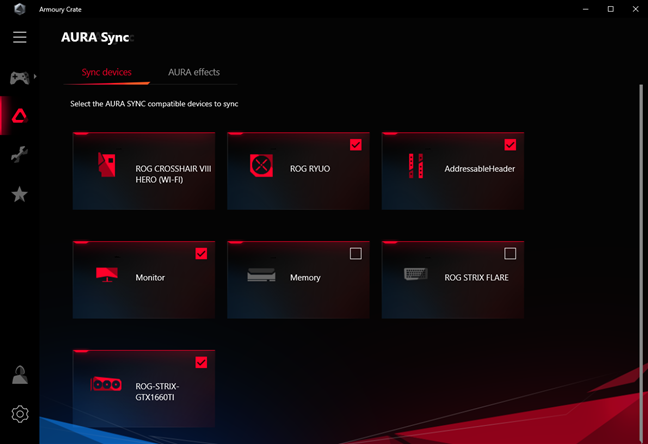
Armoury Crate is a hub from which you can install the drivers, additional apps offered or recommended by ASUS, update BIOS, manage the Aura Sync RGB lighting effects, change the settings of some of your other Republic of Gamers devices, as well as save your settings in the cloud using your ASUS user account. The app looks like a great improvement over the older AURA Lighting Control application, which was riddled with bugs.
Armoury Crate: Settings available for AURA Sync
You also get Sonic Studio III and Sonic Radar III for adjusting and configuring the audio chipset.
Sonic Studio III: Tool for configuring audio playback and recording
Then there's the list of utility and recommended apps that are not preinstalled, but which you can install if you want them:
Google Chrome: the world's most popular web browser.
AI Suite 3: a program that analyzes and shows data about your device and helps you automate things such as power consumption or fan speed.
BullGuard Internet Security: a good computer security solution with a high-quality antivirus and firewall. Theoretically, you get a one-year subscription, but, when we installed it, we only got a 10-days trial.
CPUID ROG CPU-Z: a small tool that displays information about the processor and also allows you to quickly benchmark it.
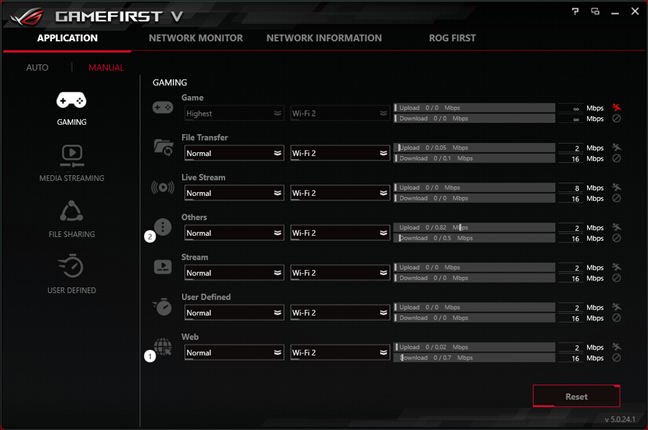
GameFirst V: a tool that lets you manage network traffic for a lag-free gaming experience.
Overwolf: a tool that can overlay information from various apps in the Overwolf Appstore, while playing games.
RAM Cache III: creates a fast cache in the RAM to help speed the loading of games.
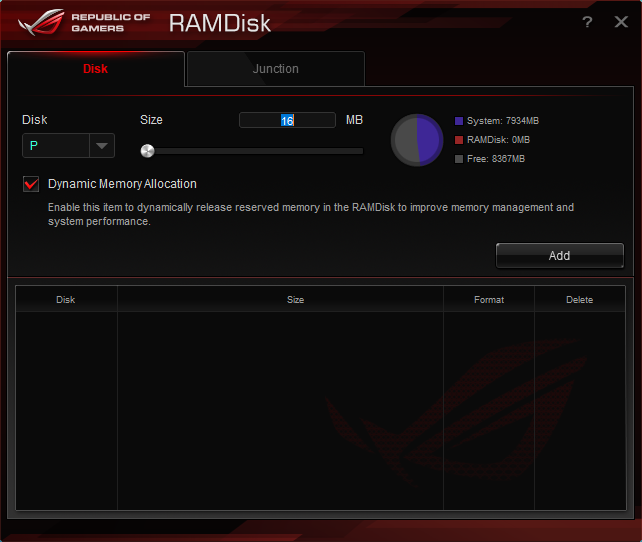
ROG RAMDisk: allows you to create a virtual disk using some of your RAM. Although the virtual disk is fast, it also means that you have to lock part of the RAM on your PC.
WinRAR: a popular shareware compression tool.
ROG RAMDisk: Creates virtual drives using RAM
The software that ASUS bundles with the ROG Crosshair VIII Impact are useful and better than it used to be in the past. We also appreciate the fact that all the unnecessary additional apps are not pre-installed by default: ASUS lets you choose which you want and which you don't.
What is your opinion about the ASUS ROG Crosshair VIII Impact?
We loved the small, cute, and powerful, ASUS ROG Crosshair VIII Impact motherboard. Before leaving, tell us: do you feel the same? Do you already have it, or do you intend to buy it? Comment below and let's discuss.














Discussion (0)
Comments are closed.