




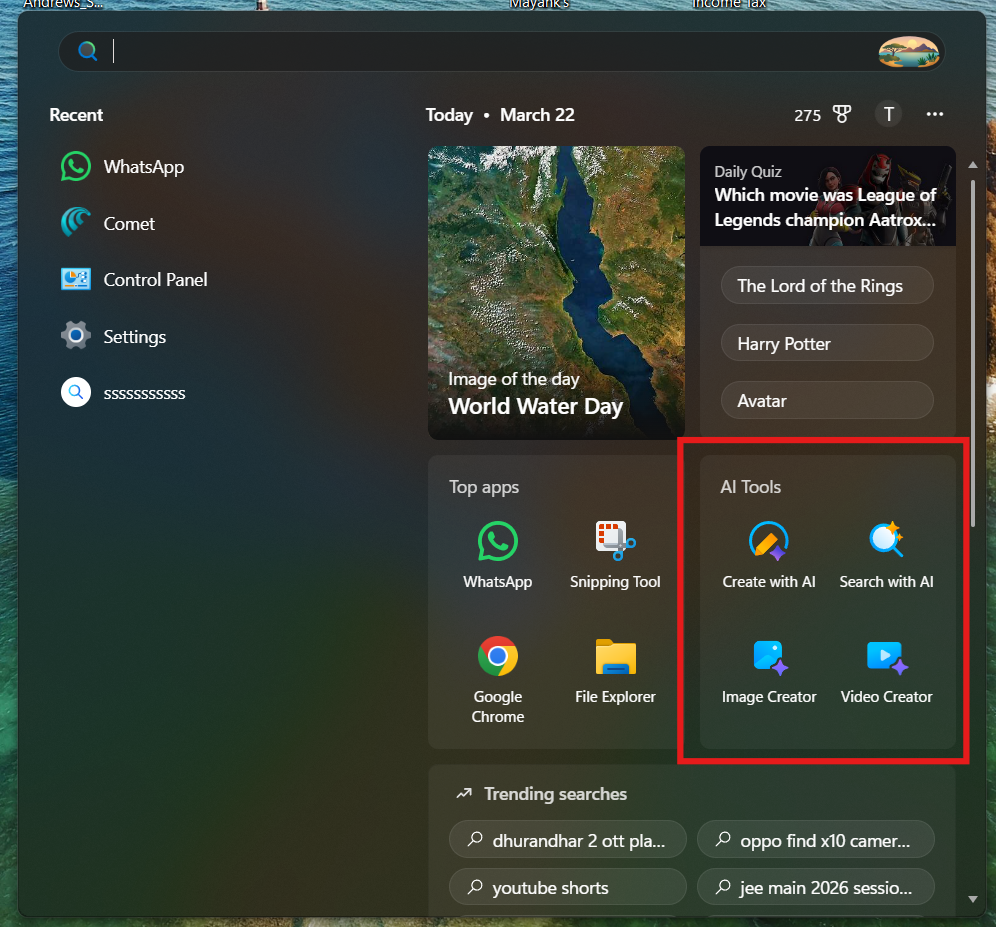
If you’ve noticed changes in your system, you might be wondering about AI tools in the Windows Start Menu in the new update. Microsoft has started integrating AI features directly into Windows, making them easier to access from everyday places like the Start menu.
This is part of Microsoft’s push to bring AI into regular workflows, not just separate apps.
What Are AI Tools in the Windows Start Menu?
In recent Windows 11 updates, Microsoft is adding AI-powered features and shortcuts directly into the Start menu. These are designed to help you quickly access AI tools without opening separate apps.
You may see:
- AI app suggestions
- Quick access to Copilot
- Smart recommendations
- AI-powered search enhancements
The goal is to make AI a natural part of how you use your PC.
What Is Microsoft Copilot in Start Menu?
The main AI feature integrated into Windows is Microsoft Copilot.
It is an AI assistant that helps with:
- Answering questions
- Writing content
- Changing system settings
- Summarizing information
In newer updates, Copilot is easier to access from the Start menu or taskbar.
How AI Features Appear in Start Menu
Depending on your update, you may notice:
1. AI-Powered Search
- Start menu search becomes smarter
- You can type natural language queries
- Windows suggests relevant results faster
2. Copilot Integration
- Shortcut or button for Copilot
- Quick access without opening a browser
3. Smart Recommendations
- Suggested apps or files based on usage
- AI-driven suggestions for tasks
4. Content Suggestions
- Recently used files
- AI-based productivity hints
How to Use AI Tools from Start Menu
Using AI features is simple.
Step 1: Open Start Menu
Press the Windows key or click the Start button.
Step 2: Use Search
Type a natural query like:
- “Summarize this document”
- “Open settings for display”
- “Best apps for editing videos”
Step 3: Open Copilot (If Available)
- Click the Copilot icon
- Start interacting with AI directly
Benefits of AI in Start Menu
These new features improve everyday use.
- Faster access to tools
- Smarter search results
- Reduced need for multiple apps
- Better productivity
It brings AI closer to your daily workflow.
Limitations of Current AI Features
Since these features are still evolving:
- Not available in all regions
- Requires latest Windows updates
- Some features depend on Microsoft account
- May not work offline
Updates will continue to improve functionality.
How to Get AI Features in Start Menu
To access these features:
- Open Settings
- Go to Windows Update
- Click Check for updates
- Install the latest version
You may also need to enable Copilot manually.
Final Thoughts
The addition of AI tools in the Windows Start Menu in the new update shows how Microsoft is integrating AI into everyday computing. Instead of being a separate tool, AI is becoming part of how you search, open apps, and manage tasks.
While still evolving, these features are a step toward a more intelligent and responsive operating system.
FAQs
What AI tools are in Windows Start Menu?
Mainly Microsoft Copilot, AI-powered search, and smart recommendations.
Do I need to enable Copilot?
In some cases, yes. It depends on your system and region.
Is AI available in all Windows versions?
No. It is available in newer Windows 11 updates.
Can I use AI offline?
Most AI features require an internet connection.


Discussion (0)
Be the first to comment.