




If you have spent any time in software development, the name Postman comes up constantly. It is the tool developers reach for when they need to test an API, debug a request, or understand how a service responds before writing a single line of code. But Postman has grown well beyond a simple testing tool. It is now a full API platform used by over 40 million developers and 500,000 organizations worldwide. This guide explains what Postman is, what it actually does, and why it has become the default choice for API work across the industry.
What Is Postman?
Postman is an API platform that lets developers design, build, test, document, and monitor APIs from a single interface. It was started in 2012 by Abhinav Asthana as a side project while working at Yahoo in Bangalore. The name is a play on the HTTP POST method, one of the core request types used in web APIs. What began as a Chrome extension for sending API requests grew into one of the most widely used developer tools in the world.
At its most basic, Postman is an API client. It gives you a graphical interface to send HTTP requests to any API endpoint and see the response, without writing code. Instead of using the command line or embedding test calls in your application, you open Postman, enter a URL, choose a request method, configure any headers or authentication, and click Send. The response comes back formatted and readable, with status codes, headers, timing information, and the response body all clearly displayed.
That core functionality is what most people know Postman for. But the platform has expanded significantly and now covers the entire API lifecycle from the first design sketch to production monitoring.
How APIs Work and Why Postman Matters
An API, or Application Programming Interface, is the way software systems communicate with each other. When your weather app shows the current temperature, it is calling an API from a weather service. whether you pay for something online, your browser calls a payment API. When a company's internal apps share data between departments, they do it through APIs.
Building and maintaining those connections requires testing them constantly. Does this endpoint return the right data? What happens when you pass an invalid parameter? Is authentication working correctly? Does the response format match what the front-end expects? These questions need answers at every stage of development, and getting those answers manually without a dedicated tool is tedious and slow.
Postman provides the environment to ask and answer those questions quickly, share the results with a team, automate the testing, and keep everything organized as a project grows.
Key Features of Postman
API Client and Request Builder
The core of Postman is its request builder. You enter an API endpoint URL, select the HTTP method you want to use, which could be GET to retrieve data, POST to send data, PUT or PATCH to update something, or DELETE to remove it, and configure everything else the request needs. This includes query parameters, request headers, authentication credentials, and the request body when sending data.
Postman supports every common authentication method including API keys, OAuth 2.0, Bearer tokens, Basic Auth, and more. You set authentication once and it applies across your requests without re-entering credentials each time. The response pane shows the returned data, response time, status code, and response headers, giving you a complete picture of how the API behaved.
Collections
Collections are how Postman organizes related requests. Rather than managing dozens of individual requests scattered around, you group them into a collection that represents a project, a service, or a workflow. A collection for a user management API might include requests for creating users, retrieving user profiles, updating account details, and deleting accounts.
Collections are shareable. You can export a collection and hand it to a teammate, or publish it to Postman's public API network for anyone to use. Many companies publish their official Postman collections so developers can start testing their APIs immediately without having to build every request from scratch.
Environments and Variables
Real API workflows involve multiple environments. The same endpoint might exist in a development environment, a staging environment, and a production environment, each with a different base URL and potentially different credentials. Managing this manually by editing every request each time you switch environments is error-prone.
Postman handles this through environments and variables. You define an environment called Development with its own base URL and API key, another called Staging with different values, and switch between them with a single click. Every request that references those variables updates automatically. You can also define global variables that persist across all environments.
Automated Testing
Postman lets you write test scripts in JavaScript that run automatically after each request. These scripts check whether the response matches what you expect. You can verify that the status code is 200, that a specific field exists in the response, that a value falls within a certain range, or that the response time is under a threshold.
These tests run individually when you send a request manually, or automatically in bulk through the Collection Runner, which executes an entire collection of requests in sequence. The results show which tests passed and which failed, making it straightforward to identify broken endpoints.
Mock Servers
A common problem in development is that the front-end team needs to work before the back-end API is ready. Mock servers solve this. You define the expected API structure and responses in Postman, and Postman generates a mock server that returns those defined responses. The front-end team can build against the mock and switch to the real API when it is ready, with no code changes required.
API Documentation
Postman generates documentation automatically from your collections. Every request, its parameters, example responses, and any descriptions you add become part of a documentation page that can be published publicly or shared privately. This removes the need to maintain separate documentation files that inevitably drift out of sync with the actual API.
Monitoring
Postman monitors let you schedule collection runs at regular intervals and receive alerts when something fails. Instead of waiting for a user to report that an API is down, you find out immediately when a monitor detects an error. This is particularly useful for tracking third-party APIs your application depends on, since you get notified when they have problems rather than discovering it through broken functionality.
Postman and Team Collaboration
Postman is built for teams working on APIs together. Workspaces are shared environments where team members can access the same collections, environments, and documentation. Changes made by one person are visible to the rest of the team without manual syncing or file sharing.
In 2026, Postman launched a rebuilt platform with Git-native workspaces, meaning your collections and API specifications are stored in version control the same way your code is. Developers work on branches, review changes, and merge updates using the same Git workflows they already use for application code. This closes the gap between API development and software development that previously required constant manual synchronization.
The platform also integrates with tools teams already use. Jira integration lets you create issues directly from failed test results. Slack and Microsoft Teams integrations push test results and alerts into the channels where teams communicate. CI/CD pipeline integration means collections can run as part of automated deployment workflows, catching API regressions before they reach production.
Postman Free vs Paid Plans
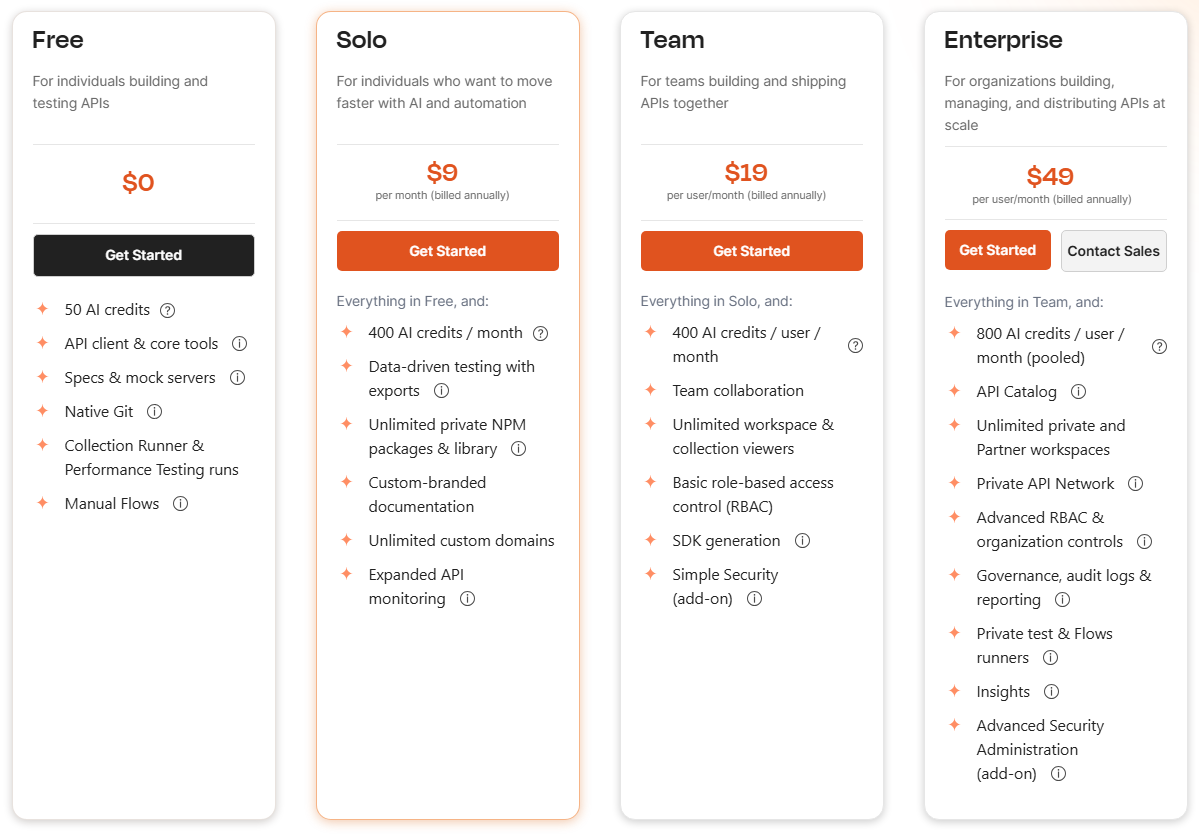
Postman offers a free tier that covers the core functionality most individual developers need. You get the API client, collections, environments, basic testing, and documentation generation without paying anything. Free workspaces are limited to a certain number of collaborators and integrations.
Paid plans add features for larger teams and organizations including unlimited collaborators, private workspaces, advanced monitoring, governance tools, more mock server call limits, and priority support. Enterprise plans add centralized administration, single sign-on, compliance features, and the private API runner capability for testing APIs behind firewalls.
For individual developers and small teams doing straightforward API development and testing, the free tier is genuinely sufficient. For teams building and maintaining APIs as a core part of their business, the paid plans add meaningful workflow and governance capabilities.
Below postman plan tier can be seen
What Postman Is Used For in Practice
Individual developers use Postman to explore unfamiliar APIs before deciding whether to use them. Reading documentation is one thing. Sending actual requests and seeing real responses is a faster way to understand whether an API will do what you need.
QA engineers use Postman to build test suites that verify API behavior before each release, catching regressions before they reach users. These test collections run in CI/CD pipelines so every code push is validated automatically.
Front-end developers use mock servers to build against APIs that do not exist yet, removing the dependency on back-end teams being finished before front-end work can begin.
Back-end developers use Postman to debug their own APIs during development, quickly checking whether an endpoint returns the expected response without switching contexts to write a test script or use the command line.
DevOps and platform teams use monitors to track API health in production, ensuring that internal and external API dependencies are performing correctly.
Final Thoughts
Postman became the default API tool for millions of developers because it solves a genuinely frustrating part of building software. APIs are everywhere, and working with them without a proper client means using the command line, writing throwaway test scripts, or clicking through poorly designed web consoles. Postman replaced all of that with a clean, organized, shareable environment that works for a solo developer testing a personal project and for an enterprise team managing hundreds of internal APIs. If you work with APIs at any level, Postman is one of the most practical tools you can add to your workflow.
Frequently Asked Questions
What is the usecase of Postman?
Developers use it to send HTTP requests to API endpoints and inspect responses, organize related requests into collections, automate testing, generate documentation, and collaborate with teammates on API projects.
Is Postman free to use?
Yes. Postman offers a free tier that includes the core API client, collections, environments, basic automated testing, and documentation generation. Paid plans add features for larger teams including unlimited collaborators, private workspaces, advanced monitoring, governance tools, and enterprise security features.
Do you need to know how to code to use Postman?
For basic API testing, no. You can send requests, inspect responses, and organize collections without writing any code. Writing automated test scripts requires JavaScript, but the core functionality of exploring and testing APIs is accessible without programming knowledge.



Discussion (0)
Be the first to comment.