



If you have ever noticed a faint buzzing or high-pitched noise coming from your laptop, especially when it is under load, you have likely encountered coil whine. It is one of those issues that can feel concerning at first, particularly because it sounds like something might be wrong with your hardware. In reality, it is far more common and far less serious than it seems.
Coil whine is not a defect in the traditional sense. It is a byproduct of how modern electronics handle power, and it can occur even in high-end devices.
What Is Coil Whine
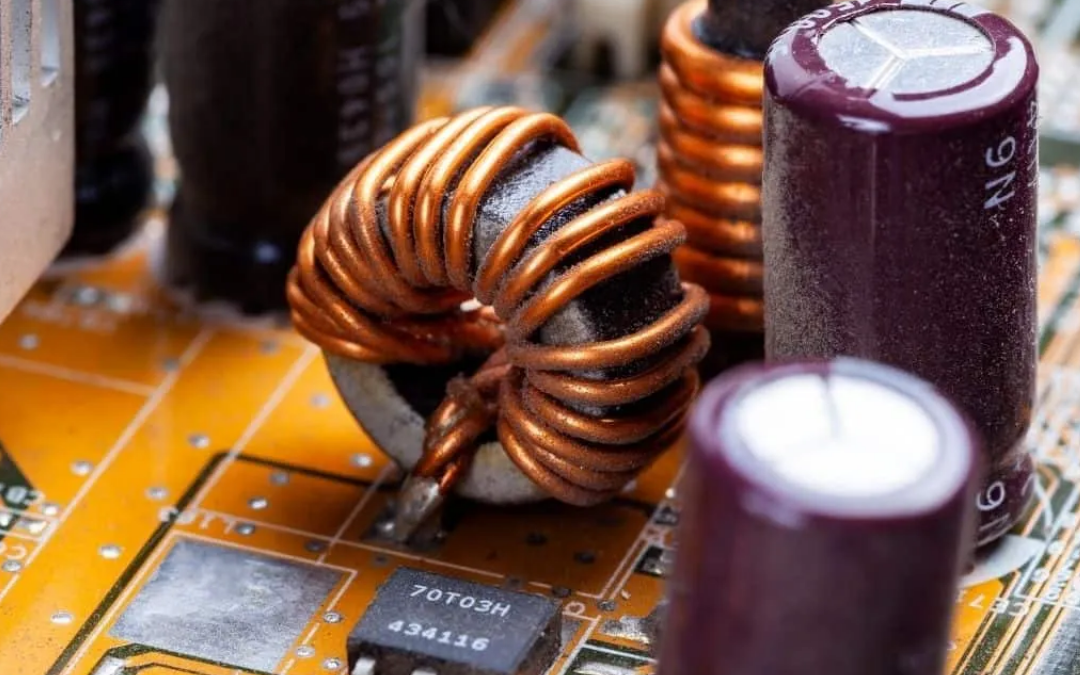
Coil whine is a high-frequency noise caused by tiny vibrations in electrical components, usually inductors or coils found in the power delivery system. These components are present in parts like the GPU, CPU voltage regulators, and the motherboard.
When electricity flows through these coils, it creates electromagnetic forces. Under certain conditions, these forces cause the coils to vibrate at frequencies that are audible to the human ear. That vibration is what you hear as a whining or buzzing sound.
The noise is often subtle. In many cases, you only notice it when you are close to the device or in a quiet environment.
Why Coil Whine Happens
The key reason coil whine occurs is rapid changes in power demand. Modern processors and graphics units constantly adjust how much power they consume depending on what you are doing. These rapid fluctuations can make the coils vibrate more intensely.
You are more likely to hear coil whine during activities that push the system, such as gaming, rendering, or running demanding applications. Interestingly, it can also happen when the system is idle, especially if power states are switching frequently.
High frame rates in games are a common trigger. When a GPU is producing very high FPS, it can cause rapid power oscillations, which in turn increase the chances of audible coil vibration.
Is Coil Whine Dangerous
Despite how it sounds, coil whine is not harmful. It does not damage your laptop or CPU, and it does not reduce performance or lifespan in any meaningful way.
It is best understood as an acoustic side effect of efficient power delivery. Many high-performance systems exhibit some level of coil whine because they are designed to handle dynamic workloads.
The only real issue is user comfort. For some people, the sound is barely noticeable, while for others it can be distracting.
Coil Whine in Laptops vs Desktops
In laptops, coil whine is usually harder to isolate because everything is packed tightly together. The sound can come from the motherboard or power circuitry, and there is very little room to dampen vibrations.
In desktop systems, coil whine is often easier to identify. It typically comes from the graphics card or the power supply, and since components are separate, you have more flexibility to replace or isolate the noisy part.
How to Reduce Coil Whine
There is no universal fix for coil whine because it depends on the physical characteristics of the hardware. However, there are practical ways to reduce how noticeable it is.
One of the most effective approaches is limiting frame rates in games. When a GPU is allowed to run at extremely high FPS, power fluctuations become more aggressive. Enabling V-Sync or setting a frame cap often stabilizes power delivery and reduces the noise.
Power settings can also make a difference. Running your system in a balanced mode instead of maximum performance can smooth out power usage and reduce the intensity of coil vibration. In some cases, updating drivers or BIOS firmware helps, as manufacturers occasionally improve how power is managed.
If you are comfortable with more advanced adjustments, undervolting can reduce the amount of power flowing through components, which may lower coil activity. However, this should be done carefully, as incorrect settings can affect system stability.
Physical factors matter as well. Hard surfaces can amplify sound, so placing your laptop on a softer surface or using a desk mat can make the noise less noticeable. Even increasing the distance between you and the device can help.
Can Coil Whine Be Fixed Completely
In most cases, coil whine cannot be completely eliminated. It is tied to the physical construction of the components, and even two identical models can behave differently. Some units are quieter than others simply due to small manufacturing variations.
In rare situations, replacing a component such as a GPU or power adapter can reduce or eliminate the noise, but this is not guaranteed. Manufacturers generally do not treat mild coil whine as a defect unless it is unusually loud.
When You Should Be Concerned
Coil whine by itself is not a cause for concern. However, if the noise is extremely loud, changes suddenly, or is accompanied by overheating or performance issues, it is worth investigating further. Those symptoms could point to a different underlying problem.
Final Thoughts
Coil whine is one of those quirks of modern computing that can feel alarming until you understand it. It is not a sign that your laptop or CPU is failing, but rather a side effect of how efficiently today’s hardware manages power.
While it may not always be possible to eliminate the sound entirely, simple adjustments like limiting frame rates or tweaking power settings can make a noticeable difference. Once you know what it is and why it happens, it becomes much easier to ignore or manage.

Discussion (0)
Be the first to comment.