



We needed a new laptop for working while traveling, running virtual machines, testing many apps and Windows features. We are also gamers at heart, and we needed something with a bit of punch regarding video processing power. Not only that, but we also wanted a comfortable keyboard because we write a lot and a cooling system that's quieter than on most gaming laptops. After carefully looking on the internet, we chose Lenovo Legion Y520. On paper, this gaming laptop met all our demands. After a few weeks of testing, playing on and working on it, here is our final review for the Lenovo Legion Y520:
What is the Lenovo Legion Y520 gaming laptop good at?
Lenovo Legion Y520 shines when it comes to:
- Gaming - its hardware, together with the efficient cooling system, make it ideal for any gamer. It can play any game, no matter how demanding, in high or at least medium graphic quality settings.
- Writing - the keyboard is a delight for any typist. The key travel distance is ideal for a laptop keyboard. Moreover, it is also backlit for easy typing in low light.
- Video editing - if you equip it with the latest mobile processor (Intel Core i7 770HQ) and a powerful graphic card (NVIDIA GeForce GTX 1060 or GTX 1050 Ti), the Lenovo Legion Y520 is a great device for editing videos.
Pros and cons
Here are the main reasons we like the Lenovo Legion Y520:
- Good build quality. Although its case is made of plastic, it feels sturdy and durable
- It is available in several hardware configurations, with pricing for different budgets
- The cooling system is highly efficient
- The keyboard is a delight to type on, and it is also backlit
- The sound system offers good fidelity
- The price/performance ratio tends to be a very good
There are also a few things that are not so positive:
- Although it uses IPS technology and its viewing angles are very generous, the display has low brightness and yellowish colors
- Battery life is rather poor

Verdict
The Lenovo Legion Y520 gaming laptop is a device that packs a lot of power at a decent price. You can equip it with the latest processor, graphics card, and storage, without making the cost overwhelming. If you want to play games on it, run demanding apps, type a lot, get good sound quality and an efficient and silent cooling system, Lenovo Legion Y520 is one of the best choices you can make. It is one of the most balanced laptops that we tested recently, and we believe that it is an excellent acquisition for anyone who is looking for good gaming laptop.
Unboxing the Lenovo Legion Y520 gaming laptop
The Lenovo Legion Y520 gaming laptop arrives in a black cardboard box that is simple and minimalistic. The only thing printed on it is a big text that says: "Legion by Lenovo." There are no details about the laptop.
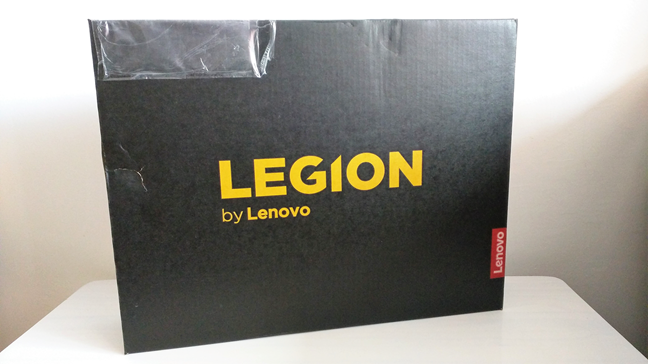
Open the box, and you will find the laptop inside a protective cover, together with its power charger, power cable, quick start guide, and warranty card.
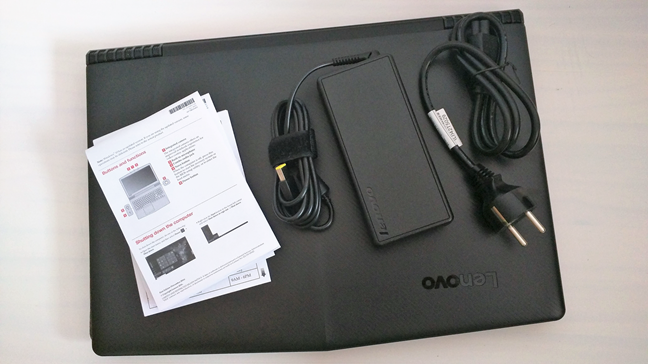
The Lenovo Legion Y520 gaming laptop comes in a simple box that looks good. The unboxing experience is pleasant, but there are no accessories bundled with the laptop, which might be disappointing for some users.
Hardware specifications
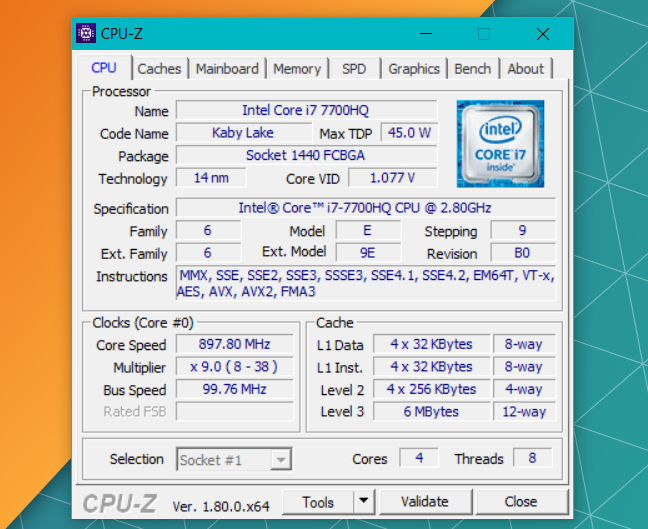
The Lenovo Legion Y520 gaming laptop can be equipped with an Intel Core i7 or an Intel Core i5 processor. The model we tested came with the 7th generation Intel Core i7 7700HQ processor, running at a frequency of 2.80GHz and up to 3.80GHz in turbo mode. This processor has four cores and eight threads, and a cache memory of 6MB. Intel launched it in the first quarter of 2017, and it is one of the most powerful mobile processors available today.
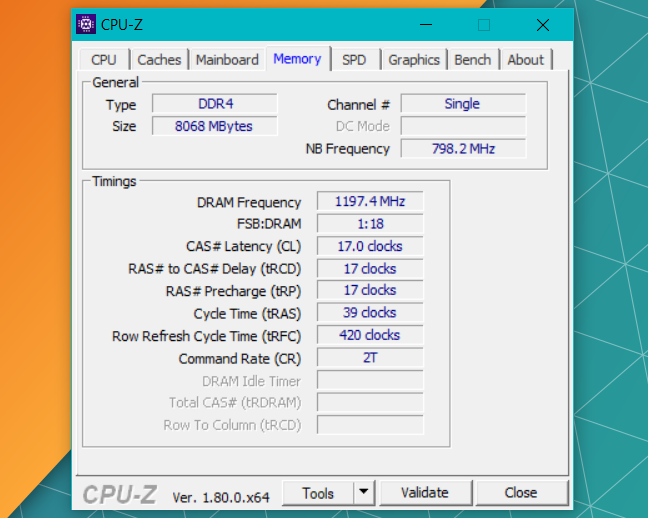
The processor works together with 8 or 16GB of DDR4 RAM running at 2400MHz. The model we tested came with 8GB of RAM, which should be just enough for gamers. However, you should know that you can add another 8GB of RAM to make a total of 16GB RAM if you wish.
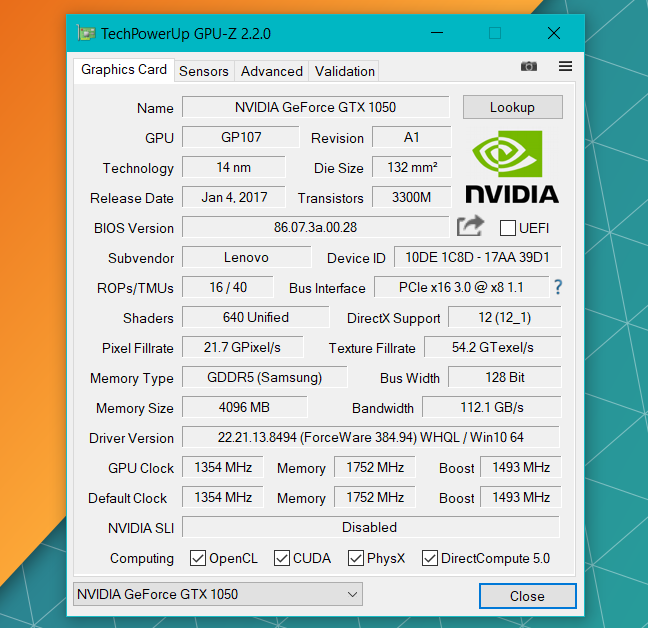
The Lenovo Legion Y520 is a gaming device, and that means that it has a decent graphics card inside. The model we tested came with a NVIDIA GeForce GTX 1050 with 4GB of GDDR5 RAM. However, this laptop can also be equipped with a NVIDIA GeForce GTX 1050 Ti with 4GB of RAM or a NVIDIA GeForce GTX 1060 with 3GB of RAM.
The images are projected on a 15.6" LED screen with a Full HD resolution of 1920x1080 pixels. The display is based on the IPS (In-plane switching) technology, which means that the color rendering should be of good quality and the viewing angles generous. The display is covered with matte glass that should help against unwanted reflections. Although some may argue that a resolution of 1080p is small by today's standards, we believe that it is more than enough to have a solid gaming experience.
Regarding storage, the Lenovo Legion Y520 gaming laptop we tested came with an NVMe SSD with a storage capacity of 256GB, manufactured by Samsung. However, the laptop can also be equipped with a 512GB PCIe SSD or with a traditional hard disk of up to 2TB and 5400 RPM. It is also possible to get this laptop in a dual drive configuration, meaning that you can equip it with both an SSD and an HDD. None of the storage configurations include an optical drive. If you are still using CDs, DVDs, or even Blu-Ray discs, you must buy yourself an external optical unit.
The audio is delivered by two 2W Harman certified speakers with Dolby Audio Premium. Also, on the top side of the screen, there is a webcam with a standard 720p resolution, useful for making video calls.
Regarding connectivity options, the Lenovo Legion Y520 laptop comes with 1 x USB 3.0 (Type-C), 2 x USB 3.0, 1 x USB 2.0, 1 x HDMI, 1 audio jack, 1 microphone jack, an Ethernet port for wired network connections, and one 4-in-1 card reader (SD, SDHC, SDXC, MMC).
You also get the best in networking options: an integrated wireless network adapter (Intel Dual Band Wireless-AC 8265) which supports the 802.11ac standard. The wireless card works with 2x2 MIMO, which means that it offers two spatial streams of transmitting and receiving data on the same channel or frequency. Together with the wireless card, you also get a Bluetooth 4.2 chip. As for the wired networking, it is worth noting that the Ethernet card is capable of transfer speeds of up to 1 Gbps.
The Lenovo Legion Y520 gets its autonomy from a three cell 45 Watt Hour battery. The power adapter is capable of an output of 20V DC, 6.75 A, 135W, which is more than enough to keep the laptop going even for very long gaming sessions. Depending on its configuration, the Lenovo Legion Y520 weighs at least 5.29 lbs or 2.4 kg, but not less. If it is equipped with a NVIDIA GeForce GTX1050 or 1050Ti, the laptop has a size of 14.96 x 10.43 x 1.09 inches or 380 x 265 x 25.8 mm in height, width and depth. If it is equipped with a NVIDIA GeForce GTX 1060, it has a size of 14.96 x 10.43 x 1.09 inches or 380 x 265 x 27.8 mm. In other words, it is slightly thicker.
If you want more details, you can find the official hardware specifications here: Lenovo Legion Y520 Tech Specs.
The Lenovo Legion Y520 gaming laptop is a device that can be equipped with some impressive hardware. Even in its barebone configuration, it should be more than capable of running any game at high-quality settings.
Read the next page of this review to see the user experience you get, what is bundled with the Lenovo Legion Y520 and the results that we measured in benchmarks.
Using the Lenovo Legion Y520 gaming laptop
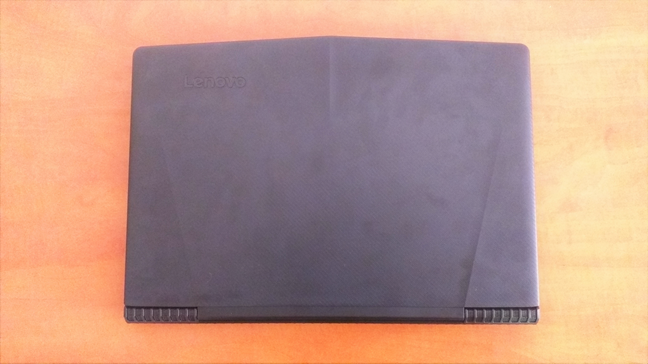
The first thing you notice about the Lenovo Legion Y520 is the fact that its design feels classic although it immediately says "gaming." The case is made from plastic, but it feels sturdy and durable. There are no colored lines or accents on back of the lid or the bottom of the device. However, the lid has a nice grippy texture and three embossed lines that give it a sporty look. Also, on the top-left corner of the lid, the Lenovo name is engraved.
Open the lid, and you can see that the laptop's exterior edge is cut at an angle, making the notebook a bit pointy. The screen connects to the base of the laptop through a long central hinge that feels robust. Although we cannot say the same about the screen, which can be twisted easily, because of the plastic it is made of, we must appreciate the fact that the display does not flicker in any way.
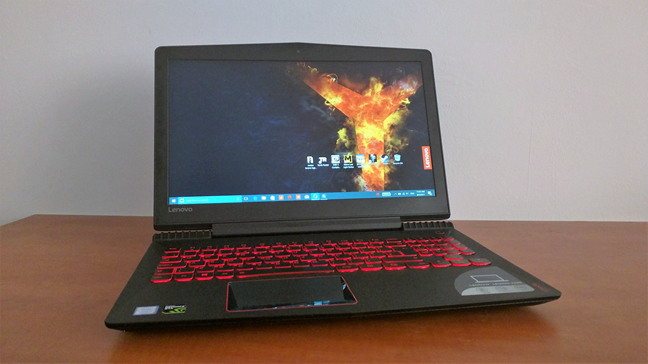
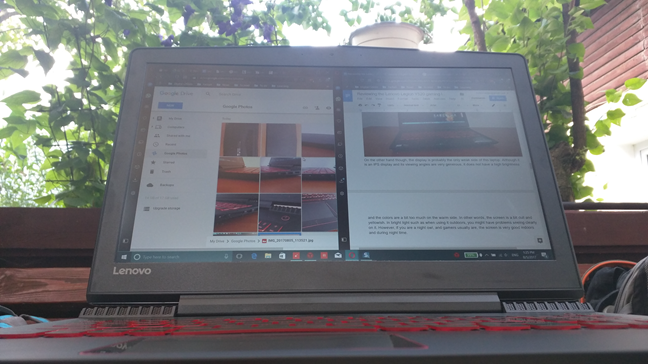
On the other hand, the display is probably the only weakness of this laptop. Although it is an IPS display and its viewing angles are generous, it does not have a high brightness, and the colors are a bit too much on the warm side. In other words, the screen is a bit dull and yellowish. In bright light such as when using it outdoors, you will have problems seeing clearly on it. However, if you are a night owl, and gamers usually are, the screen is excellent indoors and during night time.
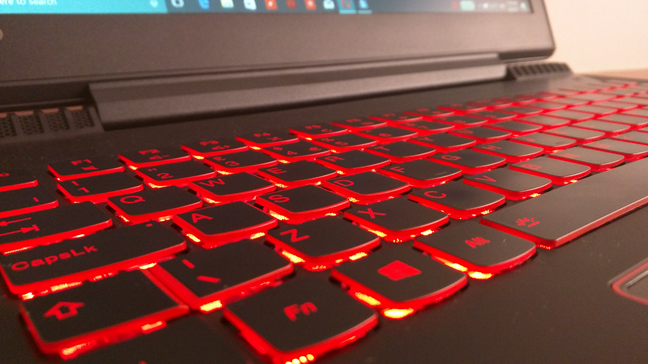
The keyboard is a delight! Although it is a laptop keyboard, Lenovo's keyboard is perfect for long typing sessions. This review and some tutorials published recently on Digital Citizen were all written using the Lenovo Legion Y520 and the experience is great. The keyboard is rigid and does not sink in. The keys have good feedback. Additionally, the keyboard is also backlit in red light: there are two illumination levels which you can enable to see the keys better in low light environments.
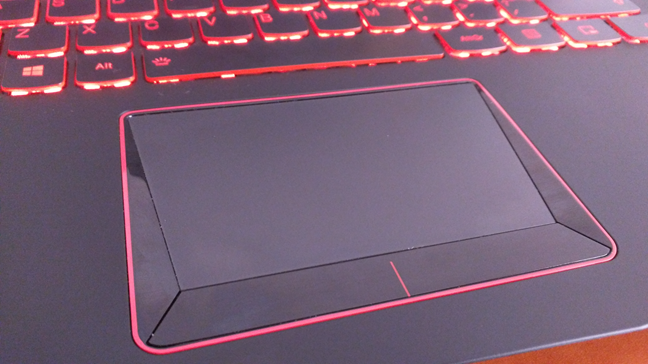
The touchpad has an odd shape, but it is large enough to be easy to use. It has trapezoid shape which might feel a little tricky to use at first but to which you can adapt quickly. We like the fact that the left and right-click buttons are separate from the finger gliding area, which makes it easy to identify and use.
One thing that you cannot miss on the Lenovo Legion Y520 is the quality of its sound system. The laptop has two front facing speakers, and they offer high sound fidelity. The Dolby enhancements are efficient and can make the sound better depending on what you do: play games, listen to music or watch a movie. The only downside is that the maximum sound level is not very high, but that is to be expected from a laptop sound system.
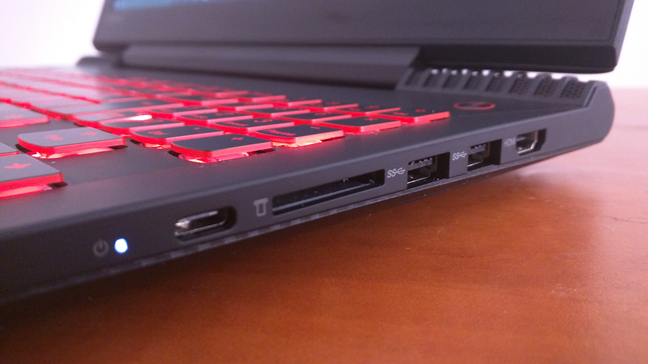
Lenovo Legion Y520 does not disappoint regarding ports either. All of them are positioned on the left and right edges, which makes them easier to find and use than it would have been if they were placed on the rear or front edges. Besides the HDMI, USB 3.0 Type A and USB 3.1 Type C ports, the one that is appreciated mostly by gamers is probably the wired Ethernet port. That is because it is always faster and more reliable to use wired network connections for gaming than it is using Wi-Fi.
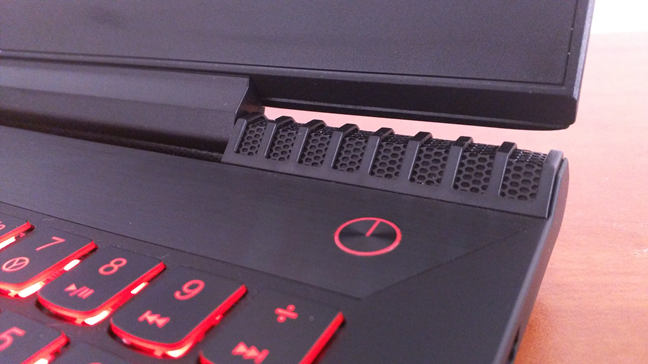
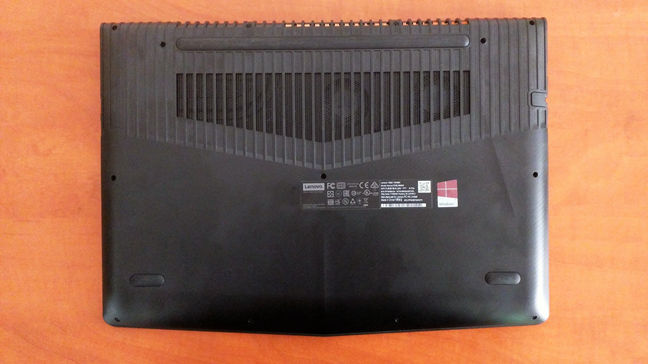
Another thing that everybody will appreciate about Lenovo Legion Y520 is how good its cooling system is. A large part of the bottom of the laptop's base is a grill through which you can see the two large fans rotating. The ventilation is efficient, and the result is that this laptop does not get hot quickly, even in demanding games.
Finally, we would also like to mention that the Lenovo Legion Y520 lasted us on battery for roughly 2 to 2.5 hours in normal use. That meant writing documents, browsing the web and listening to music. When we played games on it, the laptop lasted on average for 1.5 hours.
The Lenovo Legion Y520 is a beautiful gaming device that works great. We like its design, and we like the user experience it has to offer. Its looks are rather classic, and the overall build quality is excellent. If you use it also for writing, you will love its keyboard, and if you use it for gaming, you will love its cooling system.
Apps bundled with the Lenovo Legion Y520
Lenovo Legion Y520 comes with Windows 10 pre-installed. You can choose to buy it with Windows 10 Pro but also with Windows 10 Home. The model that we tested came with Windows 10 Home. Lenovo also bundled a few apps:
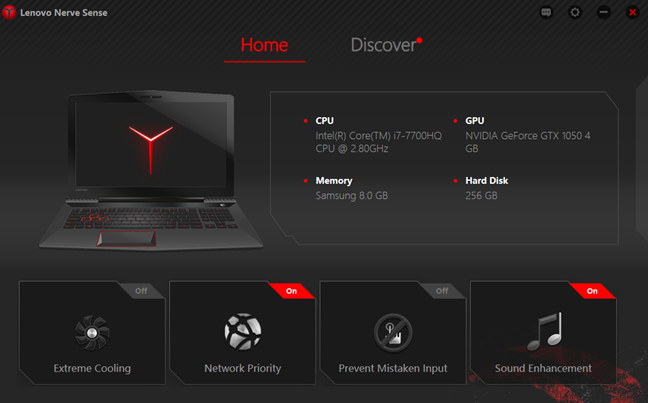
- Lenovo Nerve Sense - allows you to enable or disable options such as Extreme Cooling, Network Priority, Prevent Mistaken Input, and Sound Enhancement. These are all tools that are useful during gaming sessions. Extreme Cooling increases the speed of the cooling fans, Network Priority gives priority to games, Prevent Mistaken Input disables the Windows key during games, and Sound Enhancement enables the Dolby audio enhanced for games.
- Lenovo Companion - useful for downloading and installing system and driver updates. It also provides you with support information and diagnostic tools.
- Lenovo Settings - acts as a central hub for settings that control the battery use, the touchpad and keyboard use, audio style, webcam brightness and contrast, and also display options.
- Lenovo App Explorer - acts as a portal for Windows apps that are recommended by Lenovo. We like this approach because it is better to have one app with recommendations rather than having many apps pre-installed but which are not useful.
- McAfee Total Protection - an evaluation version of the security product developed by McAfee. Unfortunately, it is not a good security suite, and given that it also expires after one month, our recommendation is to uninstall it. Preferably, use a better antivirus product.
The Lenovo Legion Y520 comes with Windows 10 and with a few software tools that are useful. We appreciated the fact that there are not many useless apps pre-installed. Less bloatware is always a good thing.
Performance in benchmarks
The first thing we checked was how fast the Lenovo Legion Y520 boots. The model we tested uses a 256GB NVMe SSD from Samsung, so we assumed it was rather fast. To see if that is true, we installed and ran an app called BootRacer which measures the Windows boot time. The average duration was about 23 seconds, which is quite fast if you ask us.
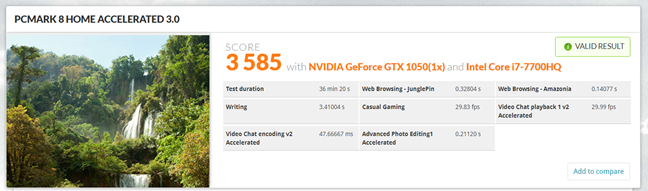
The next benchmark program we ran was PCMark 8. First, we ran the Home accelerated tests, which measured the performance of the laptop in normal daily activities like Office work, browsing the web, light image editing or video chat. These are not the most relevant tests for gaming, but gaming laptops are not bought only by gamers. Moreover, everyone spends time online, chatting with friends, or editing in-game screenshots. Lenovo Legion Y520 got 3585 points, which is a very high score. Basic computer tasks are easily fulfilled by this laptop.
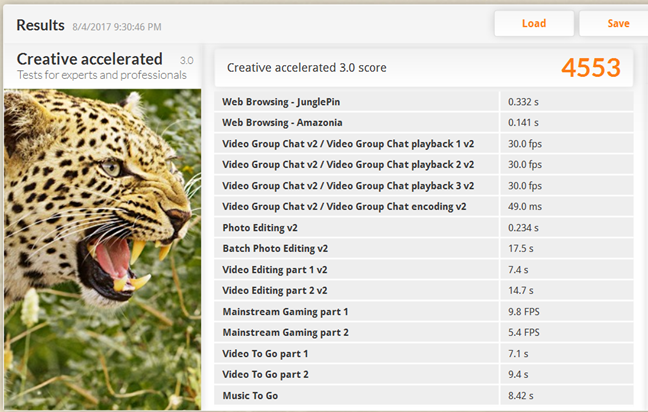
Gaming laptops are also bought by photographers and videographers, so we thought it would make a good idea if we also tested the laptop's performance in more creative workloads. For that, we ran the Creative accelerated tests from PCMark 8, and we got a score of 4553 points, which is an outstanding result.
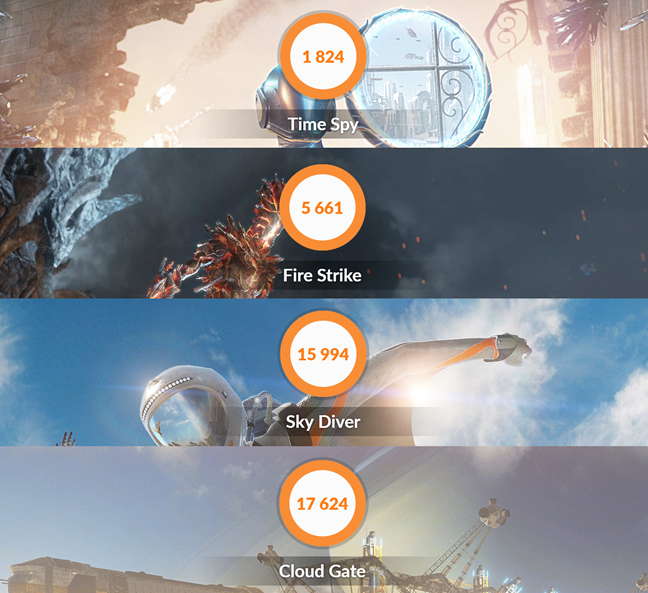
Next, we ran the four series of tests offered by the gaming benchmark 3DMark. The Intel Core i7 processor and the NVIDIA GeForce GTX1050 video card show their power in this case: the laptop got a score of 1824 points in the Time Spy test (which measures the performance in games with DirectX 12), 5661 points in the Fire Strike test (shows performance in games with DirectX 11), 15994 points in the Sky Diver test (also shows performance in games with DirectX 11), and 17624 points in the Cloud Gate test (which measures the performance in DirectX 10 games). All these scores show that the Lenovo Legion Y520 is a powerful gaming laptop that can run any modern game in high or at least medium graphical settings. Older games should run in Ultra video quality settings without problems.
We also played some of our favorite games, on the Lenovo Legion Y520. Among them, we would like to mention BioShock: Infinite, The Elder Scrolls V: Skyrim, Tomb Raider, Dirt 3, and Dishonored 2. All these games played flawlessly using high-quality settings, except Dishonored 2, which we had to configure to use medium graphic quality options.
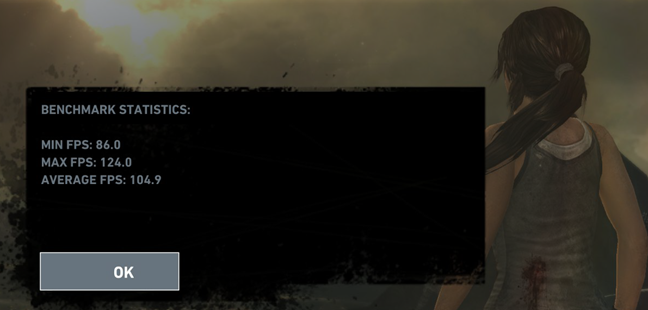
On the maximum graphical quality settings, the benchmark tool from Tomb Raider rendered an average of 104.9 frames per second, with a minimum of 86 fps. It is an outstanding result.
In BioShock: Infinite, the Lenovo Legion Y520 gaming laptop managed to render an average number of 94 frames per second. However, it is a bit odd that the minimum frames per second that we recorded were 5.89.

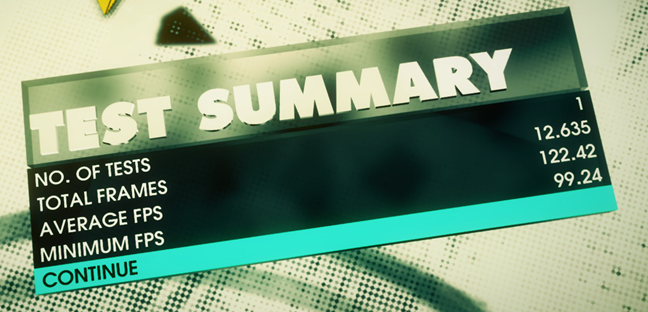
In DiRT 3 on high graphical quality settings, Lenovo Legion Y520 rendered 122.42 frames per second in average, with a minimum of 99.24 fps. Again, this is a good result.
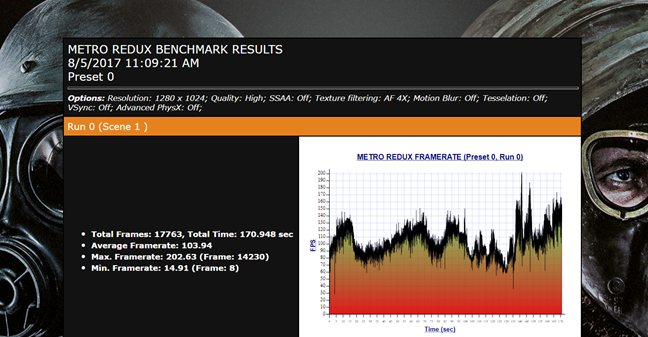
The benchmark tool offered by Metro: Last Light Redux measured an average frame rate of 102, with a minimum of 14.91. Once again, a good result.
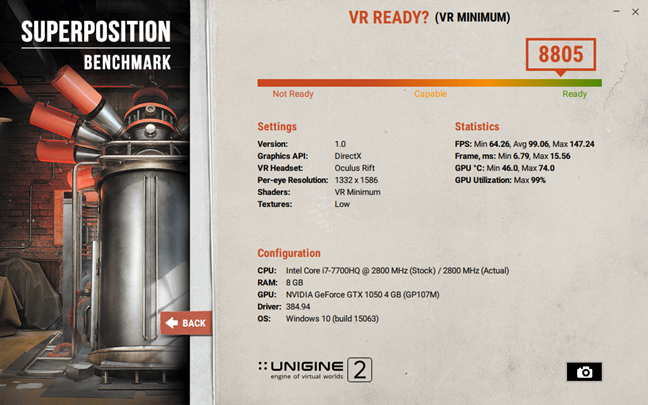
Although Lenovo does not market the Legion Y520 gaming laptop as a VR Ready device, we wanted to check if it is capable of such an experience. That is why we ran the SuperPosition VR benchmark developed by Unigine. The result we saw using the VR Minimum preset for Oculus Rift was 8805 points, which means that the laptop is VR capable, but only at low graphic quality.
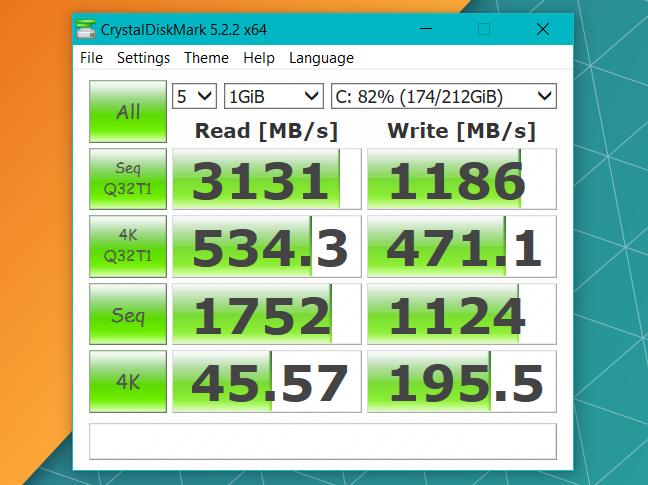
The Lenovo Legion Y520 that we tested came equipped with a very fast NVMe SSD made by Samsung, with a storage capacity of 256GB. To check its performance, we ran a tool called CrystalDiskMark. In the screenshot below, you can see the results: very high speeds both when reading and when writing data to the disk. They are impressive and show that booting Windows, as well as launching apps or games should be very fast on this laptop.
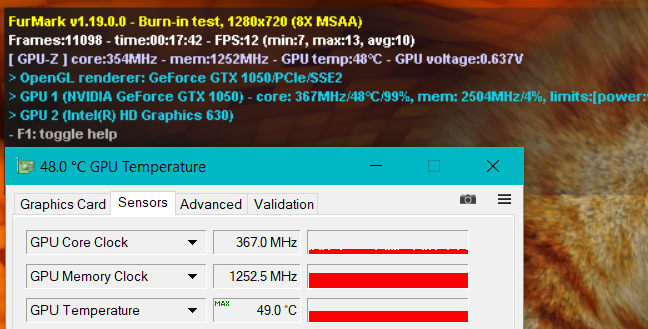
The Lenovo Legion Y520 gaming laptop has a well designed cooling system. We tested it with the help of the FurMark app. Even after long periods of time, the graphical card did not get hotter than 120 degrees Fahrenheit or 49 degrees Celsius, which is a rather cool temperature. We also appreciated the fact that the cooling system is built in such a way that the WASD part of the keyboard never gets hot. Unlike on other gaming laptops, you do not have to take your hand off the keyboard after a few hours of gaming because it burns.
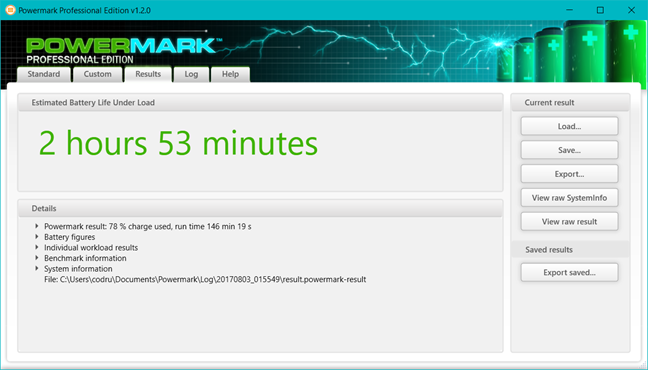
We also used Powermark to see how long the laptop's battery lasts. On the Balanced tests, which measures the battery time while browsing the web, working with Word, editing video and gaming casually, Lenovo Legion Y520 managed to keep on running for 2 hours and 53 minutes.
When using the Entertainment tests from Powermark, which focuses on video and gaming, Lenovo Legion Y520 managed to keep on going for 1 hour and 45 minutes.
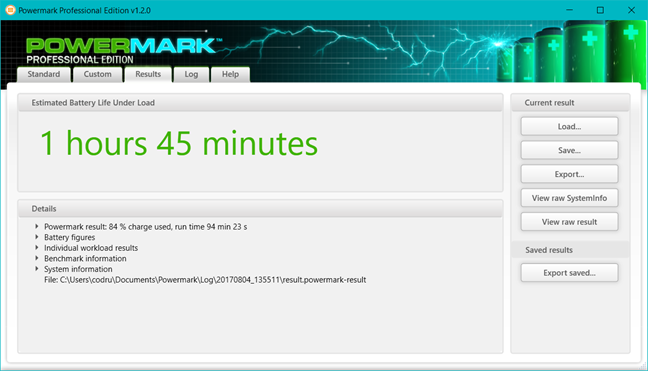
The battery results are not impressive, but they are rather typical for gaming laptops. These are, after all, powerful devices that require more energy to run than ultrabooks and 2-in-1 devices.
The benchmarks we ran, show that the Lenovo Legion Y520 is a capable device. The hardware inside gives it enough power to run almost any recent game in high graphic quality settings. Older games should run at maximum or ultra quality. The only less positive aspect is the rather poor battery life.
What do you think about the Lenovo Legion Y520?
Now that you know how this laptop fared in our review, and our perspective on it, let us know your opinion. Is the Lenovo Legion Y520 a good gaming laptop? Share your views in the comments below.
Discussion (0)
Comments are closed.