



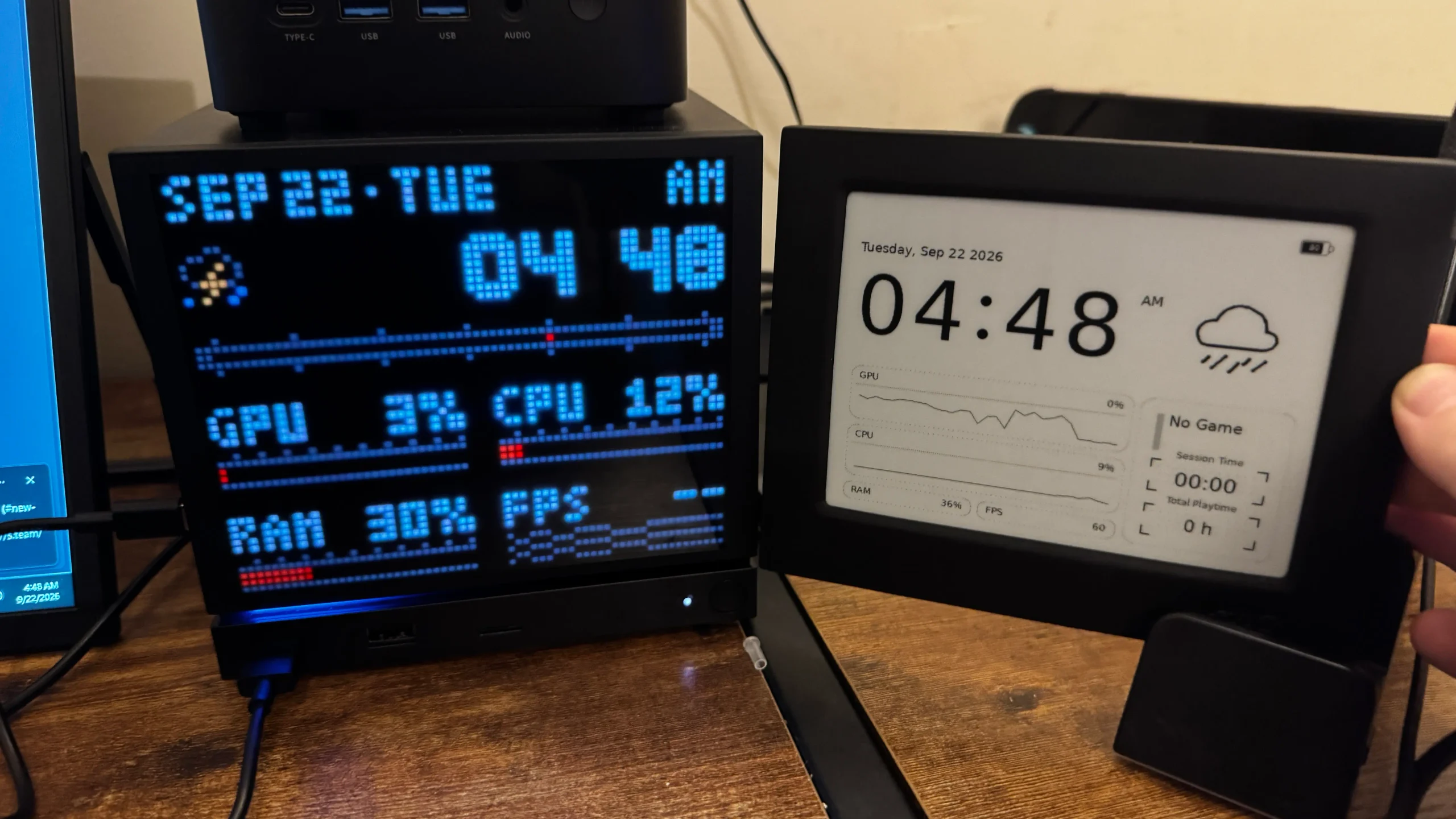
JSAUX has introduced a new range of customizable faceplates for Valve's Steam Machine, including E Ink and Dot Matrix versions that can display system information, weather, playtime and custom images.
The accessories take advantage of the Steam Machine's removable front panel design, giving owners a way to change both the appearance and functionality of the device.
Valve has already released CAD files for custom faceplates, opening the door for third party designs. JSAUX is currently preparing three models, with the E Ink and Dot Matrix versions already demonstrated in detail.
Setup requires Decky Loader and additional software
Both faceplates need some software configuration before they can be fully used.
Owners must install the Decky Loader plugin framework in Desktop Mode, then download and install the software package designed for the specific faceplate.
After setup, controls can be accessed through Desktop Mode and through Decky while using Game Mode.
| Feature | E Ink Faceplate | Dot Matrix Faceplate |
|---|---|---|
| Display type | E Ink | Color Dot Matrix |
| Backlight | No | Yes |
| Update frequency | About once per minute | About once per second |
| External power | Not highlighted as required | USB C power required |
| Custom images | Supported | Supported |
| Performance monitoring | Supported | Supported |
| Weather | Supported | Supported |
| Playtime data | Supported | Supported |
The installation process is relatively straightforward once the required programs are installed, although some controls and file selection tools remain less polished.
E Ink version focuses on readability and low power use
The E Ink faceplate uses a display similar in concept to an e reader screen.
Information appears with a paper like look that remains easy to read under normal lighting.
Its biggest limitation is the lack of a backlight. In a dark room, the content becomes difficult or impossible to see without another light source.
The display offers seven modules.
Composite combines several types of information on one screen, including the clock, weather, performance statistics, current game, session duration and total playtime.
Other modules focus separately on the clock, weather, performance, calendar and game time.
A Photo Frame mode also allows custom images to be displayed.
Composite provides the most useful E Ink layout
The Composite module is one of the more practical options because it places several important pieces of information on the screen simultaneously.
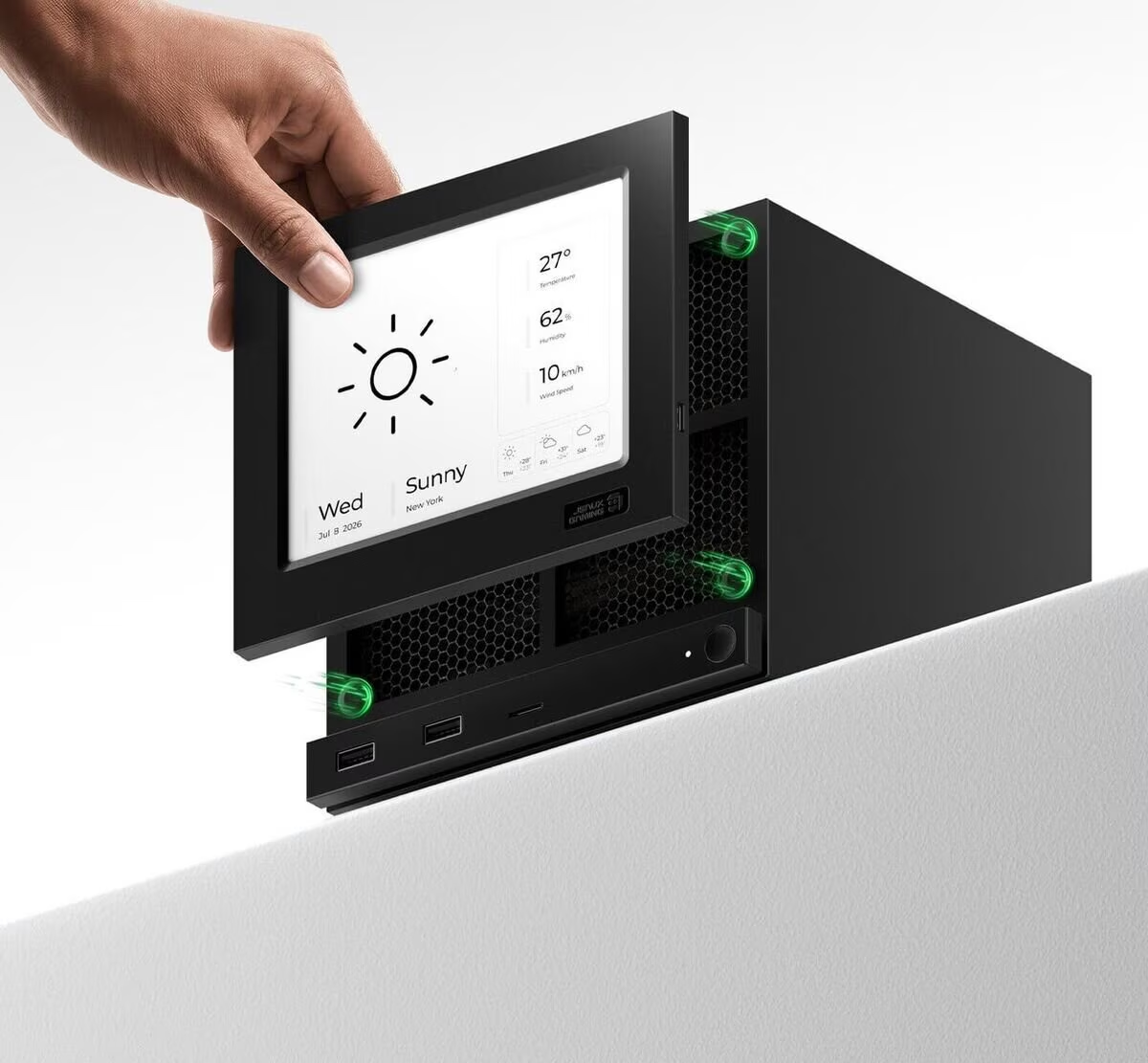
Instead of switching between separate pages for time, performance and game information, the user can see a compact summary.
The Weather module displays current conditions along with temperature, humidity, wind speed and a three day forecast.
The Game Time module shows the title currently being played along with session duration and total playtime.
The Photo Frame mode provides a more decorative option by displaying selected images from a folder.
Slow refresh limits performance monitoring
E Ink technology comes with an important limitation.
The panel refreshes roughly once per minute, which makes real time performance data less useful.
CPU load, GPU usage, memory consumption and frame rate can change rapidly during gameplay, so the Performance module effectively displays a periodic snapshot rather than live telemetry.
The same delay affects the Clock module, although being behind by around a minute is much less significant for normal use.
For static information, photos and slower changing data, the display is better suited.
Photo setup needs improvement
The E Ink Photo Frame feature can display personal screenshots and other selected images.
However, configuring it requires manually navigating through folders using the included software.
Folder locations cannot simply be pasted into the interface, making setup more time consuming than necessary.
File handling through the Decky plugin also appears inconsistent, with some folders failing to appear.
Once configured, however, images can look particularly good on the E Ink panel because of its paper style presentation.
The software also includes automatic switching options for modules and photos, with configurable time windows.
Dot Matrix faceplate offers color and real time updates
The Dot Matrix model takes a very different approach.
Instead of a paper like monochrome display, it uses larger illuminated pixels to create colorful icons, text and visual elements.
The display refreshes every second, making it far more suitable for live information.
It also includes a backlight, so it remains visible in dark environments.
Brightness can be adjusted, although testing found that the panel could occasionally become dimmer without an obvious reason.
The main hardware drawback is that it requires its own power connection through USB C, potentially occupying one of the Steam Machine's ports.
Nine modules are available on the Dot Matrix display
The Dot Matrix faceplate includes nine display modes.
Dashboard combines date, time, CPU, GPU, RAM and FPS information.
Hardware focuses on system utilization using visual bars.
Weather displays current conditions, temperature, humidity and wind speed.
Clock shows the current time with a seconds indicator.
Playtime displays the current game, session duration and total playtime.
It also includes Countdown and Count Up modes that function as timers.
Custom mode displays a selected image, while AI Agent mode can show information linked to configured AI agents.
Faster refresh makes live data more useful
The one second refresh cycle gives the Dot Matrix display a practical advantage for timers and system information.
Countdowns and stopwatches remain accurate enough to be useful during gaming sessions, while CPU and GPU utilization can respond more quickly to changing workloads.
The Playtime module also benefits from this faster update cycle.
However, not every metric works perfectly.
Testing found that the FPS counter remained stuck at 60 FPS even when the actual game was running around 37 to 38 FPS.
That limits the usefulness of one of the display's most obvious performance monitoring features.
Custom images look better on E Ink
The Dot Matrix Custom mode supports personal images, but the coarse pixel structure significantly changes how pictures appear.
Images can look dark and lose detail, especially when using normal screenshots that were not designed for a low resolution matrix display.
There is also no automatic image cycling option.
Each image must be added and selected manually.
For displaying photos or screenshots, the E Ink faceplate currently produces a cleaner result.
For live information, timers and colorful interface elements, the Dot Matrix version has the advantage.
Two faceplates target different uses
The E Ink and Dot Matrix designs offer noticeably different experiences despite serving the same basic purpose.
The E Ink model works best for static information, photos and an understated appearance. Its lack of a backlight and slower refresh rate are its biggest limitations.
The Dot Matrix version is more dynamic, colorful and readable in the dark, while its faster refresh makes it better for timers and changing system data. It does require additional power and currently has some software quirks.
Both accessories demonstrate how the Steam Machine's removable faceplate can become more than a cosmetic feature.
With Valve making the hardware design accessible to third parties, products like these could turn the front of the Steam Machine into a customizable information display rather than simply a decorative panel.


Discussion (0)
Be the first to comment.