




If you are using Comet, keeping it updated is important to ensure smooth performance, improved security, and access to the latest AI features. Fortunately, updating the Comet browser is quick and straightforward.
Why You Should Update Comet Browser
Updating your browser is not just about new features. It also helps:
- Fix bugs and crashes
- Improve speed and stability
- Add new AI assistant capabilities
- Enhance security and privacy
Since Comet is an AI-focused browser, updates often bring noticeable improvements.
How to Update Comet Browser
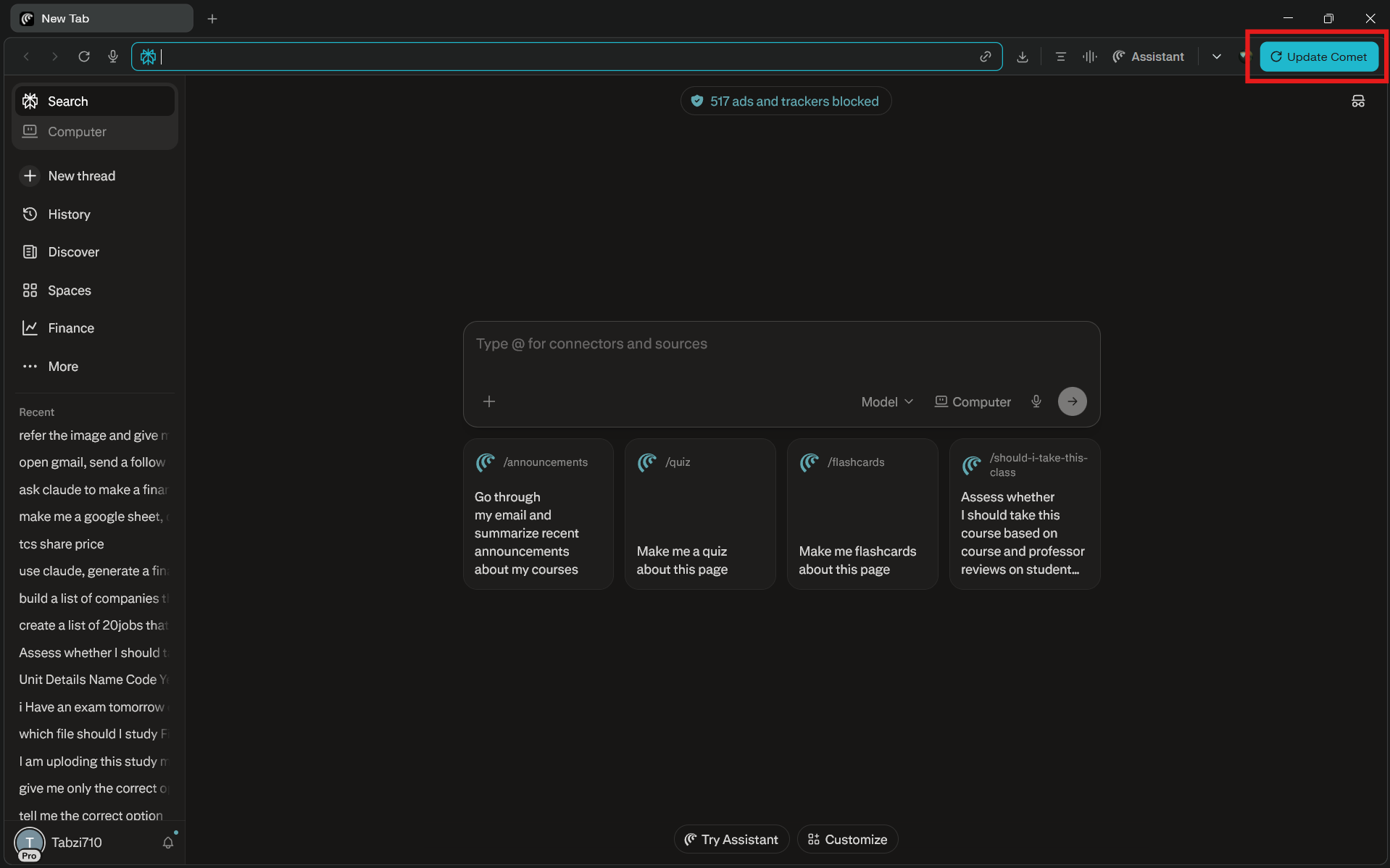
If an update is available, Comet usually shows an Update Comet button.
Step 1: Look for Update Button
Check the top-right corner of the browser.
- If you see Update Comet, it means a new version is available
Step 2: Click Update
- Click the Update Comet button
- The browser will start downloading the update automatically
Step 3: Restart the Browser
- Once the update is complete, restart the browser
- Some versions may prompt you to relaunch automatically
After restarting, your browser will be updated.
Alternative Ways to Update Comet
If you do not see the update button, you can try these methods.
Restart the Browser
- Close Comet completely
- Open it again
- It may update automatically in the background
Check Settings (If Available)
- Open browser settings
- Look for an About or Update section
- Check for updates manually
How to Confirm Comet Is Updated
After updating:
- The update button will disappear
- The browser will run smoothly with latest features
- You may notice UI or performance changes
Common Issues and Fixes
If you face problems while updating:
Update not showing:
- Restart the browser
- Ensure internet is working
Update stuck:
- Close and reopen Comet
- Try reinstalling if needed
Final Thoughts
Updating Comet browser is simple. If you see the update option, just click it and restart the browser. Regular updates ensure you get the best performance, latest features, and improved security.
Since Comet evolves quickly, staying updated helps you make the most of its AI capabilities.
FAQs
How do I update Comet browser?
Click the Update Comet button and restart the browser.
Does Comet update automatically?
Yes, but sometimes it requires manual confirmation.
Where is the update option?
It appears in the top-right corner when available.
What if I cannot update Comet?
Restart the browser or reinstall it if the issue continues.

Discussion (0)
Be the first to comment.