




Your ChatGPT sidebar fills up fast. Whether you want a clean slate, have privacy concerns, or simply find a cluttered sidebar distracting, clearing your history takes under a minute once you know where to look.
One important thing to know first: deleted conversations cannot be recovered. There is no trash folder and no undo. If anything is worth saving, export it before you delete. Go to Settings, then Data Controls, then Export data. OpenAI emails you a download link with all your conversations saved as a file.
How to Delete All Chats at Once
Step 1: Open Settings
On desktop, click your profile picture or name in the bottom left corner of ChatGPT. Select Settings. On the iPhone or Android app, tap the menu icon, tap your profile, then tap Settings, then Data Controls.
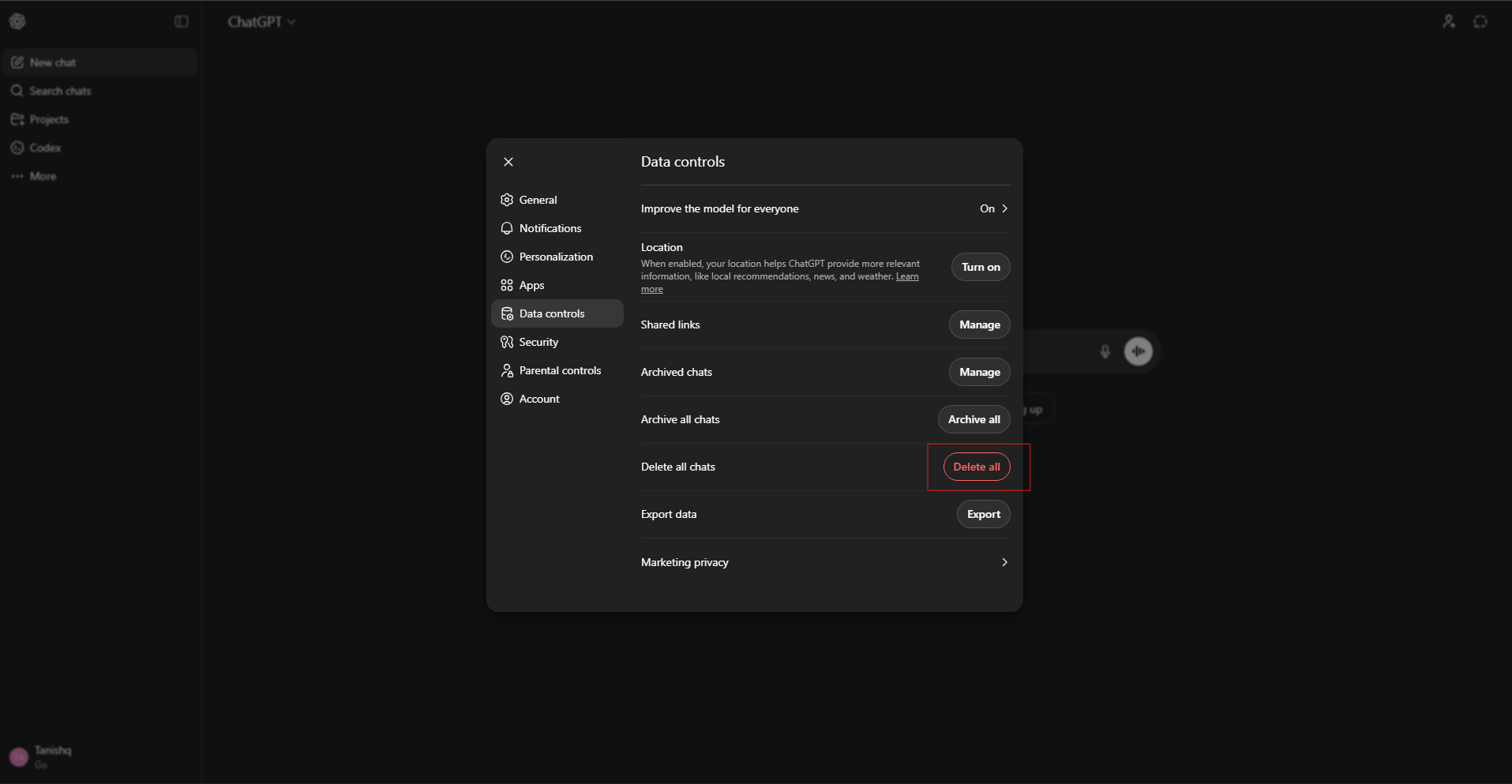
Step 2: Delete Everything
On desktop, stay on the General tab and click Delete all chats. On mobile, tap Clear Chat History.
Step 3: Confirm
A prompt warns you the action is permanent. Confirm it. Every conversation in your history is removed immediately, including archived chats and any conversations inside Projects.
How to Delete a Single Chat
On desktop, hover over the conversation in the sidebar. Click the three dots that appear and select Delete. Confirm when prompted.
On iPhone, swipe left on the conversation and tap Delete. On Android, press and hold the conversation title and tap Delete from the menu that appears.
Archive Instead of Deleting
If you want conversations out of sight without permanently removing them, use Archive instead. Hover over a conversation on desktop, click the three dots, and select Archive. The chat disappears from the sidebar but stays accessible under Settings, Data Controls, Archived Chats. You can restore or permanently delete archived chats from there at any time.
Frequently Asked Questions
Can I recover a deleted ChatGPT conversation?
No. Deletion is immediate and permanent from your side. OpenAI removes the data from its servers within 30 days. There is no way to recover a deleted conversation through the interface or support.
Does deleting chats stop OpenAI from training on my conversations?
Deleting removes conversations from your account but does not retroactively affect past training. To prevent future conversations from being used for model training, go to Settings, then Data Controls, and turn off Improve the model for everyone.
Does clearing all chats also remove archived conversations?
Yes. Both Delete all chats on desktop and Clear Chat History on mobile remove archived chats as well as active ones. If you want to keep archived chats intact, delete active conversations manually from the sidebar instead of using the bulk option.



Discussion (0)
Be the first to comment.