



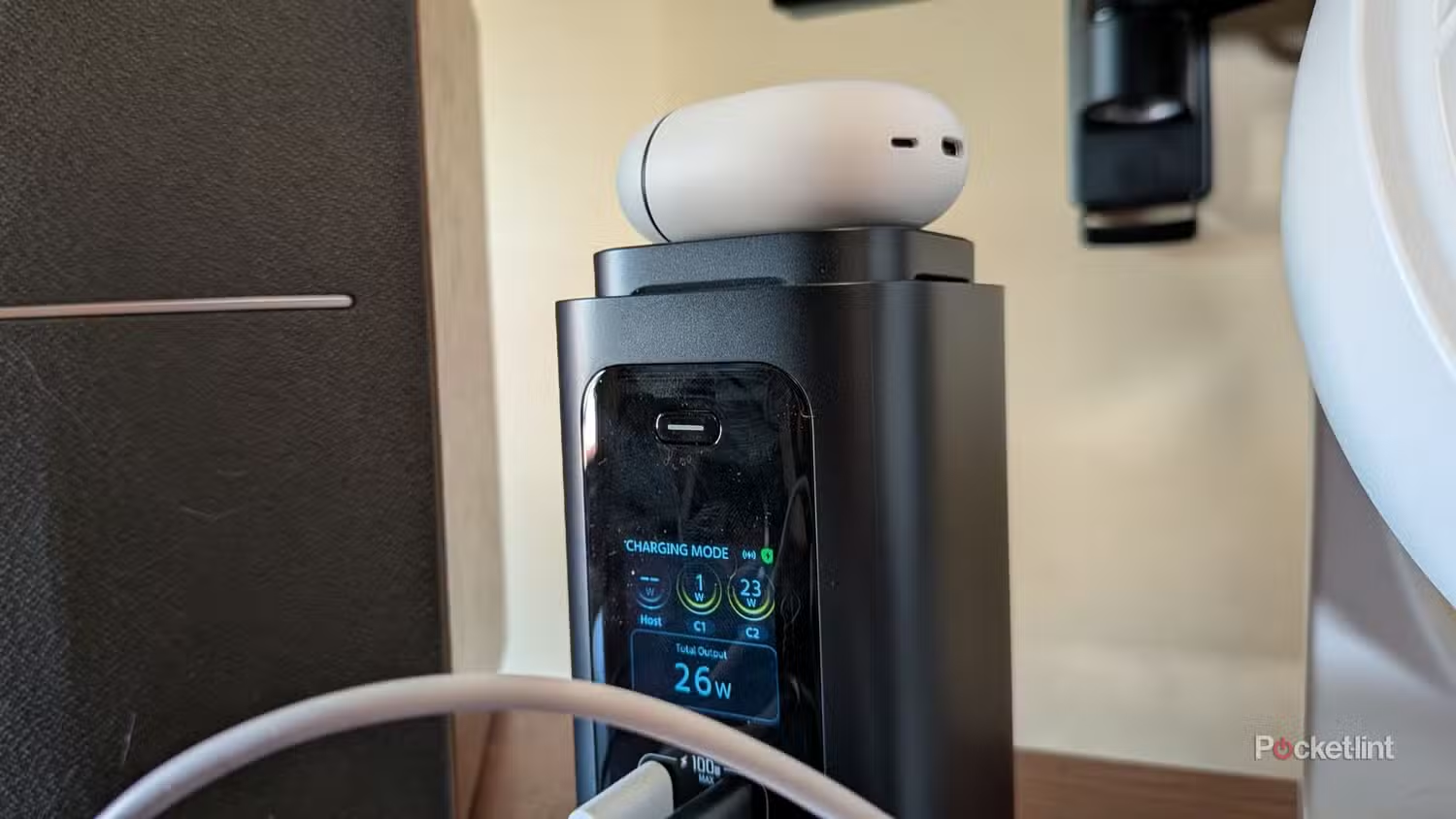
Baseus has launched the Spacemate RD1 Pro, a vertical USB C dock that combines laptop connectivity with a built in 25W Qi2 wireless charger. The dock is designed to save desk space while giving you ports for displays, storage, networking, accessories, and phone charging in one compact setup.
The biggest feature is the wireless charger on top. Most USB C and Thunderbolt docks still expect you to plug in a cable when your phone needs power. Baseus takes a different approach by adding a rotating and extendable Qi2 charger that can hold a phone in portrait or landscape mode. That makes the dock more useful on a desk, especially if you want your phone visible while working.
The Spacemate RD1 Pro is currently priced at $199.99 during a promotional period that runs until June 30. Its regular price is listed at $299.99. At the sale price, it looks like an interesting option for people who want a clean desk setup without moving to a more expensive Thunderbolt dock.
Why the wireless charger matters
Wireless charging seems like an obvious feature for a desktop dock, but it is still rare. Many dock makers avoid it because of added complexity, heat, and possible electrical interference. Baseus appears to have handled this by placing the wireless charger at the top of the dock, away from the main port area.
The charger supports up to 25W Qi2 wireless charging. It is clearly useful for iPhone owners with MagSafe compatible models, but it can also work with supported Android phones. In testing, it was able to fast charge a Samsung Galaxy phone through a Spigen case, although the back of the case became warm.
That makes the RD1 Pro more than a normal hub. It can sit beside a laptop, run displays and accessories, and keep your phone charged without adding another charger or cable to the desk.
The LCD screen shows power and port activity
Another standout feature is the front LCD screen. It can show power and data information for the dock’s ports, making it easier to understand what is connected and how much power is being used.
If the dock is disconnected from a laptop, it can act more like a charging station. In that mode, the screen shows how much power each port is supplying. The dock includes two front USB C ports rated at 10Gbps and up to 100W each, although total power is shared across the system.
| Feature | Baseus Spacemate RD1 Pro details |
|---|---|
| Main connection | USB C |
| Wireless charging | 25W Qi2 |
| Front ports | Two 10Gbps USB C, two 5Gbps USB A |
| Rear ports | Two 10Gbps USB C, two USB A, SD and TF card slot |
| Display output | Two HDMI ports |
| Networking | Gigabit Ethernet |
| Total power output | Up to 160W shared |
| Display support | Up to dual 4K at 60Hz on supported laptops |
| Promo price | $199.99 until June 30 |
The port selection is strong for everyday desk setups
The RD1 Pro includes a wide set of ports for workstations. The front gives quick access to USB C and USB A ports for accessories and charging. The rear includes more USB C, slower USB A ports, SD and TF card support, Ethernet, and two HDMI outputs.
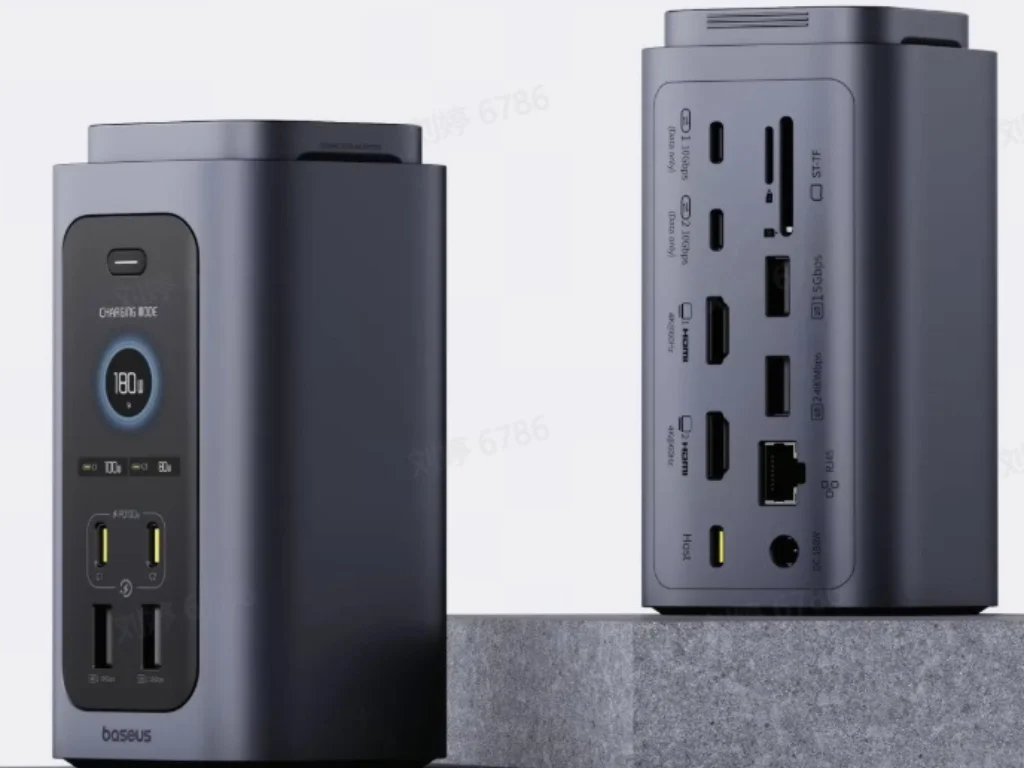
For many laptop users, that is enough to connect monitors, a keyboard, a mouse, external storage, memory cards, a network cable, and a phone charger through one device.
There are some limits. Because this is a USB C dock, all data runs through a 10Gbps connection to the laptop. That is much slower than Thunderbolt 4 and Thunderbolt 5 docks. If you connect several fast storage devices and multiple displays at the same time, you may run into bandwidth limits.
Display performance depends on your laptop
The dock can output to one HDMI display at up to 4K and 120Hz on supported systems. With two HDMI displays, it can support up to 4K at 60Hz each. However, that depends on your laptop’s hardware and support for DisplayPort features and compression.
Some laptops may only reach 4K at 30Hz or even 1080p in certain setups. That is not unusual for USB C docks, but it is something buyers should check before expecting full dual 4K performance.
The dock is plug and play, but some setups may still need a reboot or display setting adjustment before the second monitor works correctly.
Baseus gives USB C docks a more practical design
The Spacemate RD1 Pro is interesting because it uses desk space better than many traditional docks. Instead of lying flat and taking up room, it stands vertically and adds a wireless charger where empty space would normally be.
It is not the best option for people who need maximum bandwidth, heavy external storage workflows, or the strongest possible display support. A Thunderbolt dock is still better for those needs. But for everyday laptop desks, the RD1 Pro offers a smart mix of charging, ports, display output, and space saving design.
The built in Qi2 charger is the main reason it stands out. It turns a standard dock into something more useful for daily work, especially if your phone is always on your desk.



Discussion (0)
Be the first to comment.