



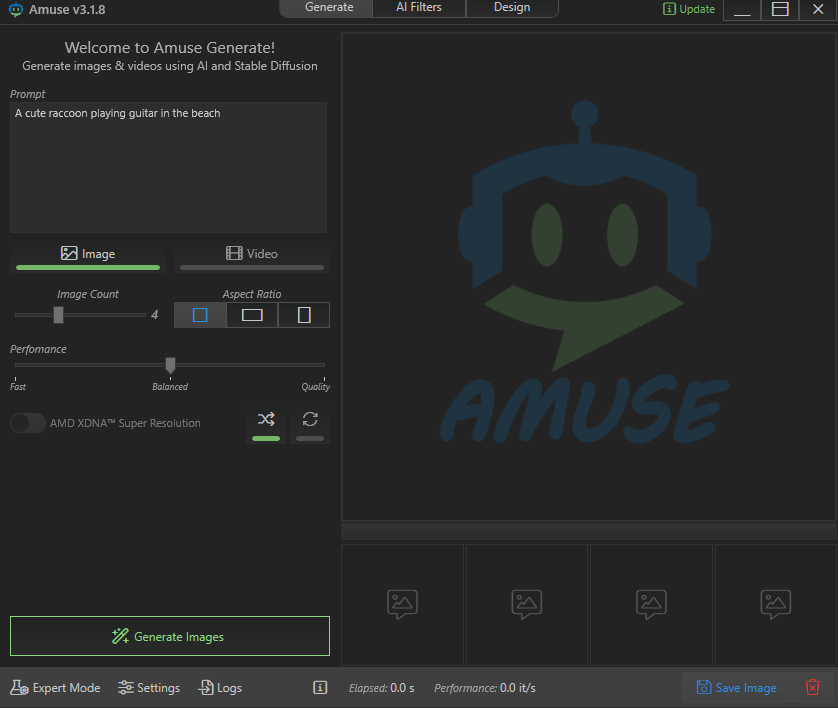
If you’ve opened AMUSE v3.1.8 and seen a clean interface with a prompt box, image controls, and options like performance tuning and super resolution, you’ve already noticed something important:
This is not a background tool.
It’s a full-fledged AI image generation application.
And once you understand that, everything about it starts to make sense.
What AMUSE Actually Is
AMUSE is a local AI image generation tool that allows you to create images (and in some cases videos) using text prompts.
At its core, it works similarly to tools powered by Stable Diffusion, meaning:
- You describe what you want in words
- The AI generates visuals based on that description
- You can refine, regenerate, and enhance results
What makes AMUSE different is its focus on local execution and AMD hardware optimization.
Instead of relying entirely on cloud-based AI like Midjourney, AMUSE runs on your system, using your CPU and GPU.
What You’re Looking At in the Interface
The UI is designed to be simple, but every control has a clear purpose.
Prompt Box
This is where everything starts.
You type something like:
- “A futuristic city at sunset”
- “A realistic portrait of a cyberpunk character”
The quality of your result depends heavily on how you describe your idea.
Image vs Video Mode
- Image mode generates static images
- Video mode (if supported) extends this into motion-based output
Most users will spend their time in image mode.
Image Count
This controls how many variations you generate at once.
- Higher count = more options
- But also more processing time
It’s useful when you’re exploring ideas rather than refining one.
Aspect Ratio
This defines the shape of your output:
- Square (1:1) for general use
- Portrait for social media or characters
- Landscape for wallpapers or scenes
Getting this right early saves time later.
Performance Slider (Fast → Balanced → Quality)
This is one of the most important controls.
It adjusts how the AI generates images:
- Fast → quicker results, less detail
- Balanced → decent quality with reasonable speed
- Quality → slower, but sharper and more refined outputs
You’re essentially choosing between speed and precision.
AMD XDNA Super Resolution
This is where AMUSE stands out.
- Uses AMD’s AI acceleration
- Upscales and enhances generated images
- Improves sharpness and detail after generation
It’s similar in concept to AI upscaling tools, but integrated directly into the workflow.
How AMUSE Works Behind the Scenes
Even though the interface is simple, there’s a lot happening underneath.
When you generate an image:
- Your prompt is converted into a structured format
- A machine learning model interprets it
- The model generates an image step by step
- Optional enhancement (like super resolution) is applied
All of this happens locally on your system, which is why performance depends on your hardware.
What AMUSE Is Actually Used For
This is where it becomes practical.
1. AI Image Generation
You can create:
- Artwork
- Wallpapers
- Concept designs
- Social media visuals
It’s especially useful if you want quick visual output without relying on online services.
2. Creative Exploration
Because you can generate multiple variations quickly, AMUSE is great for:
- Testing ideas
- Exploring styles
- Iterating on concepts
It removes the friction between idea and visual output.
3. Image Enhancement
With features like super resolution, you can:
- Improve generated images
- Sharpen details
- Increase clarity
This is useful even beyond generation.
4. Local AI Workflow
This is one of its biggest advantages.
Since it runs locally:
- No dependency on internet speed
- No usage limits (unlike cloud tools)
- Better control over your data
How It Compares to Other AI Tools
AMUSE sits in the same space as:
- Stable Diffusion (local AI generation)
- Midjourney (cloud-based generation)
- DALL·E-style tools
The key difference is:
- Cloud tools → easier, but limited and dependent on servers
- AMUSE → more control, runs locally, hardware-dependent
So it’s less about replacing those tools and more about offering a different way to use AI.
What You Need to Use It Properly
To get the best experience:
- A decent CPU and GPU
- Preferably AMD hardware (for optimization features)
- Enough RAM for AI workloads
Without good hardware, generation will be slower.
Real-World Insight
Tools like AMUSE represent a shift in how people use AI.
Instead of relying entirely on cloud services, users are starting to:
- Run models locally
- Customize their workflows
- Keep full control over performance and output
It’s not just about generating images. It’s about owning the process.
When You Should Use AMUSE
It makes the most sense if you:
- Want local AI image generation
- Prefer not to rely on cloud tools
- Have hardware capable of handling AI workloads
- Need flexibility and control
If you just want quick, simple results with no setup, cloud tools may still feel easier.
Final Thoughts
AMUSE v3.1.8 is not a background utility or a niche system component. It’s a practical AI tool designed for generating and enhancing images locally, with a clear focus on performance and hardware optimization.
Once you understand that, the interface stops feeling confusing and starts feeling intentional.
It’s built for:
- Speed when you need it
- Quality when it matters
- Control over the entire process
And that combination is what makes it genuinely useful.
FAQs
What is AMUSE v3.1.8
A local AI image generation and enhancement tool.
Does it use Stable Diffusion
It works on similar principles, likely using diffusion-based models.
Is it better than Midjourney
Not directly, it’s different. AMUSE runs locally, while Midjourney is cloud-based.
Do I need a GPU
Yes, for best performance.
What is AMD XDNA Super Resolution
An AI-based upscaling feature that improves image quality after generation.



Discussion (0)
Be the first to comment.