




Microsoft overhauled Windows 11's update system in late April 2026, giving users meaningful control over when updates install. The changes came directly from user feedback, with Microsoft's Aria Hanson reviewing 7,621 pieces of feedback that shaped the new features. They are currently rolling out to Windows Insiders on the Beta and Experimental channels before reaching all users.
Pause Updates With a Calendar, Not a Dropdown
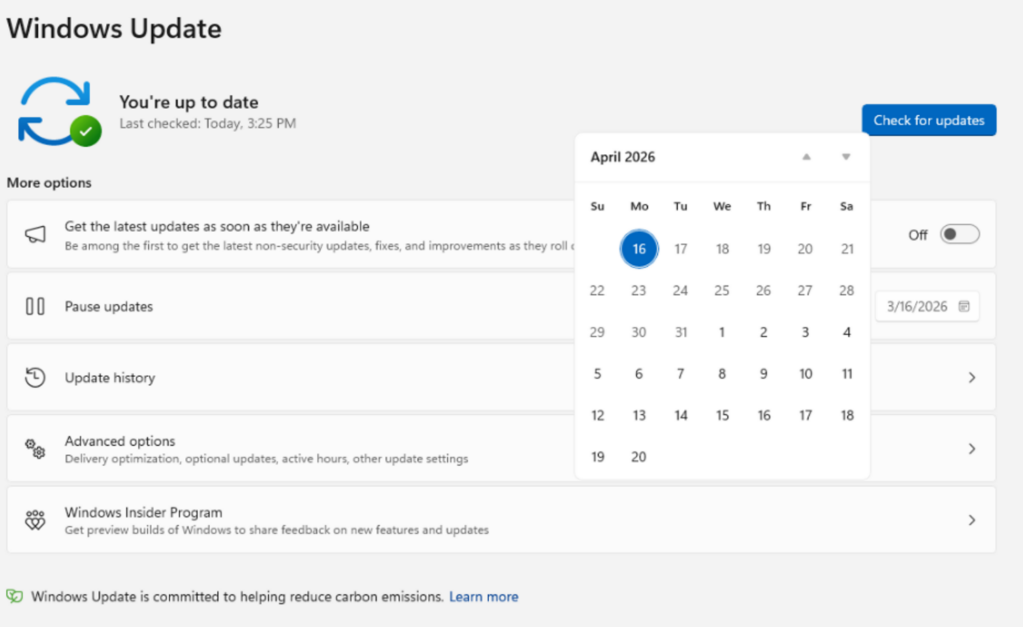
The old system gave you a dropdown with fixed options: pause for one, two, three, four, or five weeks. The new system replaces this with a calendar picker. Click a date, and updates pause until that day. No preset intervals, no forced expiry after five weeks.
More significantly, there is no limit on how many times you can extend the pause. When your 35-day pause expires, you reset it for another 35 days. You can repeat this indefinitely, meaning Windows 11 can technically run without ever installing an update if you keep clicking extend. Microsoft does not recommend this for security reasons, but the option now exists.
To use it, go to Settings, Windows Update, and click Pause updates. The calendar picker replaces the old dropdown in updated builds.
Skip Updates During Initial Setup
On a new Windows 11 device, the setup process previously prompted you to install updates before reaching the desktop. The new system adds an Update later button during setup, letting you skip updates and get to the desktop immediately. Updates install afterward on your schedule rather than before you have even used the machine.
This applies to standard consumer devices. Managed enterprise devices configured by IT administrators are not affected by this change.
Restart and Shut Down Without Installing Updates
Previously, the Power menu could show only update-related options when an update was pending. Clicking Restart would restart and install the update whether you wanted it to or not.
The updated Power menu always shows standard Restart and Shut down options. Update and restart and Update and shut down appear separately as additional options when relevant. You now have four clear choices, and none of them force an update when you just want to turn the computer off.
Fewer Monthly Restarts
Microsoft acknowledged that seeing multiple restart prompts per month was a primary source of frustration. The company is now coordinating driver, .NET, and firmware updates to reduce the total number of monthly reboots. The goal is a single monthly restart for all updates combined rather than separate restarts for each update type.
These updates download quietly in the background and wait to install during the next scheduled quality update or one you approve manually. A new Available updates section in Windows Update settings shows all pending updates in one place rather than scattered across separate notifications.
When This Reaches Everyone
These features are currently live for Windows Insider members on the Dev and Experimental channels. Insider builds are unstable by design and not recommended for everyday use on a primary machine. Based on Microsoft's public commitment to improving the update experience in 2026, the features are expected to reach the stable general release within a few months.
Frequently Asked Questions
Can I really pause Windows 11 updates indefinitely?
In practice, yes. The new system lets you pause for up to 35 days and then extend the pause an unlimited number of times. There is no maximum total duration. However, running Windows without security updates exposes your PC to vulnerabilities. The ability to pause indefinitely is a flexibility option rather than a recommended practice.
Does this work on Windows 11 Home or only Pro?
The new calendar-based pause and indefinite extension feature is designed for all Windows 11 editions including Home. Previously, Home users had limited deferral options compared to Pro and Enterprise users who could defer updates for months through Group Policy. The new system brings meaningful control to Home users for the first time.
When will these changes reach all Windows 11 users?
As of May 2026, the features are in the Windows Insider Beta and Experimental channels. Microsoft has not announced a specific date for general availability. Features tested in Insider channels typically reach stable releases within one to three months, depending on the scope of testing and any issues found.



Discussion (0)
Be the first to comment.